

Searching for files across a local area network (LAN) can be a daunting task, especially when you need to scan dozens or even hundreds of computers. Dedicated LAN file search software provides a solution through real-time scanning and indexing. This article dives deep into two powerful utilities from Softperfect and explores alternative methods for efficient file discovery in Windows environments.
Finding a specific file on a network share is not as straightforward as searching your local hard drive. When an IT professional or technician needs to locate a document scattered across multiple workstations, using Windows File Explorer’s built-in search becomes impractical. This manual method requires accessing each computer individually, typing keywords, and waiting for results. In a network with dozens of machines, the time wasted is substantial. Specialized software that simultaneously scans all network resources and delivers results in seconds is essential. This article provides a technical deep dive into two standout tools—Softperfect LAN Search Pro and Softperfect Network Search Engine—along with their inner workings and optimization strategies.
Softperfect LAN Search Pro: Real-Time Network Scanning Utility
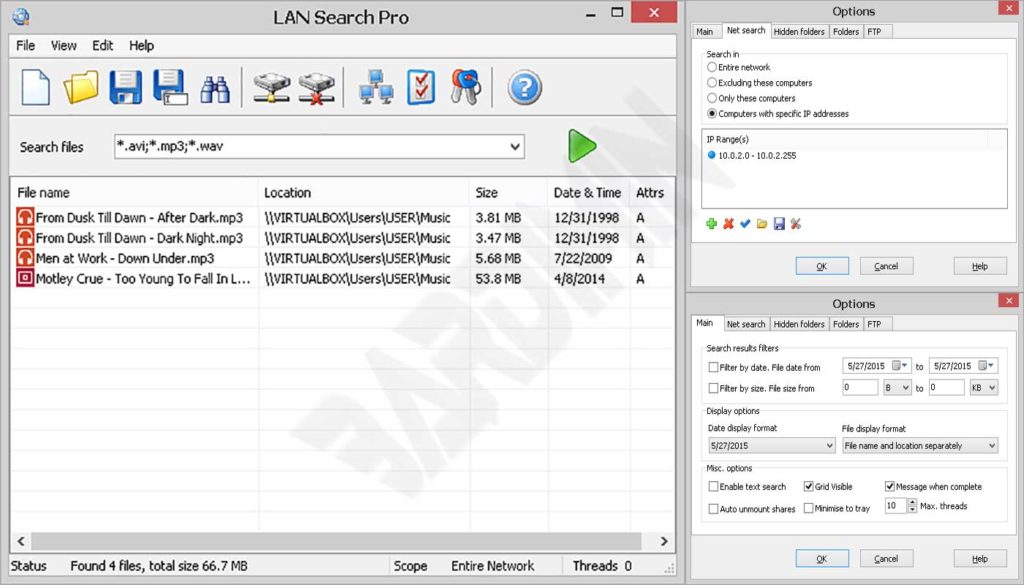
Softperfect LAN Search Pro is a freeware utility (for non-commercial use) designed to perform real-time file searches across your entire local network. It scans shared folders, including hidden resources, access-restricted shares, IP subnets, and even internal FTP servers. Users can define search criteria based on file name, extension, size, or modification date. A key technical advantage is its ability to store login credentials for password-protected shares, ensuring uninterrupted scanning across secured resources.
Under the hood, LAN Search Pro employs multithreading to accelerate scanning. When you enter a keyword, the application dispatches parallel requests to all computers within the specified IP range. Results appear in an interface reminiscent of File Explorer, complete with columns for name, path, size, and date. Beyond searching, you can copy, move, rename, or delete files directly from the result window. Advanced features include result filtering, sorting, and export to CSV, HTML, or TXT formats—ideal for network audits or documentation.
Source: www.softperfect.com
Softperfect Network Search Engine: Index-Based Solution for Large Networks
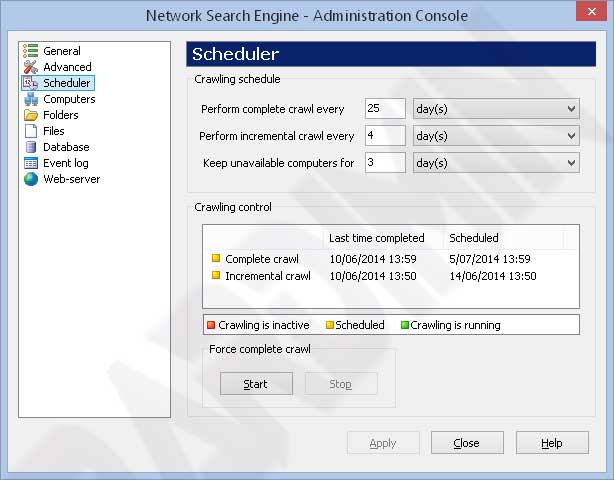
Unlike LAN Search Pro’s on-the-fly approach, Softperfect Network Search Engine uses an indexing strategy. One computer on the network acts as a server that periodically crawls all shared folders. The crawl results are stored in a centralized database. Users can then access the search engine via a web browser by typing the server’s IP address, or through a dedicated Windows GUI client. This method excels in large-scale environments because search queries hit the database rather than generating network traffic.
The indexing process can be scheduled for full crawls or incremental updates (only changed files). Administrators can select specific folders to index—for example, only department shares. Importantly, Network Search Engine indexes only file metadata (name, path, size, date) and not file contents, keeping the database compact and fast. The built-in web server handles multiple concurrent users with minimal performance impact, and it can be replaced with a third-party web server if needed.
Source: www.softperfect.com
Technical Comparison and Usage Scenarios
Both Softperfect tools serve distinct purposes and can be selected based on network size and search patterns. LAN Search Pro is ideal for ad-hoc searches in small to medium networks. A technician needing to instantly locate a configuration file on a specific workstation will appreciate its zero-setup, real-time scanning. In contrast, Network Search Engine shines in enterprise environments with hundreds of shared folders, where search speed and data availability are paramount. With a centralized database, users get instant results without waiting for recrawls.
From a management perspective, Network Search Engine offers finer control. Admins can schedule crawls, monitor database size, and choose between web or GUI access. LAN Search Pro is simpler and portable—just run the executable, define an IP range, and start searching. Both support authentication for protected shares, making them suitable for environments with strict security policies.
Built-in Windows Alternatives and Advanced Commands
For professionals who prefer command-line tools, Windows offers utilities like dir and robocopy combined with scripting. A batch script can loop through a list of computers and execute dir \\computer\share\ /s /b | find "keyword". This method provides maximum flexibility but requires scripting expertise. Gamers looking for save files on a friend’s PC in the same network might find this approach too complex; they’ll likely prefer the graphical simplicity of LAN Search Pro.
Network file search speed depends heavily on the method used. Real-time scanning suits small networks, while indexing is the key to efficiency at scale.
Conclusion and Recommendations
Choosing the right LAN file search software can save time and boost productivity. For small to medium needs, Softperfect LAN Search Pro is the go-to choice due to its ease of use and rapid scanning. For complex environments requiring fast, centralized access, Softperfect Network Search Engine is highly recommended. Both tools adhere to reliability and security standards, backed by a reputable developer. By understanding their characteristics, IT professionals can deploy the most suitable file search solution for their network infrastructure.
Important note: Always ensure you have proper authorization before searching or accessing files on other computers within the network. Use of file search tools must align with company security policies and professional ethics.
