You’re here because both indicator lights on your Epson L3050 or L3070 printer are flashing non-stop, right? The power and the flashing paper light at the same time is a very clear signal: the waste ink counter in the printer has reached its maximum limit. The printer that once loyally supported your work is now locked and unusable. This situation is bound to be frustrating, especially if the deadline is chasing.
Before you panic and think about taking the printer to a service technician, which can take a lot of time and cost, you need to know that there is a solution that you can do yourself. The key to this problem lies in a special software called the Adjustment Program Epson L3050 L3070. This software is used by authorized technicians to reset the waste ink pad counter and restore the printer to normal condition.
However, looking for information about downloading the Epson L3050 L3070 Adjustment Program on the internet is like walking in a minefield. Unclear sources, malicious download links, or incomplete guides can actually damage your printer even more. This article is here to be the most reliable and safe guide for you.
Key Features of Epson L3050 L3070 Program Adjustment
Many users think this software is just for resetting the waste ink counter. However, the Epson L3050 L3070 Adjustment Program is actually a complete toolkit that contains vital features for printer maintenance and repair. Understanding each of its features is key to maximizing usage and avoiding mistakes.
Key Features and Benefits
| Feature | Technical Description | Direct Benefits for Users | Risk Level |
| Reset Waste Ink Counter | Resets the counter value in the printer firmware that records the estimated waste ink volume to the waste ink pad back to 0%. | Solves the error of the flashing LED light, locking the printer so that it can be used again. The main solution to the problem is “Waste Ink Pad Full”. | HIGH if done without paying attention to the physical condition of the waste pad. |
| Maintenance Mode | Access printer internal service functions that are not normally available in regular drivers, such as Head Cleaning (strong), Nozzle Check, and Ink Charging (fill ink into the printer head). | Solves the problem of severe printhead blockage and optimizes ink flow. Especially useful when old printers are not in use. | MODERATE if used excessively (extravagant ink). |
| Diagnosis Tools | Read data from various printer sensors, such as monitoring ink levels, viewing error log history, and checking component status. | Diagnose complex printer problems independently. Helps identify whether the problem is from hardware or software. | LOW (only reads data, does not change settings). |
| Compatibility | Specially designed by Epson for communication with the chipset and firmware on the L3100 Series (includes L3050, L3070, L3150). | Ensure compatibility and security. Reduces the risk of “bricking” (permanent damage) to the printer due to software mismatches. | CRITICAL to pay attention to. Using incompatible programs is high-risk. |
Download Epson L3050 L3070 Program Adjustment Safely
Full Tutorial: How to Use the Adjustment Program to Reset the Waste Ink Counter
Resetting the waste ink counter is a quick solution to resolve the “Ink Pad is at the end of its service life” error on Epson L3050 and L3070 printers. To make the process run smoothly, follow these step-by-step guides.
1. Disable Antivirus Temporarily
Many antiviruses detect the Adjustment-Program of the Epson L3050 L3070 as a false positive, even though the software is safe to use. To prevent interruptions during the reset process, disable the antivirus temporarily. Once you’re done, you can turn it back on.
2. Extract Files and Run as Administrator
- Find the downloaded .rar file.
- Right-click → select Extract Here.
- Enter the password: imin.
- Once successfully extracted, open the folder and search for the AdjProg.exe file.
- Right-click the file → select Run as Administrator.
This ensures that the program runs with full access rights so that no errors occur during the reset.
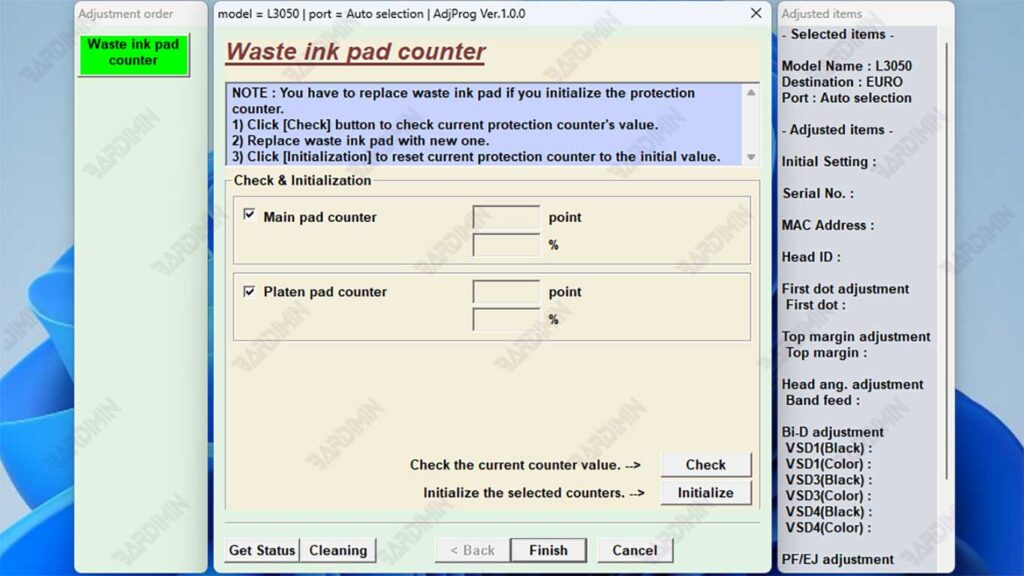
3. Select Printer Model and Port
- In the main window of the program, select the printer model: L3050 or L3070 (whichever you want to reset).
- Select the USB Port according to the printer connection (Auto selection).
- Make sure the printer is ON and connected to the computer.
4. Read the Counter and Initialize
- Click the Particular Adjustment Mode button.
- Select the menu Waste Ink Pad Counter.
- Click the Read → button to view the status of the counter. If the value is already 90–100%, then a reset is required.
- Check the Main Pad Counter and Platen Pad Counter boxes.
- Click Initialization → the reset process will take a few seconds.
- Restart the printer. After that, the error indicator light or flashing should be gone.
Now the Epson L3050 or L3070 printer is ready to be used again with normal performance.
Perform a reset only if needed. Too frequent resets without physical maintenance (such as cleaning the inkpad) can shorten the life of the printer.