

Burp Suite remains the ultimate toolkit for web application security testing. Professionals rely on its proxy, scanner, and Intruder modules. The 2026 release brings massive AI upgrades and modern protocol support.
The cybersecurity industry evolves rapidly every year. Web apps face constant threats due to their complexity. Security teams need reliable tools to find vulnerabilities quickly. Burp Suite solves this exact problem.
PortSwigger built this software back in 2006. Major companies use it for internal security audits. The latest updates boost tester productivty significantly.
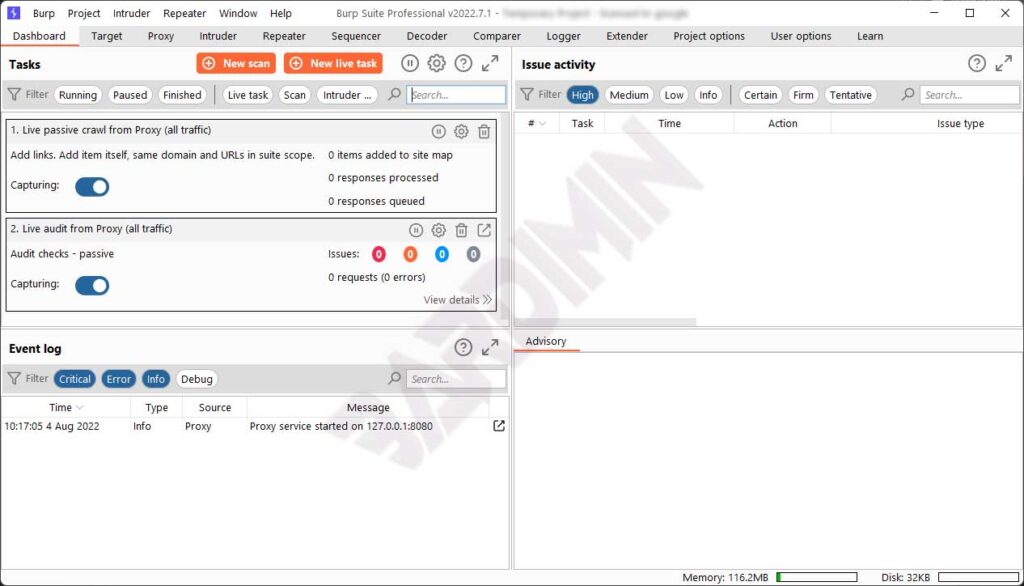
Understanding The Core Architecture
The software acts as a man-in-the-middle proxy. All browser traffic passes through it first. You can intercept and modify requests before they reach the server.
This architecure enables highly flexible testing. Users change parameters in real time. You also analyze server responses before they hit the browser. This approach grants total control over security workflows.
Burp Suite is not just an automated scanner. It gives testers full control over client-server communications to uncover hidden logic flaws.
Key Features Of The Professional Edition
The newest version introduces several massive upgrades. These specific features separate the Professional edition from the free Community version.
- HTTP/HTTPS and WebSocket proxy for real-time traffic interception and modification
- Burp Scanner to automatically detect over 300 distinct web vulnerabilities
- Burp Intruder for executing custom automated attacks with flexible payload configs
- Repeater to manually tweak and resend individual HTTP requests
- Decoder for quick data transformation across various encoding formats
- Comparer to spot subtle differences between HTTP responses
- Sequencer to evaluate the entropy of session tokens
- Burp Collaborator for advanced out-of-band application security testing
- Organizer to group and annotate interesting HTTP requests
- Extender with full BApp Store support for third-party plugins
Detecting Vulnerabilities With Burp Scanner
Burp Scanner is the most powerful component here. It tests modern web apps with complex features. The automated process still gives users full control.
It detects SQL injection and cross-site scripting easily. The 2026 version improves JavaScript and API detection. Furthermore, OAST via Collaborator finds hidden blind vulnerabilities that traditional scanners miss entirely.
Executing Custom Attacks Using Intruder
Intruder automates custom attacks with flexible configs. You define payload positions within HTTP requests. Four main attack types exist for different scenarios.
- Sniper tests one payload set sequentially against each position
- Battering Ram uses the exact same payload everywhere simultaneously
- Pitchfork runs multiple payload sets in parallel across different positions
- Cluster Bomb tries every possible payload combination from multiple sets
The new split view speeds up result analysis. You can review requests and responses side by side without switching tabs constantly.
AI Integration And Smart Automation
The 2025 release introduced AI features refined in 2026. AI helps analysts understand scan results much faster. Custom actions in Repeater analyze HTTP messages contextually.
All AI interactions stay within a secure infrastrucure. Your sensitive data never trains external models. You simply use AI credits to accelerate your workflow.
Initial Proxy Setup And Configuration
First configure the proxy settings properly. Burp listens on 127.0.0.1:8080 by default. Point your browser to this proxy address.
Use the built-in Burp browser for optimal testing. It comes preconfigured with the required CA certificate. External browsers need manual proxy setup. Download the CA cert and import it. Then enable interception in the Proxy tab.
Comparing Community And Professional Editions
Choosing the right edition impacts your efficiency. The Community version offers basic manual tools for learning. However, professional pentesting requires the upgraded feature set.
| Feature | Community | Professional |
| Proxy and History | Available | Available |
| Repeater and Decoder | Available | Available |
| Intruder Speed | Throttled | Unlimited |
| Automated Scanner | No | Available |
| Project Saving | No | Available |
| Burp Collaborator | No | Available |
| AI Assistant | No | Available |
Download And Installation Process
PortSwigger offers a unified installer for both editions. You simply select your preferred edition during setup. The installer supports Windows, macOS, and Linux natively.
Official Download Link: https://portswigger.net/burp/releases
Always grab the latest release to ensure maximum stability. The 2026 updates patch several critical memory leaks. Consequently, your large scanning jobs will finish without crashing.
Extending Functionality Via BApp Store
BApp Store offers over 300 community extensions. These add specific functionality for your tests. Popular ones include Active Scan++ and JWT tools.
The new interface filters extensions easily. Developers use the Montoya API for custom builds. This API allows deep integration with your existing security pipeline.
Best Practices For Effective Testing
Effective use requires solid methodology. Start with automated crawling to map the app. Define your scope to prevent accidental testing on unrelated domains.
Proper scoping also boosts scanning efficiency. Use Organizer to save interesting HTTP requests. You can share these collections securely with your team later.
Support For Modern Web Technologies
The 2026 release supports modern web technologies. It tests GraphQL APIs and HTTP/2 natively. WebAuthn passkeys work seamlessly in recorded logins.
The scanner handles biometric auth automatically. Additionally, TOTP multi-factor authentication is fully supported. You just upload the QR code and the tool generates valid codes.
Performance Optimization And Reporting
Large apps consume significant system resources. Java 26 runtime updates boost execution speed. AI features now use fewer system resources overall.
Professional logging records all testing activities. Generate HTML or XML reports easily for your clients. Jira integration creates tickets automatically for every confirmed flaw.
Final Thoughts On Web Security
Web security testing demands reliable tools. Burp Suite delivers complete features and strong support. Investing in the Professional edition drastically improves your daily workflow.