

You performed a factory reset on your Samsung, and now a Google Account Verification prompt is locking your device. Forgotten your old Google account? This is the frustrating problem of FRP (Factory Reset Protection).
This is where SamFw FRP Tool Version 4.9, the official tool from SamFw developers, comes in with its revolutionary reputation: Remove FRP with just “one-click”. Unlike complicated methods requiring flashing or ADB commands, this tool promises an instant solution:
- Select your device model
- Connect to a computer
- One click to unlock
This tool becomes a lifesaver for users who forgot their Google account or owners of used Samsung devices locked with FRP from previous owners.
Legality, Ethics, and Risks
Before breaking the lock, first understand what you’re breaking. Factory Reset Protection (FRP) is not a bug or system error. It is an official Google security feature specifically designed to protect your device from theft. Imagine if your phone was lost: a thief couldn’t simply perform a factory reset and use your phone. FRP ensures that only the original owner with the registered Google account can access the device after a reset.
Legality of Using FRP Tools
The use of tools like SamFw FRP Tool Version 4.9 is legal only if:
- Used on devices you genuinely own
- Performed by technicians with the device owner’s consent
- Valid proof of ownership exists (purchase receipt, registered IMEI, recognized Google account by the owner)
Removing FRP without ownership rights can be considered a legal violation as it resembles bypassing device protection.
Risks of Unethical Use
If used on devices not owned by you, potential risks include:
- Potential violation of device ownership laws
- Device being viewed as stolen or with manipulated ownership
- Technician’s reputation could be tarnished with risk of legal claims
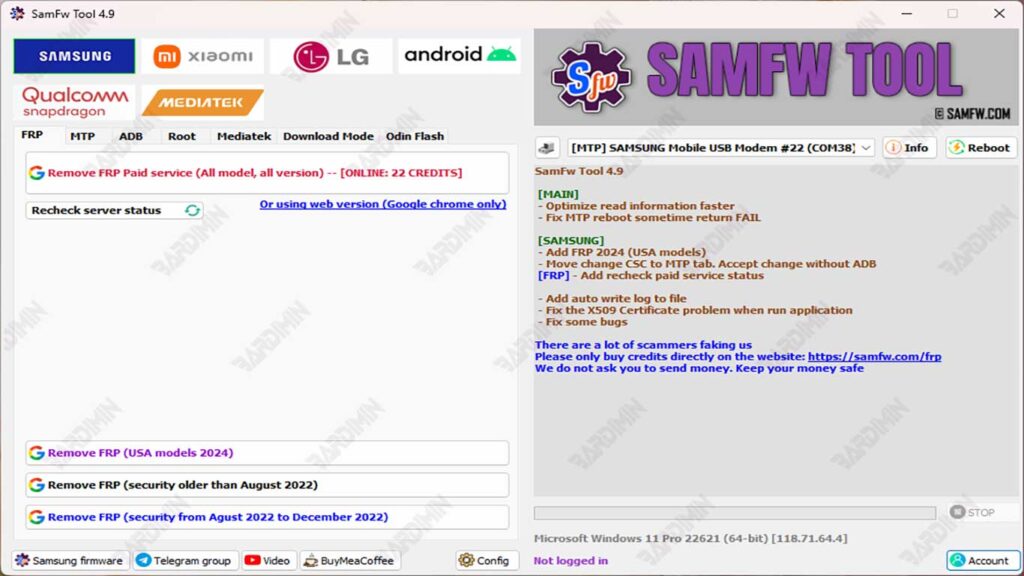
Main Features of SamFw FRP Tool 4.9: The Offered One-Click Solution
One-Click FRP Remove: The Main Feature
The main function serving as the selling point: Remove FRP with one click. A process that once required complex techniques can now be done with one button, though it still requires USB connection and correct model selection.
Easily Change Device Region
The Change CSC (Country Specific Code) feature allows you to change your Samsung device’s region. Useful for:
- Getting software updates faster
- Activating region-specific features
- Fixing network compatibility issues
Support for Latest Security Patches
What distinguishes version 4.9: supports devices with August 2022 security patches. This means the tool remains effective for relatively new devices.
FRP Remove Option Using “Paid Service” Method
Besides the free method, SamFw also provides a paid method through their official servers. This method is useful when:
- Free method fails due to newer security patches
- Device cannot enter Test Mode
- FRP is very strict on certain models (e.g., S series, Fold, or latest flagship models)
This paid server service has a higher success rate and is recommended for professional technicians.
How to Use SamFw FRP Tool Version 4.9 (Practical Steps)
This guide is based on methods recommended by SamFw, to ensure the FRP (Factory Reset Protection) bypass process runs safely, legally, and with minimal risk.
1. Initial Preparation
Before starting the FRP bypass process, perform the following preparations:
- Ensure your Windows computer has Samsung USB Driver installed so the device can be detected correctly.
- Download SamFw FRP Tool Version 4.9 directly from the official SamFw website to avoid modified files or malware.
- Use an original or good quality USB cable to ensure stable connection during the process.
2. Activate Test Mode via Emergency Call
To run the FRP remove process, the Samsung device must be in Test Mode.
Steps:
- On the FRP-locked phone screen, open the Emergency Call menu.
- Dial *#0*# to automatically enter Test Mode.
- If the code is successful, the device screen will change to the test menu display.
Test Mode allows the tool to communicate with the device even though FRP is active.
3. Run the FRP Remove Process
After the device enters Test Mode and connects to the PC:
- Open SamFw FRP Tool Version 4.9 on the computer.
- Click the Remove FRP button.
- When the device shows a “Allow USB Debugging” popup, press Allow / Accept.
- Wait a few seconds until the process completes.
- The phone will automatically reboot, indicating that FRP has been successfully removed.
This process usually only takes 5-15 seconds, depending on the device model and security patch.
4. Use Additional Features (Optional)
Besides removing FRP, version 4.9 also provides additional useful features, especially for technicians:
Change CSC
Change device region with one click, without needing to flash complete firmware.
Remove FRP (New Security Patch)
Use this option for devices with newer security patches (after August 2022) to make the process more stable.
Paid Service Method
If the free method doesn’t work, especially on newer flagship devices, you can use SamFw’s FRP Unlock Server service which has a higher success rate.
Download
FAQ (Frequently Asked Questions)
1. Is SamFw FRP Tool v4.9 free to use?
Yes, most basic features like Remove FRP (classic method) are available for free. However, some advanced features or for devices with newer security systems may require paid access or specific tokens.
2. Are all Samsung models supported, especially those with post-August 2022 patches?
Not all models can be bypassed using the classic method. For Samsung devices with security patches after August 2022, you need to use the “Remove FRP (new security)” option in SamFw. However, results still depend on each device’s firmware version.
3. What if the “Remove FRP” process fails?
Several possible causes:
- Samsung drivers not installed correctly.
- Unstable USB cable or problematic port.
- Phone not in correct mode (Test Mode/Emergency Call).
- Device uses firmware with latest security patches requiring different methods.
General solutions:
- Try the “new security” method.
- Restart phone & PC.
- Change USB port/cable.
- Reinstall Samsung USB Driver.
4. What is SamFw’s “paid service” method and when should it be used?
“Paid service” is SamFw’s paid service used when free methods fail, especially on:
- Devices with very new security.
- Certain Samsung flagship models.
- Phones with stricter protection from Google/Samsung.
This method usually works immediately as it uses SamFw’s special servers.
5. Does the FRP removal process delete all data on the phone?
No. FRP Reset only removes the locked Google account.
But note: if you performed a manual factory reset before bypassing, all data was already lost beforehand.
