

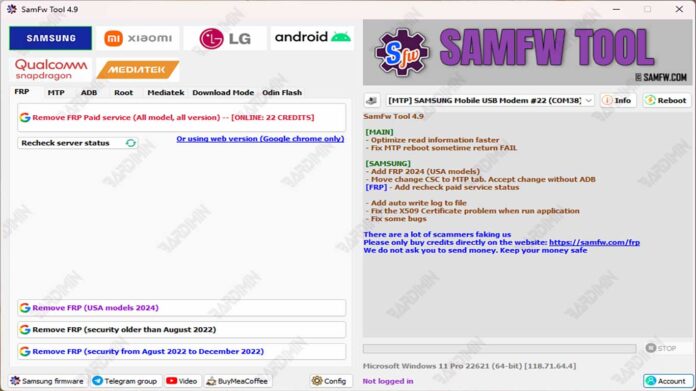
Forgetting your Google account on a Samsung phone can turn your device into an expensive paperweight. SamFw FRP Tool 4.9 offers a powerful solution, providing technicians and advanced users with a reliable software suite to bypass Factory Reset Protection, flash firmware, and perform critical system repairs on a wide range of Samsung models.
What Is SamFw FRP Tool 4.9?
The SamFwToolSetup_v4.9.zip file contains the official installer for SamFw FRP Tool version 4.9. This is a Windows-based utility designed primarily for mobile device maintenance. Its core function is to remove the Google FRP (Factory Reset Protection) lock that appears after a factory reset when the original Google account credentials are missing. Beyond that, it serves as a multi-functional toolbox for Samsung device repair and modification.
Who Should Use This Samsung Tool?
This software is not intended for casual use. It is built for specific audiences who understand the risks and technicalities involved.
- Professional Repair Technicians: A daily driver for shops needing a fast, all-in-one solution for FRP removal and basic firmware operations.
- Advanced Users & Enthusiasts: Individuals comfortable with ADB commands and system-level changes who need to regain access to their own devices.
- Device Resellers & Collectors: Those who need to clean, unlock, or change the region (CSC) on second-hand Samsung phones for resale or personal use.
Key Features & Capabilities in v4.9
The latest version refines existing tools and adds compatibility for newer models. Here are its primary functions.
1. Advanced FRP Bypass (One-Click & Emergency Mode)
This is the flagship feature. It provides methods to remove Google account locks without a full firmware flash, saving significant time. The new Emergency Mode FRP bypass is crucial for newer Galaxy devices with updated security.
2. Firmware and Combination File Flashing
You can flash official Samsung stock firmware (.md5 files) to fix bootloop errors, downgrade versions, or restore a clean OS. Flashing combination files allows for deeper-level access and repair.
3. Samsung Account and Network Unlock
The tool includes options to remove Samsung account locks. Additionally, it can perform network carrier unlocks and basic IMEI repairs on supported models, which is vital for making devices market-unlocked.
4. Comprehensive Technician Utilities
- Change CSC: Modify the country/region code to access different firmware features.
- ADB Functions: Execute ADB commands for factory resets, disabling bloatware, reading device info, and managing OTA updates.
- Reboot Control: Instantly reboot devices into Download Mode, Recovery Mode, or normal mode.
- Diagnostic Tests: Access hidden menus and run system diagnostics.
Important Notes & Warnings for Version 4.9
Using low-level system tools requires caution. Always follow these guidelines to avoid bricking your device.
- Antivirus False Positives: Such tools are often flagged. Temporarily disable your antivirus during installation and use, and only download from the official source (SamFw website).
- Data Backup is Mandatory: Any process, especially flashing, can erase all data. Backup everything possible beforehand.
- Use OEM Data Cables: A stable connection is non-negotiable. Use the original or high-quality USB cable to prevent interruptions.
- Model Compatibility: While v4.9 supports most Galaxy A/M/S/Note series (2022-2024), always check the official forum for your specific model's success rate.
Why v4.9 Is a Necessary Update
Google and Samsung continuously enhance FRP security. Consequently, older tool versions become obsolete. Version 4.9 brings critical improvements.
- Enhanced Bypass Success Rate: Improved algorithms for newer security patches on Android 12/13 devices.
- Speed Optimization: Faster processing for Galaxy A and M series, reducing wait time.
- Bug Fixes: Resolved issues in the CSC change feature that caused failures on certain firmware versions.
- Stability: A lighter software footprint with fewer crashes on diverse PC systems.
SamFw FRP Tool 4.9 remains an essential asset in a technician's arsenal. It consolidates multiple complex procedures into a single interface. For professionals and informed users facing locked Samsung devices, this tool provides a efficient path to resolution. However, its power demands respect for legal use, proper procedure, and data safety.
Always verify you are downloading the genuine SamFwToolSetup_v4.9.zip from the official channel to ensure security and functionality.
By downloading files from bardimin.com, you agree that:
- Files are obtained from the internet, and copyrights remain with their respective owners.
- Files are for educational, reference, and personal use only.
- bardimin.com does not guarantee that files are free from viruses or malware.
- Any risks, damages, or legal claims arising from the use of files are the sole responsibility of the user.
- bardimin.com is released from any and all claims or liabilities.
If you do not agree, please do not download the file.
