

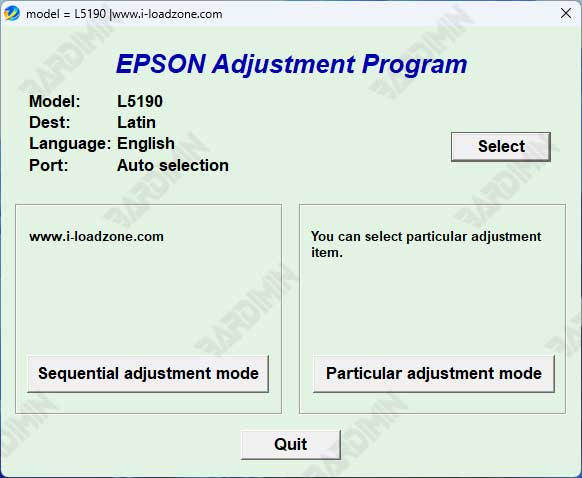
When your Epson L565 printer flashes a "Service Required" error or the waste ink pad counter reaches its limit, it can disrupt your workflow. The official solution is to Download Adjustment Program Epson L565, also known as the ESP-EPIL resetter. This powerful tool allows technicians and professionals to perform critical maintenance, reset counters, and restore the printer to optimal performance without a costly service call.
This adjustment software is the genuine utility provided for maintenance. It directly addresses common errors that halt printing operations. By using it, you gain full control over printer diagnostics and reset functions.
Why You Need the Epson L565 Resetter
Modern Epson printers have internal counters that track ink usage and waste ink absorption. Once full, the printer locks to prevent damage. This tool resets these counters. It is essential for:
- Clearing "Waste Ink Pad Counter Full" or "Service Required" errors.
- Fixing blinking power or indicator lights that signal maintenance mode.
- Performing EEPROM initialization to restore factory settings after repairs.
- Ensuring printhead health with nozzle check and cleaning utilities.
Core Features of the Epson Adjustment Program
This software package is designed for efficiency and depth. Below are its primary functions:
- Waste Ink Counter Reset: This is the main feature. It clears the pad counter error, allowing the printer to function normally again.
- EEPROM Initialization: Restores all printer settings to their original factory state, which is useful after major troubleshooting.
- Ink Charging Function: Refills ink into the system after a printhead clean or replacement, preventing air bubbles.
- Printhead Diagnostics: Includes tools for nozzle checking and head cleaning to maintain sharp print quality.
- Wide Compatibility: Runs on Windows 7, 8, 10, and 11 (both 32-bit & 64-bit architectures).
- Portable Application: Requires no complex installation; run the executable directly.
How to Download and Use the Resetter Tool
Using the Adjustment Program for the Epson L565 is straightforward. However, it requires careful attention to steps to avoid issues. Follow this guide closely.
Step 1: Download and Prepare the Files
The software comes in a compressed RAR archive. You will need file extraction software like WinRAR or 7-Zip.
⚠️ Important File & Password Information
Filename: Resetter_Epson_L565 (ESP-EPIL).rar
Size: Approximately 2 MB
Status: VirusTotal scanned and safe for use.
Extraction Password:
The password is required to open the RAR file. Ensure you type it correctly, respecting lowercase letters.
Step 2: Execution and Reset Process
- Extract the Archive: Right-click the downloaded .rar file and select "Extract Here". Enter the password bari when prompted.
- Disable Antivirus Temporarily: Security software may flag adjustment tools. Temporarily disable real-time protection to run the program. You can re-enable it afterward.
- Run as Administrator: Right-click the extracted .exe file and select "Run as administrator". This grants necessary system permissions.
- Follow On-Screen Instructions: Select the correct port for your Epson L565, choose the required function (e.g., Waste Ink Counter Reset), and execute. The printer must be connected and powered on.
Best Practices and Safety Notes
This is a powerful tool. Therefore, use it responsibly to avoid permanent printer damage.
- Always Ensure Power Stability: A power failure during the EEPROM write process can brick your printer. Use a UPS if possible.
- Physical Waste Ink Pad Check: The software resets the counter, but it does not clean the physical pad. If your printer has used extensively, inspect the pad and replace it if saturated to prevent ink leaks. Refer to the official Epson support site for service manuals.
- Use for Intended Purpose: This program is designed for the Epson L565 model. Using it on incompatible models may cause errors.
Final Verdict
The ability to Download Adjustment Program Epson L565 is a game-changer for technicians and advanced users. It provides a fast, safe, and professional-grade solution to overcome software-based service locks. By following this guide, you can restore your printer's functionality, save on service fees, and minimize downtime. Keep the file and password secure for future maintenance cycles.
By downloading files from bardimin.com, you agree that:
- Files are obtained from the internet, and copyrights remain with their respective owners.
- Files are for educational, reference, and personal use only.
- bardimin.com does not guarantee that files are free from viruses or malware.
- Any risks, damages, or legal claims arising from the use of files are the sole responsibility of the user.
- bardimin.com is released from any and all claims or liabilities.
If you do not agree, please do not download the file.
