

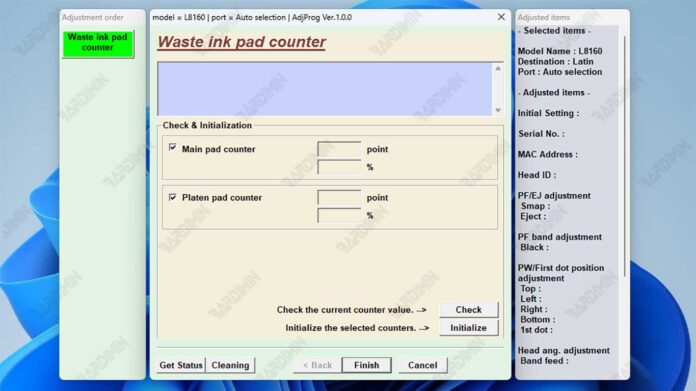
Is your Epson L8050, L18050, L18058, or L8058 printer frozen with a blinking light? Before you consider costly repairs, know this: the issue is almost always a full waste ink counter. This built-in protection lock is a common safeguard. Fortunately, a dedicated Epson waste ink reset procedure can resolve it quickly.
Understanding the Waste Ink Counter in Epson Printers
Epson printers feature an internal software counter. It tracks ink absorbed by a maintenance pad during cleaning cycles. This pad, also known as a waste ink tank or absorber, has a finite capacity. When the counter hits its limit, the printer enters protection mode. It locks to prevent potential ink overflow that could damage internal parts. A reset tool addresses this software limit, allowing you to resume printing.
Important Note: Resetting the counter does not physically clean or replace the saturated waste ink pad. For your printer's long-term health, periodic physical maintenance is essential to prevent leaks.
Key Features of a Reliable Epson Resetter Tool
The correct reset software for Epson L8050, L18050, L18058, and L8058 models offers specific advantages. A quality tool provides precision and clear functionality.
Guaranteed Model Compatibility
A dedicated file ensures full compatibility with your specific printer series. This eliminates guesswork and potential software conflicts.
Essential Toolkit Functions
- Data Reading: Displays the current waste ink counter value for accurate diagnosis.
- Counter Reset: Clears the software counter back to zero, removing the error state.
- Integrated Keygen: Generates the necessary registration code within the tool's interface.
- Streamlined Interface: Guides users through each step with clear instructions.
Pre-Reset Checklist: Ensure a Smooth Process
Follow these prerequisites to avoid common setup failures. Proper preparation is key to a successful reset.
- Operating System: A Windows PC (7, 8, 10, or 11) is required to run the adjustment program.
- Printer Connection: Power on the printer and connect it to the computer using a USB cable. Ensure the connection is stable.
- Software Preparation: You will need an archiver like WinRAR or 7-Zip to extract the downloaded .rar file.
Access Credential: The provided .rar archive is typically protected. Use the extraction password: barn.
Step-by-Step Epson Waste Ink Counter Reset Guide
Execute these steps carefully to unlock your printer. The process is straightforward when followed correctly.
- Extract the downloaded .rar file using your archiver and the password provided above.
- Locate and run the main adjustment program file (often .exe) as Administrator (Right-click > Run as administrator).
- Select your precise printer model (e.g., L8050) and the correct communication port from the list.
- Click the "Read Waste Counter" or similar button to check the current ink pad saturation level.
- Proceed with the on-screen instructions. If prompted, use the tool's internal keygen to generate and input the required code.
- Initiate the main process by clicking "Reset Waste Counter" or "Initialize". Wait for the confirmation message.
- Fully power off your Epson printer, wait 30 seconds, and then turn it back on.
Safety, Legitimacy, and Printer Maintenance
Using third-party reset tools is a common practice among technicians. However, it operates in a gray area concerning manufacturer warranties. Always consider the physical condition of your printer.
Resetting the counter is a software solution. The physical waste ink pad continues to absorb ink. If neglected, a full pad can lead to leaks, causing severe internal damage. Therefore, for optimal performance and safety, plan for physical maintenance. You can find official service information from Epson Support.
By combining a timely Epson waste ink reset with responsible hardware care, you extend your printer's operational life. This approach saves significant repair costs and downtime. Your printer should now be ready for action, freeing you from the blinking light error for the foreseeable future.
By downloading files from bardimin.com, you agree that:
- Files are obtained from the internet, and copyrights remain with their respective owners.
- Files are for educational, reference, and personal use only.
- bardimin.com does not guarantee that files are free from viruses or malware.
- Any risks, damages, or legal claims arising from the use of files are the sole responsibility of the user.
- bardimin.com is released from any and all claims or liabilities.
If you do not agree, please do not download the file.
