

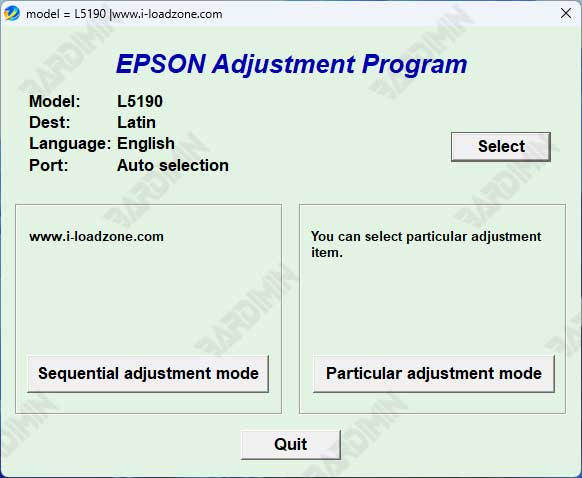
The Epson L5190 Adjustment Program is a specialized utility designed to reset the printer's internal waste ink pad counter. This article provides a secure download link, a detailed usage guide, and essential safety precautions for technicians and advanced users facing common printer errors such as "Service Required" warnings or malfunctioning printers due to full ink pads.
Understanding the Epson L5190 Adjustment Program
This Epson L5190 resetter is a crucial tool for printer maintenance. When the waste ink absorber becomes saturated, the printer's internal counter triggers an error. Consequently, the device may stop functioning to prevent potential damage. The primary function of this adjustment software is to reset that counter, allowing the printer to resume normal operations. However, it is not a substitute for physically cleaning or replacing the waste ink pad.
Common Issues Resolved by the Reset Tool
Users typically seek the Epson L5190 Adjustment Program when encountering these persistent errors:
- Service Required Warning: A message indicating the printer needs maintenance.
- Continuous blinking of the ink and paper indicator lights.
- Complete printer halt, with no response to print commands.
- Software errors related to the ink counter system.
Key Features and System Requirements
The software offers a focused set of features for effective troubleshooting:
- Direct reset of the Waste Ink Pad Counter for the Epson L5190 model.
- A straightforward interface suitable for professional technicians.
- Compatibility with Windows 10, 8.1, 8, and 7 (both 32-bit and 64-bit versions).
- Ability to read the current counter value and reset it to zero.
Important Notice: Using third-party adjustment programs carries risks. Always back up your system and printer settings beforehand. For long-term printer health, the physical waste ink pad must be checked and replaced if necessary. This tool is intended for knowledgeable users.
How to Use the Epson L5190 Adjustment Program
Follow these steps carefully to reset your printer:
- Download the adjustment program archive file using the link below.
- Extract the Adjustment_Program_Epson__L5190.rar file on your Windows computer.
- Run the executable (.exe) file as an administrator to launch the program.
- Enter the correct printer model and ensure your Epson L5190 is connected via USB.
- Select the "Waste Ink Pad Counter" option and follow the on-screen prompts to read and then reset the counter.
- Restart your printer to complete the process.
Secure Download Information
The adjustment program file is packaged in a RAR archive for distribution. Ensure you have software like WinRAR or 7-Zip to extract it.
Download File Name: Adjustment_Program_Epson__L5190.rar
Safety and Best Practices
Before proceeding, consider these critical points. First, using unofficial software may void your printer's warranty. Therefore, check if your printer is still under coverage. Second, always download software from trusted sources to avoid malware. For official support and driver updates, visit the Epson official website. Finally, after resetting the counter, plan for the physical maintenance of your printer's waste ink system.
Conclusion
The Epson L5190 Adjustment Program is a powerful tool for resolving specific printer errors. It effectively resets the waste ink counter, restoring printer functionality. Nevertheless, users must employ it responsibly alongside proper hardware maintenance. By following this guide, technicians and experienced users can solve critical service errors and extend their printer's lifespan.
By downloading files from bardimin.com, you agree that:
- Files are obtained from the internet, and copyrights remain with their respective owners.
- Files are for educational, reference, and personal use only.
- bardimin.com does not guarantee that files are free from viruses or malware.
- Any risks, damages, or legal claims arising from the use of files are the sole responsibility of the user.
- bardimin.com is released from any and all claims or liabilities.
If you do not agree, please do not download the file.
