

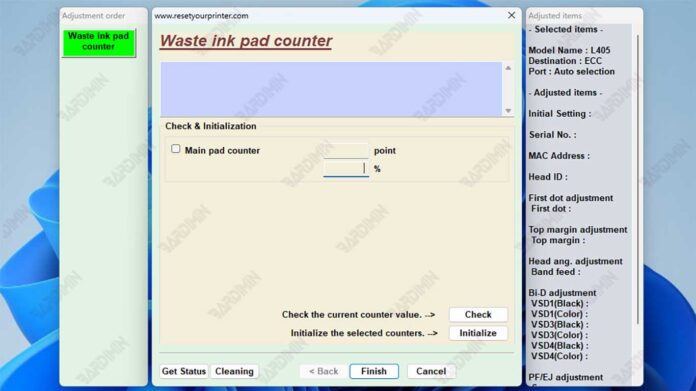
This guide provides the official Epson L405 Adjustment Program for resetting the waste ink counter, a common solution for blinking indicator lights and printer errors. We detail its secure use, critical precautions, and best practices for printer maintenance.
The Epson L405 Adjustment Program is a dedicated utility for resetting the printer's internal waste ink pad counter. When this counter reaches its limit, the printer enters a service mode and stops functioning. Consequently, using this software is often the final step after performing physical maintenance.
Therefore, technicians and users can employ this tool to clear the error state. However, it is crucial to physically service the waste ink pad first. This process prevents potential ink leakage and hardware damage.
Primary Functions and Features
This utility serves a specific technical purpose. Its design focuses on printer serviceability.
- Waste Ink Counter Reset: This is the core function. It resets the software counter to zero after the physical waste ink absorber is serviced.
- Error Resolution: It clears error codes and blinking lights related to the ink pad counter being full.
- Targeted Compatibility: The software is specifically designed for the Epson L405 model and similar L-series printers.
- Technical Utility: It provides a cost-effective solution for experienced users, avoiding unnecessary service center visits.
Critical Usage Notes and Warnings
This software is a powerful tool. Misuse can lead to printer damage. Follow these guidelines carefully.
Important: Resetting the counter does not clean or replace the physical ink absorber. A full pad can cause irreversible damage. Always check or replace the physical waste ink pad before using this adjustment program. For official support, visit the Epson website.
Additionally, download files only from trusted sources. The file provided here is archived for security.
Password: bar
How to Use the Adjustment Program
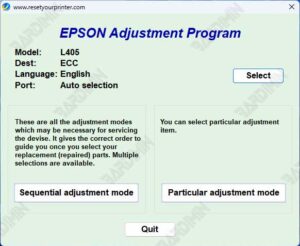
- First, download the "Adjustment Program EPSON L405 (ECC).rar" file.
- Next, extract the archive using software like WinRAR. Use the password provided above.
- Then, run the extracted executable file as an Administrator.
- After that, select the specific function for "Waste Ink Counter" or "Main Pad Counter".
- Finally, follow the on-screen prompts to initialize the counter reset.
Safety and Best Practices
Use this program at your own risk. It is intended for technically proficient users. For most users, seeking professional service is safer.
Furthermore, always ensure your printer drivers are updated. This can sometimes resolve communication issues with the adjustment software. Regular maintenance extends printer life significantly.
Disclaimer: This guide is for informational purposes. The author assumes no liability for any damage to your printer. Always consult the official Epson support resources for manufacturer-recommended procedures.
By downloading files from bardimin.com, you agree that:
- Files are obtained from the internet, and copyrights remain with their respective owners.
- Files are for educational, reference, and personal use only.
- bardimin.com does not guarantee that files are free from viruses or malware.
- Any risks, damages, or legal claims arising from the use of files are the sole responsibility of the user.
- bardimin.com is released from any and all claims or liabilities.
If you do not agree, please do not download the file.
