

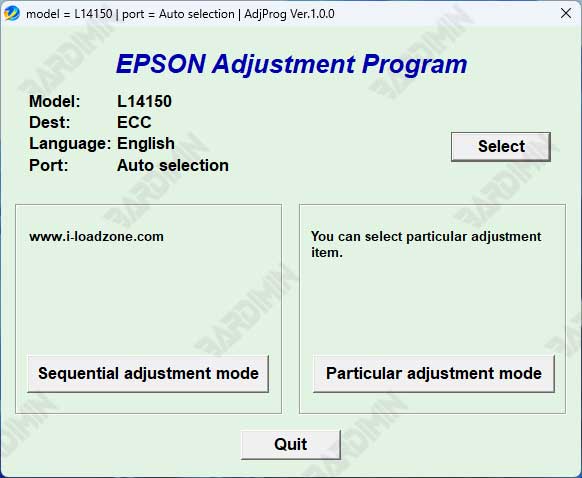
The Download Epson L14150 and L14158 Adjustment Program is a professional utility designed to reset the waste ink pad counter and resolve Service Required errors. This updated guide explains features, supported systems, safe usage, and technical steps to restore printer performance efficiently.
The Epson L14150 and L14158 Adjustment Program is an official-style service utility used by technicians to reset internal printer counters. When the waste ink pad reaches its limit, the printer automatically stops operating. As a result, users see warning lights and system messages.
By using this adjustment tool, professionals can restore printer functionality without replacing hardware components. Therefore, it is widely used in repair environments and advanced user setups.
Common Errors Fixed by Epson L14150 and L14158 Adjustment Program
This tool effectively resolves the following technical issues:
- Service Required message appears on the screen.
- Printer stops printing despite normal ink levels.
- All indicator lights blink continuously.
- Waste ink pad counter reaches its maximum limit.
Key Features of Epson L14150 and L14158 Adjustment Program
- Reset waste ink pad counter safely and accurately.
- Designed specifically for Epson L14150 and L14158 models.
- Lightweight software with a simple technical interface.
- Compatible with Windows 7, Windows 8, Windows 10, and Windows 11.
- Supports both 32-bit and 64-bit operating systems.
System Requirements
- Windows operating system only.
- Administrator access enabled.
- USB connection between printer and computer.
- Temporarily disable antivirus during the reset process.
How to Use Epson L14150 and L14158 Adjustment Program
- Extract the file Epson L14150 L14158 Adjustment Program.rar.
- Right-click the executable file and select Run as Administrator.
- Choose the correct printer model.
- Open Particular Adjustment Mode.
- Select Waste Ink Pad Counter.
- Check Main Pad Counter, then click Check.
- Click Initialization to reset the counter.
- Turn off the printer and restart it.
Important Notes for Professional Use
This adjustment program is intended for maintenance purposes only. Always ensure proper disposal or replacement of waste ink pads after resetting the counter.
For official Epson maintenance guidelines, refer to the Epson Support documentation:
Epson Official Support

FILE PASSWORD
amin
By downloading files from bardimin.com, you agree that:
- Files are obtained from the internet, and copyrights remain with their respective owners.
- Files are for educational, reference, and personal use only.
- bardimin.com does not guarantee that files are free from viruses or malware.
- Any risks, damages, or legal claims arising from the use of files are the sole responsibility of the user.
- bardimin.com is released from any and all claims or liabilities.
If you do not agree, please do not download the file.
