

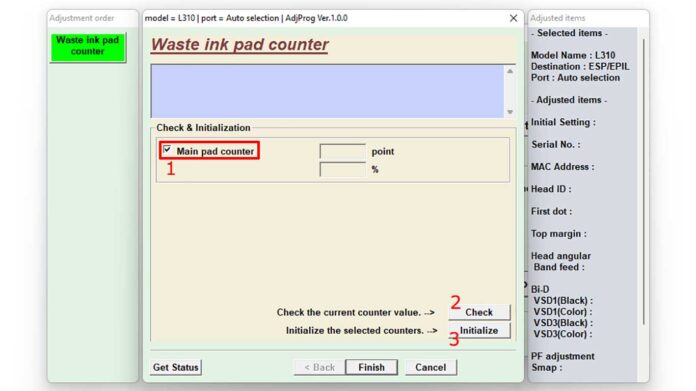
When your reliable Epson WorkForce Pro WF-M5799 suddenly halts with a stubborn "Service Required" or "Ink Pad Full" error, it can disrupt any workflow. This dedicated Epson WF-M5799 Adjustment Program offers a professional-grade solution, allowing you to reset the waste ink counter and restore full printer functionality quickly, often without costly hardware replacement.
Printers like the Epson WF-M5799 track waste ink absorption in an internal pad. Once a predetermined threshold is reached, the printer locks itself to prevent potential damage. This official resetter tool communicates directly with the printer's firmware to clear this counter, effectively telling your device it has a fresh start.
Core Functions and Professional Benefits
This resetter tool performs one critical task with precision, but the benefits for office productivity are significant.
- Eliminates "Ink Pad at End of Service Life" Errors
Clears the persistent service message that appears after extensive printing, getting your device back online. - Resets Waste Ink Counter to Zero
Restores the internal software counter to 0%, allowing normal printing operations to resume immediately. - Restores Optimal Printer Performance
Returns the printer to its standard operating state, clearing error codes and blinking indicator lights. - Guaranteed Compatibility
Designed specifically for the Epson WF-M5799 series, including all regional variants, ensuring a reliable connection and reset process. - Maximizes Uptime for Offices
A vital tool for businesses relying on high-volume printing, minimizing downtime and avoiding unnecessary service calls.
What's New in the Latest Version?
This updated version of the Epson WF-M5799 Adjustment Program addresses compatibility with newer Windows security protocols and provides enhanced stability. It ensures reliable communication with printers that may have received recent firmware updates from Epson.
Key Features and Technical Specifications
- One-Click Automated Reset Process: Streamlined interface for a fast, straightforward reset operation.
- Broad Windows OS Support: Fully compatible with Windows 7, 8, 10, and 11 (both 32-bit and 64-bit architectures).
- Standalone & Portable: No complex installation required. The tool runs directly and does not alter critical system files.
- Automatic USB Device Detection: Intelligently identifies your connected Epson WF-M5799 printer.
- Included Comprehensive Guide: Comes with a detailed PDF manual for a guided, error-free process.
Download File Information
| File Name | Restter_Epson_WF-M5799.rar |
| File Size | Approximately 5.2 MB |
| Supported Systems | Windows 7, 8, 10, 11 |
| File Type | Epson Official Adjustment Program (Resetter) |
⚠️ Archive Password Required
The downloaded RAR file is protected to prevent unauthorized execution. Use the password below to extract the adjustment program.
Password is case-sensitive. Enter it exactly as shown.
How to Use the Adjustment Program (Step-by-Step)
- Extract the Archive: Download the .rar file. Use WinRAR or 7-Zip to extract it, entering the password "bani" when prompted.
- Connect Your Printer: Power on your Epson WF-M5799. Connect it to your Windows PC via a USB cable. Ensure it's in a ready state.
- Run the Resetter: Right-click the extracted executable file (e.g., Resetter.exe) and select "Run as administrator".
- Follow On-Screen Prompts: The program will detect your printer. Follow the precise instructions in the software and the included guide to initialize the reset.
- Completion: Once the process finishes, the software will confirm the reset. Turn your printer off and back on. The service error should now be cleared.
Professional Advice & Best Practices
While this Epson WF-M5799 Adjustment Program resets the software counter, the physical waste ink pad will eventually need inspection or replacement by a technician, especially after multiple resets. For official service manuals and parts information, refer to the Epson website. Using this tool responsibly ensures the longevity of your office equipment.
By following this guide, you can effectively manage your printer's maintenance cycle. This tool empowers you to maintain continuous operation, making it an essential resource for any technical professional managing office print environments.
By downloading files from bardimin.com, you agree that:
- Files are obtained from the internet, and copyrights remain with their respective owners.
- Files are for educational, reference, and personal use only.
- bardimin.com does not guarantee that files are free from viruses or malware.
- Any risks, damages, or legal claims arising from the use of files are the sole responsibility of the user.
- bardimin.com is released from any and all claims or liabilities.
If you do not agree, please do not download the file.
