

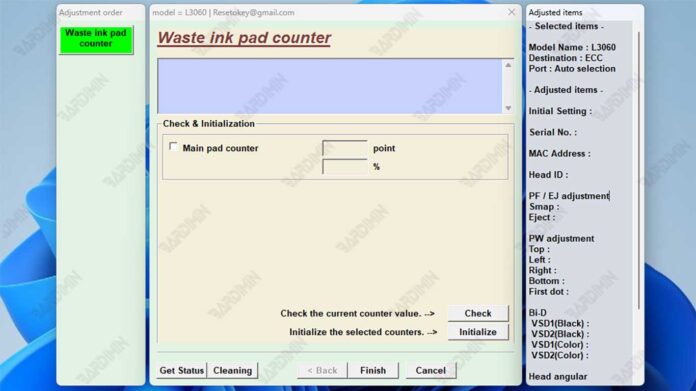
This guide provides a detailed overview of the Epson L3060 Adjustment Program, a dedicated maintenance utility for resetting the waste ink pad counter and performing critical printer diagnostics. We cover its official use, key features, and safe download instructions for technicians and professionals.
Understanding the Epson L3060 Adjustment Program
The Epson L3060 Adjustment Program is a specialized maintenance software. Technicians primarily use it to reset the printer's internal waste ink pad counter. Consequently, this action clears the "Ink Pad is at the end of its service life" or "Waste Ink Pad Full" error. This utility, often called an Epson L3060 Resetter, is essential for printer longevity.
Furthermore, the program allows access to the printer's service mode. This mode enables advanced functions like print head cleaning and nozzle pattern checks. Therefore, it is a vital tool for troubleshooting and maintaining optimal print quality.
Important Note: This software is intended for use by qualified technicians or informed users. Incorrect use may affect printer functionality. For official support, always refer to Epson's official website first.
Core Functions and Technical Features
The software performs several critical maintenance tasks. Its primary function is to reset the waste ink pad counter. Printers track ink absorbed by a maintenance pad, and this counter requires periodic resetting after pad service or replacement.
Additionally, the program offers comprehensive printer diagnostics. Users can check the printer's current status and error history. It also facilitates crucial print head maintenance operations to prevent clogs and ensure consistent output.
The Epson L3060 Adjustment Program is designed exclusively for the L3060 series. It is a lightweight Windows application. The software operates offline, requiring no internet connection for its core functions.
Download Information and System Requirements
Before downloading, verify your printer model and computer specifications. The program is compatible with 32-bit and 64-bit versions of Windows 7, 8, 10, and 11.
- Download File: Epson L3060 Adjustment Program (ECC).rar
- Approximate Size: 13 MB
- OS Compatibility: Windows (32-bit & 64-bit)
The archived file is protected. Use the password below to extract it.
bardimin
Security Notice and Installation Guidelines
Many dedicated adjustment tools are flagged by antivirus software as potential risks (false positives). This happens because they modify low-level system and printer settings.
For a smooth installation, temporarily disable your antivirus real-time protection during extraction and setup. Remember to re-enable it immediately afterward. Always ensure you download files from trusted sources to minimize security risks.
In summary, the Epson L3060 Adjustment Program is a powerful tool for resolving waste ink counter errors. It is indispensable for technicians performing routine maintenance. However, always proceed with caution and refer to official documentation when possible.
By downloading files from bardimin.com, you agree that:
- Files are obtained from the internet, and copyrights remain with their respective owners.
- Files are for educational, reference, and personal use only.
- bardimin.com does not guarantee that files are free from viruses or malware.
- Any risks, damages, or legal claims arising from the use of files are the sole responsibility of the user.
- bardimin.com is released from any and all claims or liabilities.
If you do not agree, please do not download the file.
