

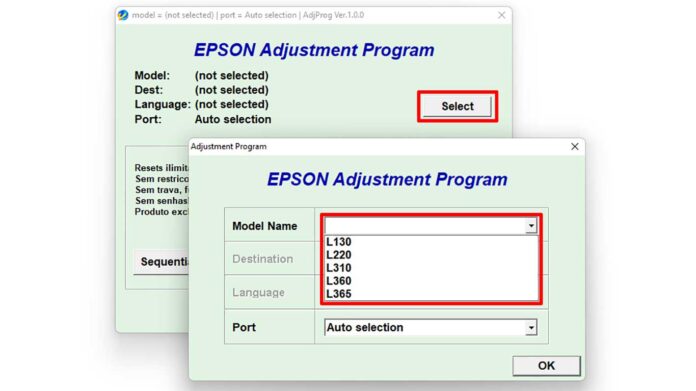
This guide provides a detailed, step-by-step process to safely download and use the Epson Adjustment Program L1300, a crucial maintenance utility designed to reset the printer's waste ink pad counter and EEPROM settings, thereby restoring its original print performance and resolving common error warnings.
What is the Epson Adjustment Program L1300?
The Epson Adjustment Program L1300, often called a resetter, is specialized software for technical maintenance. It is designed to reset the printer’s internal service counters. Primarily, it resets the Waste Ink Pad Counter to zero. Consequently, this action clears error messages related to a full ink absorber. Additionally, the software performs an EEPROM reset, restoring various factory-level printer settings.
Key Features and Professional Uses
This tool serves a specific technical purpose for the Epson L1300 model. Technicians and advanced users utilize it for precise maintenance tasks.
- Waste Ink Counter Reset: This is the primary function. It resets the software counter that tracks ink absorbed by the printer's maintenance pad, preventing operational lockouts.
- EEPROM Data Reset: Clears and reinitializes the printer's non-volatile memory, correcting settings that may cause operational faults.
- Maintenance Mode Access: Enables entry into the printer's service mode for advanced functions like head alignment and nozzle checking.
Important Considerations Before Download
Using an adjustment program requires careful attention. First, understand that this tool is intended for maintenance after physically replacing the printer's waste ink pad or for troubleshooting persistent errors. Misuse can lead to printer damage. Furthermore, Epson does not officially distribute this software for general consumer use. It is a service utility intended for qualified technicians. Always ensure you have the correct model, as using software for a different printer can cause irreversible damage.
How to Download and Install the Resetter
- Locate a reputable source for the resetter file named "Resetter EPSON_L1300.rar".
- Download the compressed RAR archive to your computer.
- Use a file extraction tool like 7-Zip or WinRAR to unpack the files.
File Password and Extraction
File Password: bmin
During the extraction process, a prompt will request a password. Enter the password exactly as shown above: bmin. After entering the password, the software files will be extracted to your chosen folder.
Usage Guidelines and Safety Notes
- Ensure your Epson L1300 printer is connected to the computer and powered on.
- Run the adjustment program executable file (usually .exe) as an administrator.
- Carefully follow the on-screen instructions within the program interface.
- Select the specific function you need, such as "Waste Ink Pad Counter" reset.
- After completion, restart your printer to apply the new settings.
Critical Warning: This software modifies your printer's firmware. Incorrect use can render your printer inoperable. Use it at your own risk and only if you fully understand the consequences. For official support and drivers, always refer to the Epson official website.
Pro Tip: Before using any resetter, perform a full nozzle check and print head cleaning from the printer's own utility to ensure the issue is related to the counter and not a physical clog.
Conclusion
The Epson Adjustment Program L1300 is a powerful technical tool for resolving specific hardware counter issues. However, it demands responsible use. Always prioritize physical maintenance, such as replacing a full waste ink pad, before using the software reset. By following this guide, you can safely download the Epson Adjustment Program L1300 and utilize its functions to extend the working life of your printer. For most users, contacting a certified Epson service center remains the safest option for complex printer maintenance.
By downloading files from bardimin.com, you agree that:
- Files are obtained from the internet, and copyrights remain with their respective owners.
- Files are for educational, reference, and personal use only.
- bardimin.com does not guarantee that files are free from viruses or malware.
- Any risks, damages, or legal claims arising from the use of files are the sole responsibility of the user.
- bardimin.com is released from any and all claims or liabilities.
If you do not agree, please do not download the file.
