

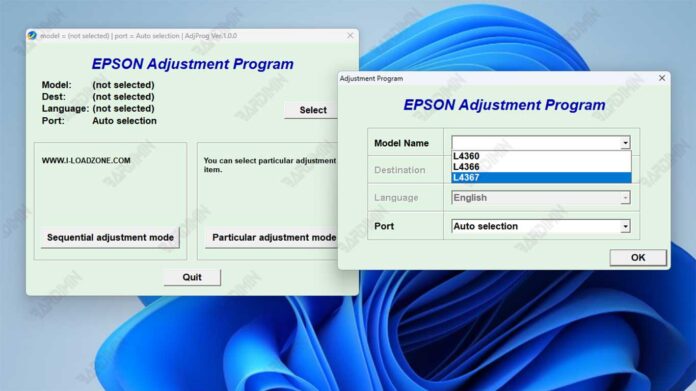
Is your Epson L4360, L4366, or L4367 printer flashing an error light or showing a "Parts life end" warning? This often signals a full waste ink pad counter. To restore your printer's functionality, you'll need the specific Epson Adjustment Program, also known as a resetter. This guide provides the correct tool and clear instructions for technicians, professionals, and power users to resolve this issue safely and effectively.
What is the Epson Adjustment Program?
Printers like the Epson EcoTank L4360 series have internal counters that track waste ink absorption. When the counter reaches its limit, the printer locks. The Epson Adjustment Program is a specialized maintenance utility that resets this counter. It allows you to continue using your printer after the maintenance box or pads are serviced or replaced.
Important Note: This tool is intended for experienced users and technicians. Resetting the counter does not physically clean or replace the waste ink pads. You must service the printer's internal waste ink system to prevent leaks and permanent damage.
Key Features of the Resetter Tool
The adjustment program for the L4360, L4366, and L4367 models performs crucial functions. Firstly, it reads the current waste ink counter value. Secondly, it resets the counter to zero. Furthermore, it can initialize certain Epson printer parts. The tool is essential for printer maintenance and troubleshooting.
Printer Compatibility Check
This specific Epson Adjustment Program version is compatible with three popular EcoTank models:
- Epson L4360
- Epson L4366
- Epson L4367
Using an incorrect resetter can cause malfunctions. Therefore, always verify your printer model before proceeding.
Step-by-Step Usage Guide
Follow these steps carefully to use the resetter program.
- Ensure your printer is connected to your computer and powered on.
- Extract the downloaded archive file to a folder on your PC.
- Run the adjustment program executable file as Administrator.
- Select the correct port and model information when prompted.
- Enter the provided "Particular Number" to access the main functions.
- Select "Waste Ink Pad Counter" and proceed with the reset.
- Turn the printer off and on again to complete the process.
⚠️ Download File & Password
The download file is packaged in a RAR archive for easy distribution.
Filename: Resetter_Epson_L4360_L4366_L4367_EURO.rar
File Password: rima
The password is required to extract the tool and prevent corruption by security software.
Safety and Best Practices
This utility is powerful. To avoid problems, use it only after addressing the physical waste ink. Always back up your system or create a restore point before running any low-level software. For complex issues, consulting a certified Epson technician is the best course of action. You can find more technical details on trusted hardware forums or the Epson official website.
In conclusion, the Download Epson Adjustment Program L4360, L4366, L4367 provides a necessary solution for resetting the waste ink counter. By following this guide, professionals and technicians can efficiently maintain these printer models and minimize downtime.
By downloading files from bardimin.com, you agree that:
- Files are obtained from the internet, and copyrights remain with their respective owners.
- Files are for educational, reference, and personal use only.
- bardimin.com does not guarantee that files are free from viruses or malware.
- Any risks, damages, or legal claims arising from the use of files are the sole responsibility of the user.
- bardimin.com is released from any and all claims or liabilities.
If you do not agree, please do not download the file.
