

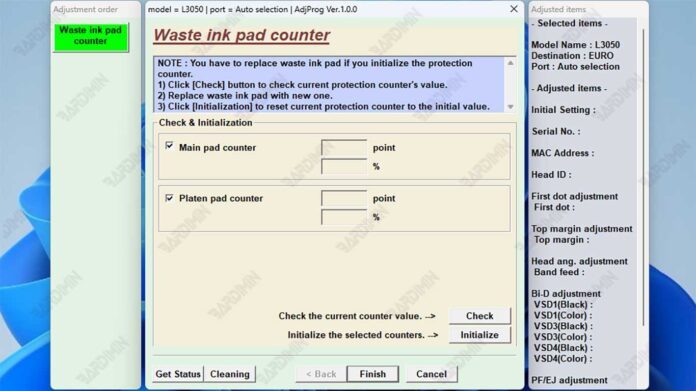
The Epson L3050 L3070 Adjustment Program is a specialized maintenance utility designed to reset waste ink counters and perform critical service functions. This technical guide provides the latest information for professionals and technicians on safely downloading and using this essential tool to resolve common printer errors like "Ink Pad at End of Service Life."
Understanding the Epson L3050 L3070 Adjustment Program
Technicians require specialized software for printer maintenance. The Epson L3050 L3070 Adjustment Program serves this exact purpose. Consequently, it is an indispensable tool for resetting the waste ink counter. This action clears the "waste ink pad full" error that eventually halts all printing operations. Furthermore, the software grants access to advanced maintenance modes for printer head cleaning and nozzle checks.
Primary Functions and Latest Updates
This adjustment program performs several key functions. Its primary role is to reset the waste ink counter. Additionally, it enables users to run deep cleaning cycles and perform ink charging. The software is specifically coded for the Epson L3050 and L3070 printer series. Importantly, recent versions remain compatible with modern Windows operating systems, including Windows 11. For official diagnostic procedures, you can refer to the Epson support page.
Critical Notice: This adjustment program is intended for use by qualified technicians. Incorrect usage can lead to printer damage. Always ensure you have identified the correct error before proceeding with a reset.
Download and Installation Guidelines
First, locate a trustworthy source for the software file. The download is typically a compressed RAR archive. Next, extract the contents to a dedicated folder on your computer. Before running the executable, ensure your Epson printer is connected and powered on. Then, follow the on-screen instructions within the adjustment program carefully.
Below are the technical specifications for the download file:
- File Name: Reset Epson L3050 L3070 (EURO).rar
- Format: RAR Archive
- Estimated Size: Approximately 2 MB
- System Requirements: Windows OS (7, 8.1, 10, 11)
Accessing the Software Archive
The downloaded archive is protected to prevent unauthorized execution. You must use the correct password to extract the files. Therefore, please use the password provided in the highlighted section below.
After extraction, run the main adjustment program as an administrator. Subsequently, select the specific function you need, such as "Waste Ink Pad Counter Reset." Finally, the software will guide you through the remaining steps to complete the maintenance task.
Important Safety and Legal Considerations
Using third-party adjustment software may affect your printer's warranty. Always check Epson's warranty policy first. Moreover, only perform a reset when the waste ink pad has been physically replaced or cleaned. Otherwise, ink leakage and hardware damage can occur. For genuine Epson parts and official service information, visit the official Epson website.
In summary, the Epson L3050 L3070 Adjustment Program download is a powerful solution for technical maintenance. It effectively resolves critical errors and restores printer functionality. However, it demands careful and knowledgeable application to ensure both safety and optimal results.
By downloading files from bardimin.com, you agree that:
- Files are obtained from the internet, and copyrights remain with their respective owners.
- Files are for educational, reference, and personal use only.
- bardimin.com does not guarantee that files are free from viruses or malware.
- Any risks, damages, or legal claims arising from the use of files are the sole responsibility of the user.
- bardimin.com is released from any and all claims or liabilities.
If you do not agree, please do not download the file.
