

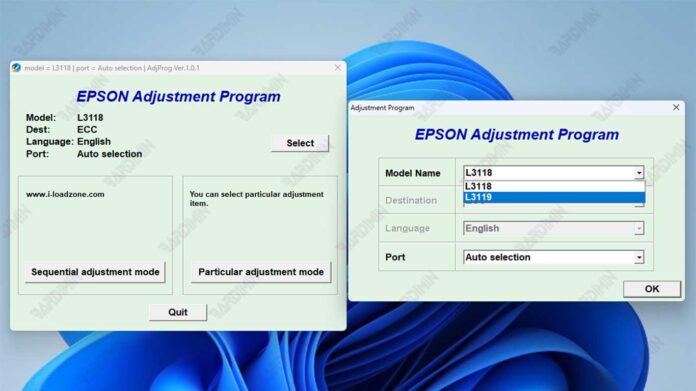
This article provides the official Epson L3118 and L3119 adjustment program download for technicians to reset the waste ink counter. It details safe usage, key features, and critical warnings to fix the "Ink Pad Full" error and restore printer functionality.
Official Epson L3118 L3119 Adjustment Program Overview
The Epson L3118 and L3119 adjustment program is a specialized utility software. Professional technicians use it to reset the waste ink counter on compatible Epson printer models. Consequently, it resolves persistent "Ink Pad is at the end of its service life" errors and blinking indicator lights. This utility communicates directly with the printer's internal chip to clear the counter. However, it is a technical procedure intended for experienced users.
Critical Technician Warnings and Precautions
Please read these essential points before proceeding. Using the adjustment program carries inherent risks.
- Use at Your Own Risk: Incorrect usage may permanently damage your printer's motherboard or other components.
- Void Warranty: This reset procedure will typically invalidate your printer's manufacturer warranty.
- Physical Maintenance Required: The software reset only clears the digital counter. The physical waste ink pad inside the printer will still become saturated over time. Therefore, you must manually inspect, clean, or replace this pad to prevent dangerous ink overflow.
- Security Scan: Always scan downloaded files with antivirus software. Furthermore, you may need to temporarily disable antivirus during extraction, as security software often flags these utilities as false positives.
For Authoritative Reference: Always consult your printer's official Epson support page for warranty and service information.
Key Features and Primary Uses
The adjustment program offers several specific functions for printer repair.
- Waste Ink Counter Reset: It fully resets the waste ink counter value to zero.
- Error Code Resolution: The program fixes the "Ink Pad Full" error message and stops all blinking lights.
- Broad Compatibility: This utility supports the Epson L31xx series, including models L3110, L3111, L3115, L3116, L3117, L3118, and L3119.
- Technical Interface: It provides a direct interface for chip communication, designed for technician use.
Download and Extraction Instructions
Follow these steps carefully to obtain and prepare the adjustment program file.
- Download the archive file named "Reset Epson L3118 L3119.rar".
- Extract the .rar file using software like WinRAR or 7-Zip.
- You must enter the correct password to unlock the archive.
After extraction, run "AdjProg.exe" with Administrator rights. For instance, right-click the file and select "Run as administrator." Finally, follow the on-screen instructions specific to your printer model to complete the reset process safely.
Long-Term Printer Maintenance Advice
Remember, a software reset is a temporary solution. For long-term printer health, plan to physically replace the full waste ink pad. Additionally, using genuine Epson inks can reduce unnecessary waste ink production. This practice helps maintain optimal printer performance and prevents future errors.
By downloading files from bardimin.com, you agree that:
- Files are obtained from the internet, and copyrights remain with their respective owners.
- Files are for educational, reference, and personal use only.
- bardimin.com does not guarantee that files are free from viruses or malware.
- Any risks, damages, or legal claims arising from the use of files are the sole responsibility of the user.
- bardimin.com is released from any and all claims or liabilities.
If you do not agree, please do not download the file.
