

To remove Yii2 frontend web from your application URL structure, you can apply several safe methods so the URL becomes cleaner and more professional. This approach increases user trust, improves manageability, and keeps the development structure organized.
In modern application development, URL presentation is important. Long URLs can confuse users. In addition, internal directories such as frontend or backend should not appear directly. Therefore, proper configuration is needed to keep the application working smoothly without exposing internal structure.
This article explains three main methods you can use, which include Apache Virtual Host configuration, Yii2 structure modification, and Nginx configuration. All these methods are safe to apply in local development or production environments when combined with best practices.
1. Remove Yii2 Frontend Web Using Apache Virtual Host
Virtual Host allows you to map a domain to a specific directory so that the frontend/web and backend/web structures do not appear in the URL. This method is widely used because it is simple and supports useful additional configurations.
Open the Apache configuration file, usually located in the httpd-vhosts.conf directory. Add the following configuration:
<VirtualHost *:80>
    ServerName frontend.local
    DocumentRoot "C:/xampp/htdocs/yii2-test/frontend/web/"

    <Directory "C:/xampp/htdocs/yii2-test/frontend/web/">
        RewriteEngine on
        RewriteCond %{REQUEST_FILENAME} !-f
        RewriteCond %{REQUEST_FILENAME} !-d
        RewriteRule . index.php
        DirectoryIndex index.php
    </Directory>
</VirtualHost>

<VirtualHost *:80>
    ServerName backend.local
    DocumentRoot "C:/xampp/htdocs/yii2-test/backend/web/"

    <Directory "C:/xampp/htdocs/yii2-test/backend/web">
        RewriteEngine on
        RewriteCond %{REQUEST_FILENAME} !-f
        RewriteCond %{REQUEST_FILENAME} !-d
        RewriteRule . index.php
        DirectoryIndex index.php
    </Directory>
</VirtualHost>
After completing the configuration, add the domain entries to the system hosts file:
127.0.0.1 frontend.local
127.0.0.1 backend.local
If everything is configured correctly, the frontend will be available at http://frontend.local/ and the backend at http://backend.local/. Additional references can be found in the official Apache documentation (nofollow).
2. Modify Yii2 Structure to Remove Yii2 Frontend Web
This method requires moving several frontend files into the root directory. It is effective for development or testing environments. However, for production, Apache Virtual Host or Nginx is more suitable.
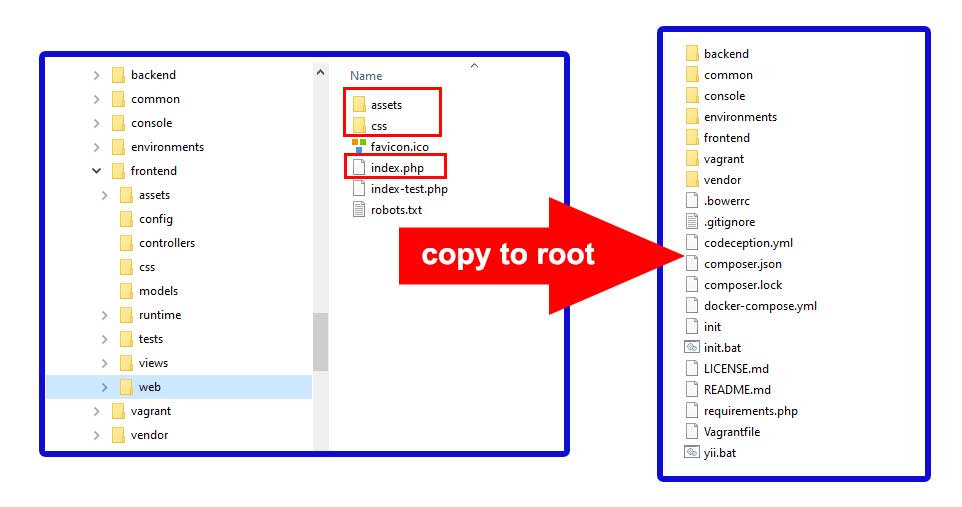
Copy the assets and css directories and the index.php file from frontend/web into the root of your Yii2 project. Then modify the index.php file using this code:
<?php
defined('YII_DEBUG') or define('YII_DEBUG', true);
defined('YII_ENV') or define('YII_ENV', 'dev');

require(__DIR__ . '/vendor/autoload.php');
require(__DIR__ . '/vendor/yiisoft/yii2/Yii.php');
require(__DIR__ . '/common/config/bootstrap.php');
require(__DIR__ . '/frontend/config/bootstrap.php');

$config = yii\helpers\ArrayHelper::merge(
    require(__DIR__ . '/common/config/main.php'),
    require(__DIR__ . '/common/config/main-local.php'),
    require(__DIR__ . '/frontend/config/main.php'),
    require(__DIR__ . '/frontend/config/main-local.php')
);

(new yii\web\Application($config))->run();
After completing the modification, you can access the application at http://localhost/project-name/.
3. Remove Yii2 Frontend Web Using Nginx
Nginx provides excellent performance and is often used on production servers. To remove Yii2 frontend web on Nginx, you only need to point the server root to the application web directory.
Frontend Configuration
server {
    listen 80;
    server_name frontend.local;
    root /var/www/yii2-test/frontend/web;

    index index.php;

    location / {
        try_files $uri $uri/ /index.php?$args;
    }

    location ~ \.php$ {
        include fastcgi_params;
        fastcgi_pass unix:/run/php/php8.2-fpm.sock;
        fastcgi_param SCRIPT_FILENAME $document_root$fastcgi_script_name;
    }

    location ~* /\.(htaccess|svn|git) {
        deny all;
    }
}
Backend Configuration
server {
    listen 80;
    server_name backend.local;
    root /var/www/yii2-test/backend/web;

    index index.php;

    location / {
        try_files $uri $uri/ /index.php?$args;
    }

    location ~ \.php$ {
        include fastcgi_params;
        fastcgi_pass unix:/run/php/php8.2-fpm.sock;
        fastcgi_param SCRIPT_FILENAME $document_root$fastcgi_script_name;
    }

    location ~* /\.(htaccess|svn|git) {
        deny all;
    }
}
Finally, add the domains to your system hosts file:
127.0.0.1 frontend.local
127.0.0.1 backend.local
Once everything is configured, access the frontend via http://frontend.local/ and the backend via http://backend.local/. This method is reliable for production and can be combined with HTTPS, caching, and additional security optimization.
