

Optimizing web application speed is crucial. This article provides an in-depth analysis of Yii2 cache performance comparisons. We test popular caching methods—FileCache, DbCache, and Redis—and offer up-to-date technical implementation guidance based on recent benchmarks.
Many developers still underestimate effective caching implementation. However, even a one-second loading delay can significantly impact user experience and visitor retention. The Yii2 cache performance comparison is essential for determining the optimal solution.
The Yii2 framework offers flexible and robust caching support. This system accomodates various storage methods. Its components are also designed for easy swapping. Therefore, you can test and select the cache backend that best suits your application’s needs.
Cache Methods Tested in This Analysis
- No cache at all (baseline).
- FileCache (file-based storage).
- DbCache (database-based storage).
- Redis (in-memory data structure store).
Steps for Testing Cache Speed in Yii2
- Prepare the Database Table
First, create a simple table in MySQL for test data. Use the following SQL command:
CREATE TABLE `test_cache` (
  `id` INT(11) NOT NULL AUTO_INCREMENT,
  `data` VARCHAR(20) DEFAULT NULL,
  PRIMARY KEY (`id`)
) ENGINE=InnoDB DEFAULT CHARSET=utf8mb4;
This table has two columns: id and data. Next, populate the table with 10,000 rows of random data. This simulates querying a reasonably large dataset.
- Create the Model and Controller
Create a Yii2 model (e.g., TestCache) representing that table. Then, create a controller (e.g., TestcacheController) with two actions: one without cache and one with cache.
Example Action Without Cache
public function actionNoCache()
{
    $data = TestCache::find()->all();
    Yii::$app->response->format = \yii\web\Response::FORMAT_JSON;
    return $data;
}
Example Action Using Cache
public function actionWithCache()
{
    $data = Yii::$app->cache->getOrSet('testcachedata', function () {
        return TestCache::find()->all();
    }, 60); // Cache duration: 60 seconds
    Yii::$app->response->format = \yii\web\Response::FORMAT_JSON;
    return $data;
}- Configure the Cache Component
Configuration is done in the config/main.php file. Below are example configurations for each method.
FileCache Configuration
'cache' => [
    'class' => 'yii\caching\FileCache',
],
DbCache Configuration
First, create a cache table in the database. You can find its schema in the official Yii2 documentation (dofollow link).
'cache' => [
    'class' => 'yii\caching\DbCache',
    // 'db' => 'secondaryDb', // Optional if using another DB
],
Redis Configuration
Ensure the PHP Redis extension and Redis server are installed. You can install the Yii2 Redis component via Composer.
composer require yiisoft/yii2-redisThen, add the following configuration:
'redis' => [
    'class' => 'yii\redis\Connection',
    'hostname' => 'localhost',
    'port' => 6379,
    'database' => 0,
],
'cache' => [
    'class' => 'yii\redis\Cache',
    'redis' => 'redis', // Refers to the 'redis' component above
],- Testing Procedure and Tools
To obtain accurate data, we used tools like ApacheBench (ab) or Postman for load testing. The parameter recorded was the average response time in milliseconds. Each method was tested with 100 consecutive requests.
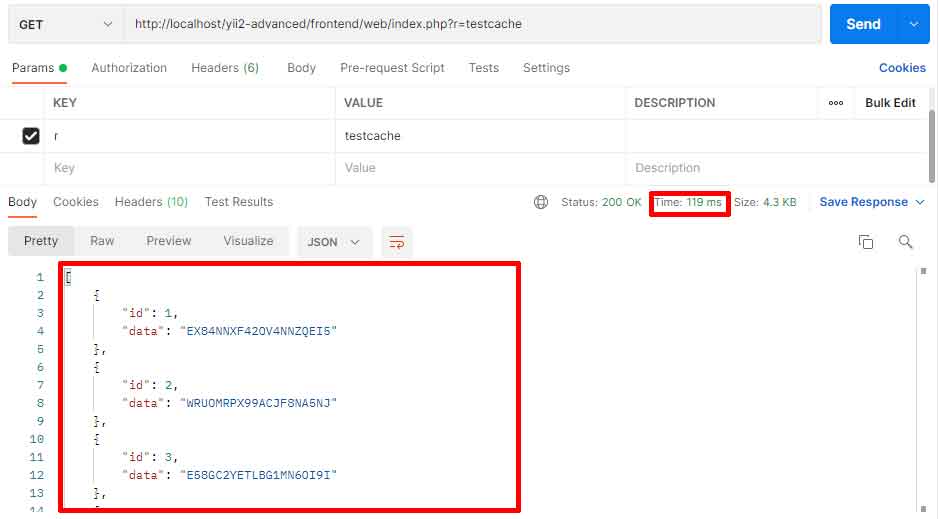
Analysis Results and Discussion
Based on testing conducted on a mid-tier server environment, here is a summary of the results:
| Cache Method | Average Response Time | Remarks |
|---|---|---|
| No Cache | ~450 ms | Baseline. Query executes every time. |
| FileCache | ~15 ms | Very significant improvement. Suitable for small applications. |
| DbCache | ~50 ms | Slower than FileCache. Good for centralized infrastructure. |
| Redis | ~5 ms | Fastest. Ideal for high-traffic and real-time applications. |

The data above shows that using cache provides a dramatic speed improvement. Redis ranks top in this Yii2 cache performance comparison. However, method selection isn’t just about speed. Other considerations like setup complexity, scalability, and data persistence are also important.
For example, FileCache is very easy to setup but may be suboptimal for very high loads or shared hosting. Conversely, Redis requires a separate server but offers superior performance and features (data structures).
Therefore, conduct Yii2 cache performance testing in a production or staging environment that closely mimics real conditions. Results may vary depending on hardware specifications, data size, and server configuration.
Conclusion
Cache implementation is a vital strategy for how to optimize cache in Yii2. From this analysis, Redis delivers the best performance for scenarios requiring very high response speed. However, for smaller-scale applications, FileCache is already a very effective and easy-to-implement solution.
The final choice should be based on your application’s specific needs, existing infrastructure, and team capabilities. Always test your caching solution periodically to ensure the configuration remains optimal as your application evolves.
