

A media converter is a hardware device used to change the format or type of data transmission media from one type to another. It can be used in the context of computer networks to convert signals between two different kinds of media, such as optical fiber and copper wires.
The importance of a media converter in connecting different types of networks lies in its ability to provide interoperability between devices using different media.
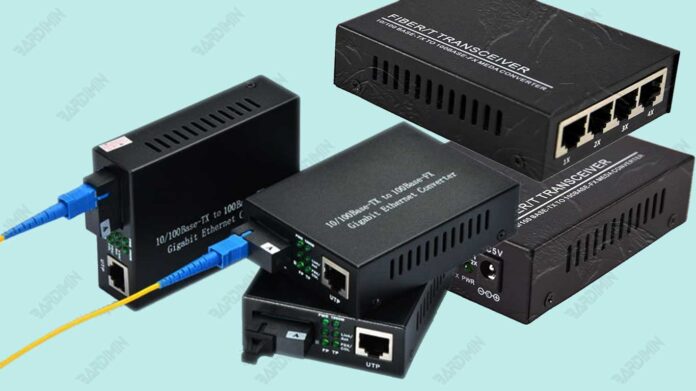
Benefits of Media Converters
Media converters are necessary in network infrastructure because they allow the integration of devices that use different media. Some of the main benefits of using a media converter are:
- Interoperability: Media converters allow devices that use different transmission mediums to connect and communicate within the same network. For example, using a media converter, you can connect a device that uses copper wires with a device that uses fiber optics.
- Flexibility: Media converters allow flexibility in network design. They will enable the use of different types of transmission media according to the specific needs of the network, such as distance, speed, or reliability.
Here are some examples of situations where the use of media converters is particularly relevant:
- New network integration with existing infrastructure: For example, if you want to connect an existing copper cable network with a new fiber optic network, you can use a media converter to convert signals between the two without needing to replace the entire infrastructure.
- Network coverage expansion: If you need to extend your network coverage beyond the limit of the distance that can be reached by one type of transmission medium, a media converter can be used to convert the signal to a media type that better suits the required distance, such as from optical fiber to copper wire.
Thus, media converters play an important role in enabling efficient and flexible connectivity within modern computer networks.
Jenis-Jenis Media Converter
Media converters come in different types, each with its functions and uses. Here are some common types of media converters along with a more detailed explanation, examples of use, and considerations in choosing one:
1. UTP of fiber optic (Copper)
Fiber Optic to UTP converter media converts signals from fiber optic cables into signals that can be used by copper twisted-pair cables (UTP). This is especially useful in situations where you want to connect a device that only has a UTP port to a fiber optic network that offers superior coverage and speed.
Examples of use:
- It connects servers in the data room to switches in the network room via fiber optic cables and UTP media converters, enabling high-speed long-distance data transfer.
- Connecting outdoor security cameras to the NVR network inside the building via fiber optic cable and UTP media converter, ensures stable and secure video transmission.
2. Single Mode to Multimode
Fiber optic cables are divided into two types, namely single mode and multimode. Each type of cable has its characteristics and uses. Single mode to multimode media converters are used to connect these two types of fiber optic cables, bridging the differences between them.
Difference between single mode and multimode:
- Distance: Single-mode cables can transmit data over long distances, such as several kilometers, ideal for wide-area networks (WANs). Multimode wires, on the other hand, are limited to shorter distances, about a few hundred meters, suitable for local area networks (LANs).
- Bandwidth: Single-mode cables have higher bandwidth, allowing for faster data transmission. Multimode cables have lower bandwidth but are still sufficient for general networking needs.
- Cost: Single-mode cables are generally more expensive than multimode cables.
Advantages and use of media converter single mode to multimode:
- Extend network coverage: This media converter allows you to connect remote devices that cannot be reached with a multimode cable, ideal for extending the network to other buildings or remote locations.
- Increase bandwidth: This media converter can be used to increase network bandwidth by using a single-mode cable, allowing faster data transfer for applications that require high bandwidth.
- Reduce costs: These media converters can help you save money by allowing you to use cheaper multimode cables for shorter distances, and only use single-mode cables for segments that require long distances and high bandwidth.
3. Supported Protocols
Media converters are available in different types that support different network protocols, such as Ethernet, Fast Ethernet, Gigabit Ethernet, and others. This allows you to connect devices with different protocols to your network, ensuring compatibility and interoperability.
Examples of use:
- Connect older computers with the 10Base-T protocol to a Gigabit Ethernet network using a media converter, enabling faster internet access and data transfer.
- Connect an IP phone with SIP protocol to a VoIP network by using a media converter, enabling digital voice communication over the internet network.
4. Other Types of Media Converter
In addition to the types of media converters mentioned above, there are many other types of media converters available with different features and functions, such as:
- Media Converter Managed: Provides more advanced network control and management through SNMP, enabling remote monitoring of status, configuration, and troubleshooting.
- Media Converter PoE (Power over Ethernet): Provides power to devices connected via Ethernet cable, eliminating the need for a separate power supply, ideal for devices such as wireless access points and IP cameras.
- Standalone Media Converter: Has a compact design and is easy to install, perfect for use in desktop or server racks.
- Chassis Media Converter: Houses multiple media converter modules in a single chassis, enabling scalability and centralized management for larger networks.
Choosing the Right Media Converter
When choosing a media converter, it is important to consider the following factors:
- Cable type: The type of cable you want to connect (for example, fiber optic to UTP, single mode to multimode).
- Protocol: The network protocol you want to support (e.g., Ethernet, Fast Ethernet, Gigabit Ethernet).
- Distance: The distance you want to cover.
- Bandwidth: The bandwidth you need.
- Features: Additional features at your disposal.
- Brand and reputation: Choose a media converter from a trusted brand with a good reputation for providing high-quality products and reliable after-sales service.
- Warranty: Choose a media converter with an adequate warranty to protect your investment.
- Price: Compare prices from different vendors to get the best deal.
Physical Installation of Media Converter
- Set Up the Device:
- Make sure you have a media converter that matches the type of cable you want to use (copper or fiber optics).
- Prepare an Ethernet cable (RJ45) to connect the media converter to switches/routers and other devices.
- Prepare a fiber optic cable (if using a fiber optic media converter) with appropriate connectors (e.g. SC, ST, LC).
- Prepare a power adapter (if needed) to power the media converter.
- Install SFP Module (if required):
- Fiber optic media converters typically use separate SFP modules to connect fiber optic cables.
- Make sure you have an SFP module that is compatible with the type of fiber optic cable you are using.
- Carefully insert the SFP module into the SFP slot on the media converter. Make sure the module is properly installed and locked.
- Connect the Cable:
- Connect the Ethernet cable from the switch/router to the RJ45 port on the media converter.
- Connect the fiber optic cable to the SFP port on the media converter. Make sure the connector is properly attached and secure.
- Power:
- Connect the power adapter to the media converter and plug it into a power outlet.
- Turn on the media converter. There is usually a power button or indicator light to indicate that the media converter is active.
Examples of inter-building Ethernet networks:
- Use two fiber optic media converters, one in each building.
- Connect the switch/router in the first building to the RJ45 port on the first media converter.
- Connect a device (such as a computer) in the second building to the RJ45 port on the second media converter.
- Connect both media converters with fiber optic cable.
- Turn on both media converters.
- Your Ethernet network is now connected between buildings via fiber optic cables.
Media Converter Configuration
- Access Interface Configuration:
- Media converters usually have a web interface or CLI (command-line interface) to configure.
- How to access varies depending on the media converter model. Check the user manual for detailed instructions.
- Generally, you can access the web interface through the IP address listed on the label of the media converter, or use an Ethernet cable directly to the media converter and use special configuration software.
- Set Mode:
Select the appropriate mode of operation for your network:
- Half-duplex: Data flows one way at a time, and each device takes turns sending and receiving data.
- Full-duplex: Data can flow both ways simultaneously, enabling faster and more efficient data transfer.
- Set the Speed:
- Choose the appropriate data rate for your network, such as 10 Mbps, 100 Mbps, 1 Gbps, 10 Gbps, or 40 Gbps.
- Make sure the speed you choose is compatible with other devices on your network.
- Set Data Flow:
- Select the appropriate data flow control for your network. Data flow control helps prevent data loss during transmission.
- Common options include None, Xon/Xoff, and Pause.
- Save Settings:
- When you’re done configuring, save your settings.
- The media converter may need to be restarted for the new settings to take effect.
Example Configure media converter for full-duplex 1 Gbps network with Xon/Xoff data flow control:
- Akses interface web media converter.
- Open the network settings menu.
- Select “Full-duplex” for the operation mode.
- Select “1 Gbps” for the data rate.
- Select “Xon/Xoff” for data flow control.
- Click “Save” to save the settings.
- Restart media converter.
Example Use Cases
A media converter is a device used to convert signals between two types of network media, such as copper wires and fiber optics. Here are some examples of using media converters in office and industrial environments:
Office Environment:
- Building Interconnection: In an office environment, media converters can be used to connect different buildings using fiber optic cables. For example, if there are two buildings on campus or an office that want to connect, a media converter can convert signals from copper wires (e.g., Ethernet) into fiber optic signals to address longer distances.
- Internet Access: Media converters can also split Internet access between buildings in an office complex. This allows users in various buildings to connect to the internet through a faster and more reliable fiber optic connection.
Industry Sector:
- Factories: In the industrial sector, media converters are often used to connect devices in factories using fiber optic cables. For example, connecting production machines, sensors, and other devices to the network using a media converter. This helps ensure reliable and efficient communication in harsh environments, such as factories that may have extreme temperatures and shocks.
- Oil Mining: In the oil mining industry, media converters can convert signals from copper wires to optical fibers to connect devices in remote and dangerous locations. This helps ensure reliable communication even in difficult environmental conditions.
Conclusion
Media converters are important devices in optimizing network connections because they allow interoperability between different types of data transmission media. With its ability to convert signals between optical fiber and copper wires, as well as between different transmission modes, media converters facilitate the integration of devices using different media into the same network.
By addressing existing challenges and seizing opportunities for innovation, media converter technology has the potential to continue to evolve and provide greater benefits in optimizing network connections across a variety of environments and industries.
By using media converters, organizations can expand their networks efficiently and overcome the challenges of distance and different environmental conditions. Media converters play an important role in connecting devices in different locations and ensuring reliable connectivity.
