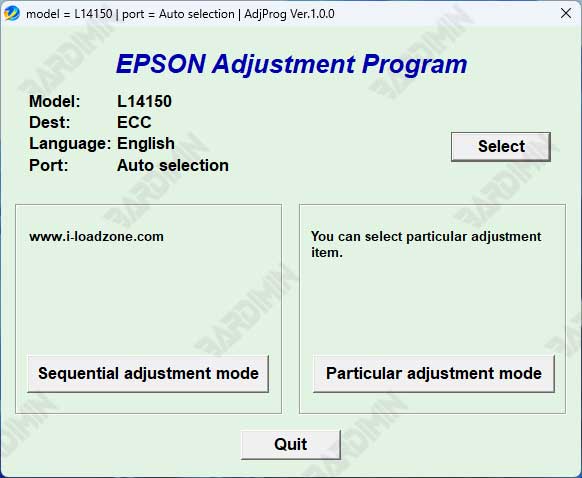
Is your Epson L4150 showing "Service Required" errors or blinking warning lights? This professional guide provides the official software solution. Learn how to properly download, install, and use the Epson Adjustment Program L4150 to reset the waste ink counter and restore full printer functionality without costly repairs.
When your Epson L4150 displays persistent error messages, the issue is often software-based rather than mechanical. Specifically, the printer's internal waste ink counter reaches its limit. This comprehensive tutorial explains how to download the Epson Adjustment Program L4150, the essential service tool that resets this counter. Consequently, you can resolve common errors and extend your printer's lifespan significantly.
Recognize these key symptoms that indicate a necessary software reset:
- The Alternating Red Light Error: Power and error lights blink alternately, making the printer completely unresponsive.
- "Service Required" or "Ink Pad End of Service Life" warnings appearing on your computer screen.
- Automatic Job Cancellation: Print jobs cancel themselves despite available ink and paper.
- Persistent Errors After Physical Maintenance: The error continues even after cleaning or replacing the actual waste ink pad.
If you experience any of these issues, your printer requires a software counter reset. This adjustment program provides professional-grade access to your printer's service functions.
What is the Epson L4150 Adjustment Program?
This specialized software is an official-grade service utility used by certified technicians. It establishes direct communication with your printer's EEPROM memory chip. Therefore, you can perform critical maintenance and reset operations that standard printer drivers cannot access. For official safety guidelines, consult Epson's official support portal.
Primary Function
Waste Ink Counter Reset
Directly solves the "Ink Pad End of Service Life" error by resetting the internal counter to zero.
Advanced Diagnostics
Maintenance & Testing
Execute nozzle checks, deep head cleaning cycles, and initial ink charging procedures.
EEPROM Access
System-Level Control
Read error logs, reset various internal counters, and perform factory resets.
Step-by-Step Usage Guide
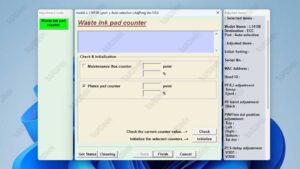
Epson L4150 Adjustment Program Interface: Navigate to the 'Waste Ink Pad Counter' section for the reset procedure.
⚠️ Important Preparation: Ensure your Epson L4150 is turned ON and connected to your computer via USB cable before starting.
- Download the Archive: Obtain the
Reset_Epson_L4150.rarfile from a trusted source. - Extract the Files: Right-click the RAR file and select "Extract Here". You will need the correct password.
- Run as Administrator: Navigate to the extracted folder. Right-click the main .exe file and select "Run as administrator".
- Enter Service Mode: Follow the specific button combination (usually Power + Cancel buttons) to put your printer into Service Mode.
- Select Reset Function: In the program, choose "Waste Ink Pad Counter" from the menu.
- Execute Reset: Click "Read" to check the current value, then click "Reset" to clear the counter.
- Complete the Process: Turn the printer OFF and ON again as instructed. The error should now be cleared.
📦 File Download Information
Filename: Reset_Epson_L4150.rar
Tool Type: Epson Service Adjustment Program (Official Grade)
Compatibility: Epson L4150 series printers only
🔓 Extraction Password
badi
This password prevents file corruption and unauthorized distribution.
Critical Safety Notes & Professional Disclaimer
⚠️ LEGAL & SAFETY DISCLAIMER
- Use At Your Own Risk: This is a powerful system-level tool. Incorrect use may permanently damage your printer's firmware. The author and publisher assume no liability for any damage or data loss.
- Physical Maintenance Required: Resetting the software counter does not clean or replace the physical waste ink pad. If the pad is oversaturated, you must service it to prevent internal leaks and damage.
- Antivirus False Positives: Security software often flags deep-system utilities as potential threats. This is expected. Temporarily disable your antivirus or add an exception if necessary, but only after verifying the file's source.
- Warranty Voidance: Using this software may void your printer's manufacturer warranty. Proceed only if your warranty has expired.
By following this guide accurately, you can successfully download the Epson Adjustment Program L4150 and execute a proper waste ink counter reset. This process restores functionality for many common error conditions, saving significant repair costs. Always prioritize safety and verify each step during the procedure.
By downloading files from bardimin.com, you agree that:
- Files are obtained from the internet, and copyrights remain with their respective owners.
- Files are for educational, reference, and personal use only.
- bardimin.com does not guarantee that files are free from viruses or malware.
- Any risks, damages, or legal claims arising from the use of files are the sole responsibility of the user.
- bardimin.com is released from any and all claims or liabilities.
If you do not agree, please do not download the file.