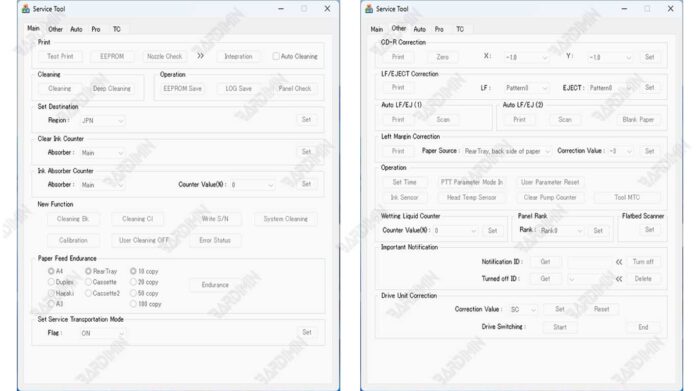
For technicians and professionals dealing with stubborn "Service Error" or "Ink Absorber Full" messages, the Canon Service Tool V6000 offers a powerful software solution. This specialized utility, often sought as a download, performs critical maintenance like waste ink counter resets and clearing deep-seated error codes on a wide array of Canon inkjet printers, restoring them to full operation without a physical service call.
Canon printers use a built-in counter to track the ink collected in a internal waste pad. When this counter reaches its limit, the printer enters a service mode and stops printing. The Canon Service Tool V6000 is the definitive software tool that allows authorized technicians and advanced users to safely reset this counter and clear related errors.
Utilizing this tool can save significant time and money, extending the lifespan of your printer. However, it requires careful use and is intended for those with technical knowledge.
Core Functions and Benefits
The primary purpose of the V6000 tool is to interact with the printer's service mode. Its main functions provide direct solutions to common hardware maintenance alerts.
- Waste Ink Counter Reset: This is the key feature. It resets the software counter to 0%, clearing the "ink absorber full" warning and allowing printing to resume.
- EEPROM Initialization: Clears error history and resets certain printer settings to their default state, which can resolve persistent error codes.
- Ink Absorber Maintenance: Initiates cleaning cycles for the waste ink system.
- Printer Detection and Model Support: Identifies connected Canon printers and provides model-specific reset options.
Therefore, this tool is invaluable for repair shops, IT departments, and serious home users looking to maintain their printing equipment efficiently.
Download File Details and Instructions
The software is distributed in a compressed archive for security and ease of distribution. Below are the essential details for accessing it correctly.
⚠️ Critical Download Information
Download File Name: ST6000.rar
Important: You must use the correct extraction password to access the files inside the archive.
Archive Extraction Password
rdim
Use this password to unpack the ST6000.rar file.
Step-by-Step Usage Guide
- Download the
ST6000.rarfile to your computer. - Extract the archive using a tool like WinRAR or 7-Zip, entering the password: rdim.
- Disable your antivirus software temporarily (as it may flag service tools) or add an exception. Always scan the files yourself before proceeding.
- Connect your malfunctioning Canon printer to the PC via USB and turn it on.
- Right-click on the extracted
.exefile and select "Run as administrator". - In the tool's interface, select your detected printer model from the list.
- Click the appropriate button, often labeled "Main" or "Clear Waste Ink".
- Wait for the success message, then fully power off and restart your printer.
Pro Tip: For best results, ensure your printer is in a ready state (no paper jams, cartridges installed) before running the reset. The process typically takes less than a minute.
Extensive List of Supported Printer Models
The Canon Service Tool V6000 supports an extensive range of popular Canon PIXMA series. Compatibility is broad, but always verify your specific model.
Primary Supported Series
- PIXMA G Series: G1000, G2000, G3000, G4000, G5000, G6000 series and their sub-models (e.g., G1810, G2810, G3810, G4810).
- PIXMA TS/TR Series: TS3300, TS5000, TS6000, TS7000, TS8000, TS9000 series and equivalent TR models (e.g., TS5020, TS6020, TR7520, TR8520).
- PIXMA MG Series: MG3000, MG3600, MG5500, MG5600, MG5700, MG6700, MG6800, MG7700 series.
- PIXMA MX Series: MX490, MX530, MX920 series and older MX300 series models.
- PIXMA MB Series: MB2000, MB2100, MB2300, MB2700, MB5000, MB5100, MB5400 series.
For a more detailed list, you can reference community-driven compatibility charts on reputable technician forums. The tool's interface itself will often show the connected printer's model, confirming support.
Models Not Supported for Reset
It is crucial to note that some newer or specific low-cost models have permanent, non-resettable waste counters. Attempting to use this tool on them will be ineffective.
- Certain MG24xx models (e.g., MG2440, MG2450)
- E400 and E500 series
- TS200 and TS300 series (some early models)
- Specific single-function models
Security, Safety, and Best Practices (E-E-A-T)
This information is provided for educational purposes by individuals with experience in printer repair. Using service tools requires responsibility.
Disclaimer of Liability: Use the Canon Service Tool V6000 at your own risk. Incorrect use can potentially lock your printer's service module permanently. The author and publisher assume no liability for any damage to equipment or data loss.
- Antivirus Scan: Always scan downloaded files with multiple engines using a site like VirusTotal before execution.
- Backup: If the tool offers a backup function for printer EEPROM, use it.
- Printer Health: A reset is not a repair. If the physical waste ink pad is saturated, it must be replaced to prevent leaks and damage.
- Intended Use: This tool is meant for servicing your own equipment or with client consent. Resetting counters to sell a printer without disclosing maintenance needs is unethical.
By following this guide, technicians can effectively utilize the Canon Service Tool V6000 download to solve common waste ink issues, ensuring printers remain productive tools in any professional or gaming setup where regular printing is required.
By downloading files from bardimin.com, you agree that:
- Files are obtained from the internet, and copyrights remain with their respective owners.
- Files are for educational, reference, and personal use only.
- bardimin.com does not guarantee that files are free from viruses or malware.
- Any risks, damages, or legal claims arising from the use of files are the sole responsibility of the user.
- bardimin.com is released from any and all claims or liabilities.
If you do not agree, please do not download the file.