

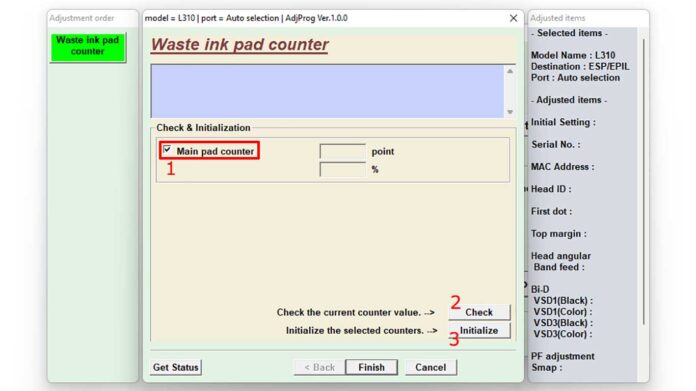
Is the "Service Required" or "Ink Pad Full" error stopping your Epson WorkForce printer in its tracks? Regain control with the official adjustment program. The Epson WF-7210 WF-7710 WF-7715 WF-7720 Resetter software is the definitive tool for technicians and professionals to reset the waste ink counter and clear these critical errors, restoring your printer to full working order without a costly service call.
This specialized maintenance program provides a targeted solution for Epson's popular WorkForce series. It resets the internal maintenance counter, which tracks waste ink absorption. When this counter reaches its limit, the printer locks down. Using this software, you can reset it to zero, clear the error, and extend your printer's operational life significantly.
What This Epson Resetter Software Delivers
This package goes beyond a simple reset. It offers a complete diagnostic and maintenance utility designed for reliability and ease of use in 2024.
- Complete Error Clearance: Permanently removes "Service Required," "Parts Life Over," and "Ink Pad Full" warnings.
- Precision Counter Management: Resets the waste ink counter to its default state, allowing continued printer use.
- Professional-Grade Tool: Enables advanced diagnostics and maintenance typically performed by certified technicians.
- Cost Savings: Avoids expensive repairs or premature printer replacement by managing maintenance yourself.
- Extended Hardware Life: Maximizes the return on your printer investment through proper care.
Key Features and Compatibility
Engineered for performance, this adjustment program supports a range of models and modern systems.
- Wide Model Support: Fully compatible with the Epson WorkForce WF-7210, WF-7710, WF-7715, and WF-7720.
- Modern System Ready: Optimized for stability on Windows 10 and the latest Windows 11 operating systems.
- User-Centric Design: Features a logical interface that guides both seasoned technicians and proficient users.
- Integrated Diagnostics: Can read printer status and error history for informed troubleshooting.
Download and Installation Guide
Follow these steps to successfully download and use the adjustment program for Epson WF-7210, WF-7710, WF-7715, and WF-7720 printers.
- Download the File: Use the download manager on this page to get the archive.
- Prepare Your System: Ensure you have WinRAR or 7-Zip installed to extract the .rar file.
- Extract the Software: Right-click the downloaded archive and select "Extract Here." You will need the password below.
- Run the Program: Temporarily disable your antivirus (as a precaution, it may flag the tool) and run the adjustment program as Administrator.
- Follow On-Screen Steps: Connect your printer via USB and follow the precise instructions within the software.
Critical File Information
Before proceeding, please note these essential details about the download package.
- File Name:
Epson WF-7210 WF-7710 WF-7715 WF-7720 Resetter.rar - Extraction Tool Required: WinRAR or 7-Zip.
⚠️ File Password Required
The password to open the .rar file is: bmin
You must enter this password to extract and access the adjustment program software.
Important Usage Disclaimer
This software is intended for legitimate maintenance of your own Epson WorkForce printer. Use it responsibly and at your own risk. The process should not be interrupted, and ensuring a stable power and USB connection is crucial. Results can depend on your printer's specific condition and usage history.
Pro Tip: For optimal results, run the adjustment program on a primary computer with a direct USB connection. Avoid using USB hubs or virtual machines to prevent communication errors during the reset process.
By downloading this Epson WF-7210, WF-7710, WF-7715, and WF-7720 adjustment program, you are choosing a professional solution to a common printer problem. Restore functionality, bypass service mode, and get back to high-quality printing without delay.
Ready to fix your printer? Click the download button to get the complete resetter package now.
By downloading files from bardimin.com, you agree that:
- Files are obtained from the internet, and copyrights remain with their respective owners.
- Files are for educational, reference, and personal use only.
- bardimin.com does not guarantee that files are free from viruses or malware.
- Any risks, damages, or legal claims arising from the use of files are the sole responsibility of the user.
- bardimin.com is released from any and all claims or liabilities.
If you do not agree, please do not download the file.
