

Do you hear a repetitive clicking sound from the UPS connected to an electronic device? This sound can raise the question, is this normal or a sign of a problem? Many UPS users are worried about the functionality of their devices.
UPS (Uninterruptible Power Supply) protects electronic devices from electrical disturbances, such as sudden blackouts or voltage surges. However, a strange clicking sound could be a sign of a problem with the power, load, or components inside.
Bardimin will provide a complete guide to understanding the cause of the clicking sound from UPS and steps to address it safely. By knowing the cause, you can prevent further damage to your UPS and connected devices and learn how to maintain it to keep it functioning optimally.
Since UPS is directly related to high voltages, it is important to handle the problem carefully. Otherwise, it may cause power interruption, risk of short circuit, or fire. Make sure you follow the steps in this article to maintain the safety and optimal performance of your UPS.
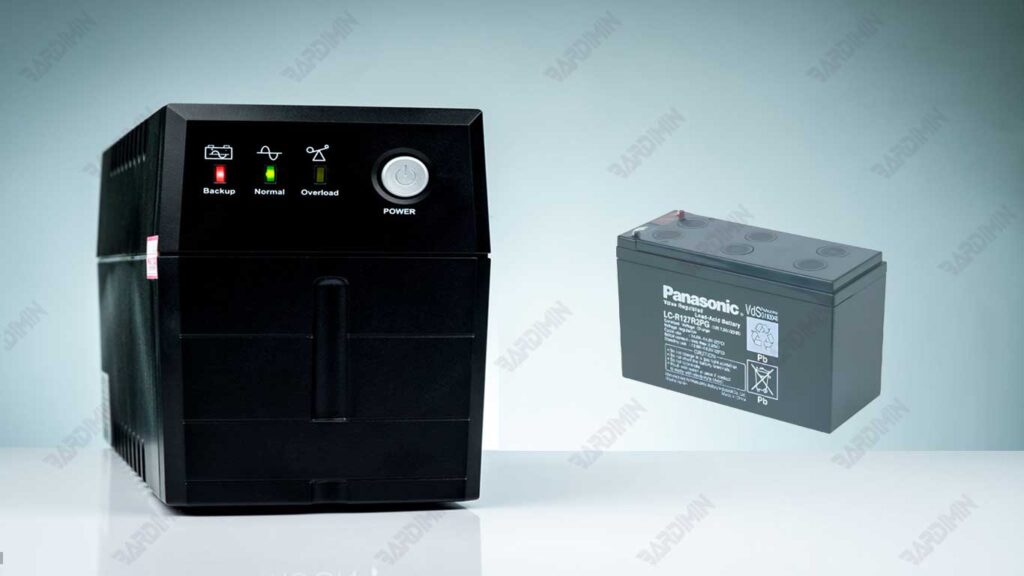
Is the “Click” Sound on UPS Dangerous?
A “click” sound on a UPS is a sound that comes from the inside of a device, such as a relay or switch, as the UPS moves between the main power source and the battery. This sound can be heard periodically or continuously, depending on the UPS condition.
Technically, this sound occurs due to mechanical movement inside the UPS. When the main power supply is interrupted, or the voltage is unstable, the UPS will automatically switch to battery mode. This process involves electronic components such as relays that open and close circuits, resulting in a distinctive “click” sound.
However, not all “click” sounds have the same meaning. Sometimes, this sound is normal and is part of the UPS function. However, if this sound appears too often or is accompanied by other issues, such as a UPS that is completely shut down or unable to store power, this could be an indication of a serious problem that needs to be checked immediately.
Causes of Your UPS Making a Click Sound
A clicking sound on the UPS often indicates a problem. While sometimes this sound is normal, such as when the UPS switches modes, it often signals a problem that needs to be fixed immediately. Quickly knowing the cause of the clicking sound can prevent further damage and maintain the performance of your UPS.
Clicking sounds are usually not common, especially if they occur continuously or are accompanied by other symptoms, such as a UPS that is completely shut down or unable to store power. It is important to find out the cause immediately before the problem gets worse.
Common Causes of Click Sound on UPS:
1. Switching of Operating Modes
The UPS is designed to switch between the main power source and the battery in the event of a fault. This process involves internal components such as relays that open and close circuits, resulting in a clicking sound.
When the power goes out, the UPS will automatically switch to battery power, which may produce a clicking sound.
2. Relay Displacement
The relay is an important component in a UPS that serves to divert power from the main power source to the battery. The mechanical movement of the relay is what often causes a clicking sound.
Relays are used to enable or disable certain features, such as mode switching or overload protection.
3. Overload
Overload occurs when too many devices are connected to the UPS, exceeding its capacity. The UPS will attempt to protect itself by disconnecting the circuit, which may result in a clicking sound as a warning.
If you connect too many devices to the UPS, this can cause overload and trigger a clicking sound.
4. Low or Damaged Battery
A battery that is not working properly can interfere with the performance of the UPS. When the UPS tries to charge a damaged battery, a repetitive “click” sound may appear.
An aging battery may not be able to store energy properly, so the UPS is constantly trying to charge and make a clicking sound.
5. Other Internal Issues
Some of the problems in the UPS that can cause clicking sounds include:
- Damage to components such as capacitors, transformers, or circuit boards.
- Loose cables or poor connections inside the UPS.
- Dust or debris build-up inside the UPS.
Simple Diagnostic Flowchart
Here’s a simple flowchart to help you identify the cause of the clicking sound on the UPS:
Does a clicking sound occur when the power goes out?
   ├── Yes: This is most likely due to a change in operating mode or relay switching.
   └── No:
       ├── Does the UPS indicate an overload?
       │   ├── Yes: Reduce the load on the UPS.
       │   └── No:
       │       ├── Has the UPS battery not been replaced for a long time?
       │       │   ├── Yes: Replace the UPS battery.
       │       │   └── No: Inspect the internal components or take it to a qualified technician.
       └── Check the cables and internal connections of the UPS.
How to Fix Clicking Sound on UPS (Troubleshooting Steps)
A clicking sound on the UPS can be an indication of a problem that needs to be addressed immediately. Here are troubleshooting steps you can take to find and address the cause of the sound.
Step 1: Find the Source of the Click Sound
- Try to figure out where the click is coming from. Is it from the back, side, or inside the UPS?
- Note whether or not the clicking sound appears regularly. For example, does this sound appear whenever the power goes out or when the UPS is charging?
- Note when the click appears. Is it when the power is off, when charging, or when the UPS is functioning normally?
Step 2: Check the Load on the UPS
- Ensure that the total power from the connected device does not exceed the UPS’s capacity. This information is on the UPS specification label.
- If the load is too heavy, reduce the number of connected devices.
- To find out how much power each device uses, you can use a power meter. This helps ensure the load does not exceed the capacity of the UPS.
Step 3: Perform UPS Calibration
Some types of UPS have calibration features that can reduce how often mode switching occurs.
If your UPS has this feature, perform the calibration according to the instructions in the user manual. This can help reduce the “clicking” sound that occurs due to too frequent mode switching.
Step 4: Check the Battery Condition
- UPS batteries typically last 3-5 years. If it has passed its useful life, immediately replace it with a new one.
- See if there is any physical damage to the battery, such as leakage or swelling.
- Use a measuring device to check the battery voltage. If the voltage is below the specification, the battery may need to be replaced.
Step 5: Check the Cable and Terminal Connections
- Make sure all cables are properly installed and secure. Check for any loose or damaged cables.
- If there is any corrosion in the battery terminals, clean them with a small brush and a safe cleaning solution.
Step 6: Clean the UPS
- Make sure the UPS is off and unplugged from the power source before cleaning.
- Use a vacuum cleaner or soft brush to remove dust and debris inside the UPS. Make sure that no foreign objects enter the UPS.
Step 7: Contact an Expert Technician
If the above steps do not resolve the issue, it is best to contact an expert technician who is experienced in UPS repair. Explain to the technician any symptoms, including any clicks you hear. The technician will be able to perform further checks and fix any issues that may not be visible to you.
Conclusion
A “click” sound on the UPS (Uninterruptible Power Supply) can be a sign of a normal change in operating mode, but it can also indicate a problem, such as a low battery, overload, or damage to internal components.
If this sound only appears occasionally and corresponds to a change in power source, it is most likely part of the normal functioning of the UPS. However, if the clicks occur continuously, with overload warnings, or the UPS is not working properly, then further checks are necessary to find and resolve the problem.
By understanding the causes of clicking sounds and performing regular maintenance, you can ensure that your UPS is functioning properly, extending its lifespan, and protecting your electronic devices from unexpected electrical disturbances. If the clicking sound continues for no apparent reason, consider replacing the UPS battery or consulting a professional technician to keep the power system safe and reliable.
