

Gii is a web-based code generator within the Yii2 framework that accelerates development. This article provides an up-to-date technical guide to implementing a single-page CRUD system using the AjaxCrud extension, an ideal solution for applications requiring high interactivity.
Gii for Yii2 is an essential development tool. By default, Gii provides generators for models, forms, controllers, and conventional CRUD operations. However, Gii’s default template runs each CRUD action on a separate page. For modern developers prioritizing user experience, implementing single-page CRUD with Ajax is the solution.
To meet this need, the yii2-ajaxcrud extension by Johnitvn serves as the answer. This extension allows all operations—create, view, edit, delete—to run within a modal dialog on a single view without page reload. Below are the updated implementation steps.
Steps to Implement Single-Page CRUD in Yii2
Ensure your Yii2 development environment (advanced or basic) is active. Then, carefully follow these technical procedures.
1. Install the AjaxCrud Extension
Install the extension via Composer. Run the following command in your terminal within the project directory:
composer require johnitvn/yii2-ajaxcrud "~2.0"2. Handle Icon Assets (Font Awesome)
The extension requires Font Awesome. You can use the yii2-icons package from Kartik. Add the following line to your composer.json file:
"kartik-v/yii2-icons": "*"Then run composer update. An alternative is to include Font Awesome via CDN in your main project layout.
3. Verify the Menu in Gii
Access Gii through your browser (e.g., http://localhost/project/web/index.php?r=gii). If the installation is successful, a new option named “Ajax CRUD Generator” will appear.

4. Create a Model from a Table
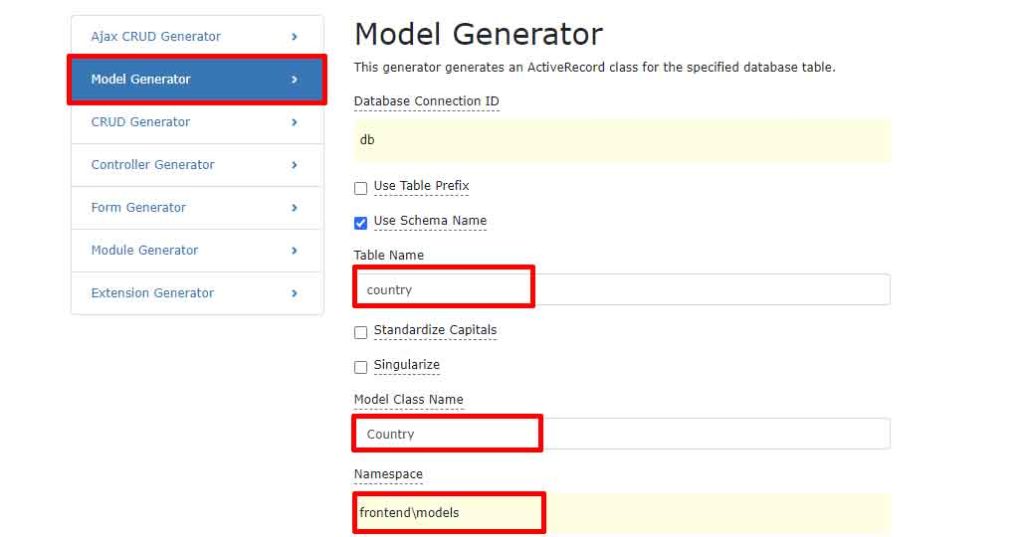
Create a model class using the standard Model Generator. For example, create a Country model from the country table in your database.
5. Generate CRUD with the Ajax CRUD Generator
Select the “Ajax CRUD Generator” menu. Fill in the form with the Model Class (e.g., app\models\Country) and Controller Class (e.g., app\controllers\CountryController). Then, preview and generate.

6. Initial Testing and Problem Identification
Access the created controller (e.g., http://localhost/project/web/index.php?r=country). A data grid will appear, but action buttons may not work optimally due to icon assets.
7. Register Font Awesome Assets
Edit the generated index view file (typically at views/country/index.php). Add the following code at the top after the use statements:
use kartik\icons\FontAwesomeAsset;
FontAwesomeAsset::register($this);
8. Final Verification
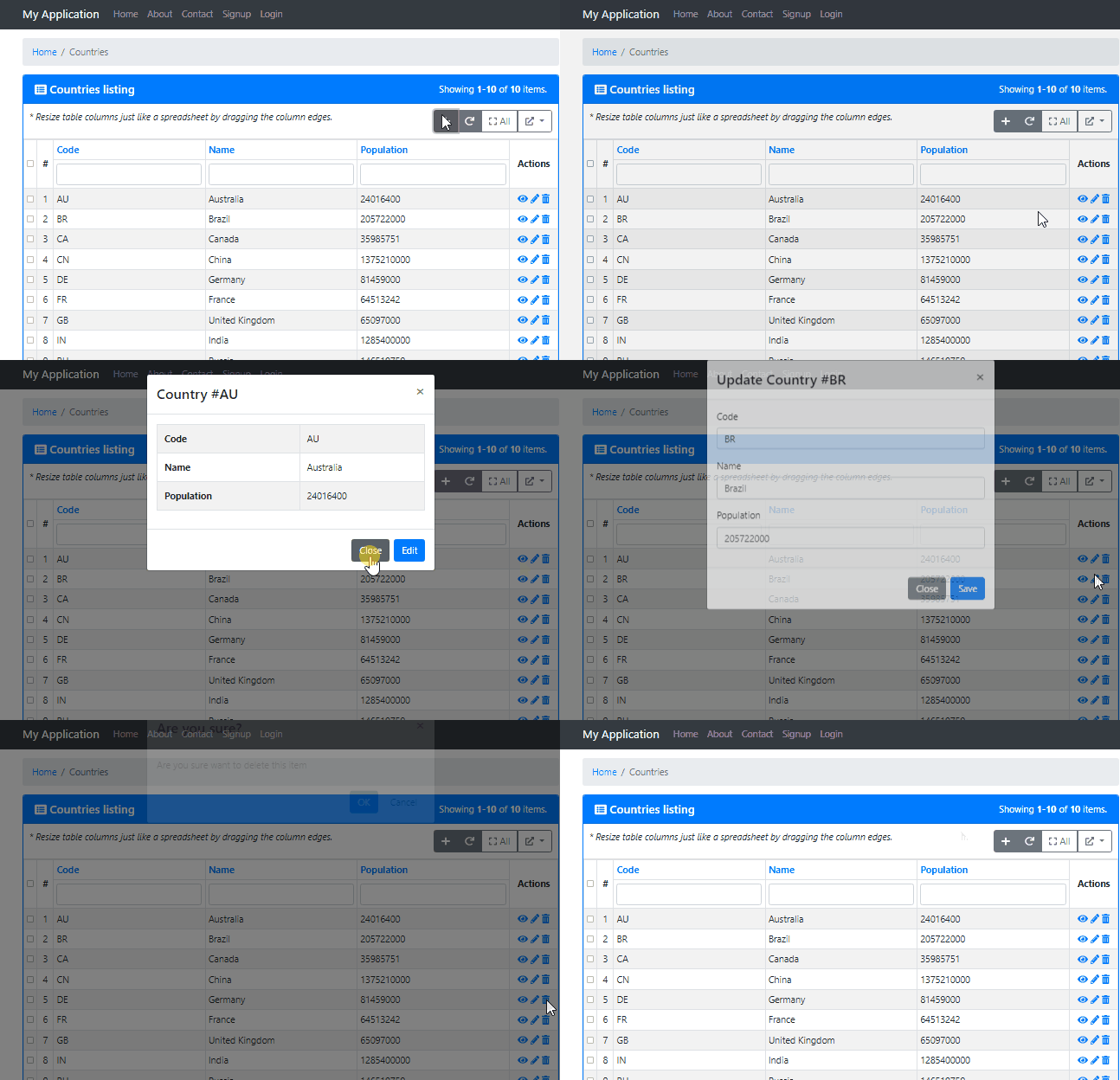
Reload the CRUD page. Now, the Create, Update, View, and Delete features will appear in Ajax modal dialogs. This process is fast and occurs without leaving the main page, providing a smoother user experience. This is a key advantage of single-page CRUD.
Conclusion and Development Recommendations
The combination of Gii Yii2 and the AjaxCrud extension yields a highly efficient development solution. This single-page CRUD implementation is suitable for admin dashboards and applications requiring real-time interaction. Always refer to the extension’s official documentation for further configuration. Additionally, ensure thorough testing in a staging environment before deployment to production.
By following this guide, developers can create responsive and modern data management interfaces. This approach fully leverages the speed of Gii and the agility of Ajax technology for a superior user experince.
