

Network sniffers enable professionals, technicians, and gamers to monitor internet traffic in real time, uncover hidden connections, and analyze protocols for security and bandwidth optimization. This article reviews three top tools—URLSnooper, HTTPNetworkSniffer, and Wireshark—with technical guidance on their usage.
In today’s digital landscape, nearly every application on your device communicates over the network, whether for updates, tracking, or data transmission. Unfortunately, not all of this activity is visible on the surface. Many background processes access the internet without your knowledge, potentially leaking personal data or slowing down your connection. Therefore, the ability to monitor network traffic is an essential skill, especially for IT professionals, network technicians, and gamers who demand low latency.
By using a network sniffer, you can capture data packets, view accessed URLs, analyze protocols, and even detect suspicious activity. Some tools even come in portable versions that require no installation. Below are three free network monitoring applications you can use, complete with their strengths, weaknesses, and download links.
1. URLSnooper: Capturing Streaming Media URLs
URLSnooper is a popular tool designed to uncover hidden URLs from network traffic, especially streaming media URLs. Developed by DonationCoder, it comes in both installer and portable versions. However, for the portable version, you must manually install the WinPcap driver to capture packets.
By default, URLSnooper identifies potential URLs by monitoring all data streams. This tool is particularly useful for extracting video or audio links from streaming services that do not provide direct links. To maximize its functionality, you need to enable Advanced Mode via File > Advanced Mode. Then, under Protocol Filter, select Show All to monitor all protocols.
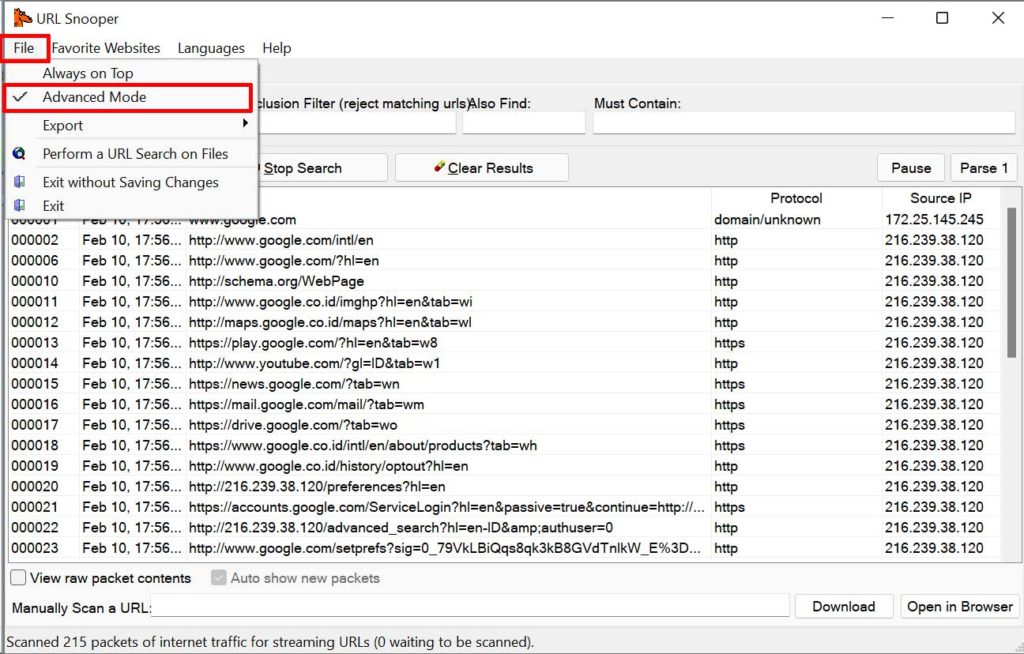
After configuration, URLSnooper will display all HTTP requests sent from your computer. Information such as host, URL path, HTTP method, and content size can be viewed in a table. However, URLSnooper’s main drawback is its lack of support for HTTPS, so it only captures unencrypted connections. Additionally, the tool is rarely updated, which may lead to compatibility issues with modern operating systems.
Download URLSnooper: DonationCoder Official Site (installer and portable versions).
2. HTTPNetworkSniffer: Lightweight Sniffer for HTTP Traffic
HTTPNetworkSniffer is a lightweight packet sniffer from NirSoft that specializes in capturing HTTP traffic. It works by intercepting all requests and responses between your browser and web servers, then displaying them in a simple table. The information provided includes host name, HTTP method (GET, POST), URL path, user agent, response code, content type, referer, cookies, and more.
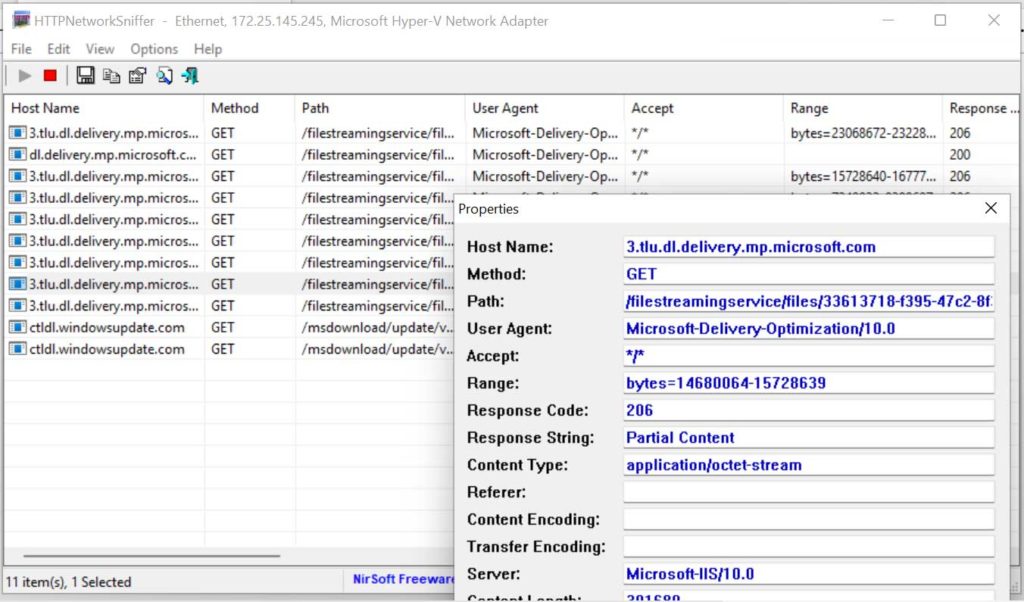
The main advantages of HTTPNetworkSniffer are its small size, portability (no installation required), and intuitive interface. However, it has a fundamental limitation: it cannot capture data from secure websites (HTTPS). Today, almost all websites use HTTPS encryption, making HTTPNetworkSniffer useful only for HTTP traffic, which is increasingly rare. To use it, you still need the WinPcap or Npcap driver installed on your system.
Despite this, the tool remains relevant for analyzing legacy applications or IoT devices that still rely on HTTP. For technicians wanting to quickly monitor internal connections on a local network, HTTPNetworkSniffer can be a convenient choice.
Download HTTPNetworkSniffer: NirSoft Official (free, portable).
3. Wireshark: Professional Network Sniffer for All Protocols
If you need a more advanced tool, Wireshark is the industry standard for network protocol analysis. Wireshark can capture traffic from nearly every protocol, including HTTP, HTTPS, TCP, UDP, DNS, and thousands of others. It supports HTTPS decryption if you have the private key and comes with powerful filtering capabilities to isolate specific packets.
Wireshark captures and analyzes thousands of protocols, making it the go-to choice for network professionals.
Wireshark is available for Windows, macOS, and Linux. In addition to the installer version, there is a portable edition that can run from a USB drive. It uses the Npcap driver (the successor to WinPcap) for packet capture on Windows. Its feature-rich interface displays every packet in detail, including headers, payload, and timestamps.

For gamers, Wireshark can be used to analyze latency and detect packet loss. Technicians can leverage it to troubleshoot connectivity issues or identify security vulnerabilities. However, its learning curve is steep due to the abundance of features. Fortunately, extensive official documentation and an active community are available to help.
Download Wireshark: Wireshark Official Site (free, open source).
Quick Comparison of the Three Network Sniffers
- URLSnooper: Ideal for finding streaming URLs, but outdated and lacks HTTPS support.
- HTTPNetworkSniffer: Lightweight and portable, yet only handles HTTP (insecure).
- Wireshark: Most comprehensive, supports thousands of protocols, including HTTPS (with conditions).
Thus, the choice of tool depends on your specific needs. If you only want to extract video URLs from non-HTTPS sites, URLSnooper may still suffice. For quick analysis in an HTTP environment, HTTPNetworkSniffer is handy. However, for serious professional work, Wireshark is the answer.
Tips for Choosing and Using a Network Sniffer
Here are some technical considerations before selecting a sniffer:
- Security: Ensure you only monitor networks you are authorized to inspect. Using a sniffer on someone else’s network without permission may violate laws.
- Performance: Sniffers can strain your CPU and storage if they capture all packets. Use filters to limit data collection.
- Privacy: HTTPS encrypts content, so sniffers only see metadata (host, IP addresses). To inspect payload, you need decryption with proper authorization.
Additionally, for Windows users, make sure to install the Npcap or WinPcap driver to enable packet capture. These drivers are free and are often included with the installer of many tools.
Therefore, a basic understanding of the OSI model and network protocols will greatly help in interpreting sniffer output. Beginners are advised to start with a simple tool like HTTPNetworkSniffer and then progress to Wireshark as their needs grow.
Conclusion
Monitoring internet traffic is no longer an exclusive activity for network administrators. With tools like URLSnooper, HTTPNetworkSniffer, and Wireshark, anyone can see which applications access the internet, detect suspicious behavior, and even optimize their connection. Choose the tool that matches your expertise and technical requirements. Always keep your packet capture drivers up to date and use sniffers ethically.
By mastering netwerk sniffers, you not only enhance your data security but also gain full control over the digital traffic on your devices.
