

NAT (Network Address Translation) is a mechanism that allows devices with private IP addresses to connect to public networks, such as the Internet. The existence of NAT is crucial in contemporary networks given the limited number of public IP addresses, while the demand for internet-connected devices is constantly increasing.
NAT works by translating private IP addresses into public IP addresses so that devices in a private network can access the Internet without needing their respective public IP addresses. Thus, NAT becomes an efficient solution for using IP addresses and protects private networks from direct access by outsiders.
Main Purpose of NAT
NAT hides a device’s private IP address from external networks, thus increasing protection against potential threats.
By hiding the network’s internal structure, NAT helps reduce the likelihood of direct attacks on devices.
2. Efficiency in the Use of IP Addresses
NAT allows multiple devices to share one or more public IP addresses, thus reducing the need for limited public IP addresses. This is very useful in dealing with the limitations of IPv4 addresses.
3. Ease in Network Administration
NAT provides flexibility in network management as it does not rely entirely on ISPs for IP allocation.
Administrators can easily manage private networks without publishing each device to the internet.
Types of NAT
1. Static NAT
Static NAT is a network address translation method where one private IP address is always translated into one specific public IP address. In Static NAT, the relationship between a private IP address and a public IP address is permanent, which means it does not change over time.
Static NAT is commonly used on devices that require direct access from a public network, such as web servers, email servers, or other devices that require an IP address that can be accessed from the outside.
Examples of Use on Internal Servers
For example, a company has an internal server with a private IP address 192.168.11.10. These servers need to be accessed by users from the internet. Using Static NAT, network administrators can configure the public IP address 203.0.113.10 to always be connected to the private IP address 192.168.11.10.
This allows the server to remain accessible from the internet using a public IP address without having to disclose its private IP address.
Advantages of Static NAT
Static NAT provides a consistent public IP address to devices on a private network, making it easy to manage network access.
Since public IP addresses are fixed, Static NAT simplifies the registration process in DNS. For example, the www.contohperusahaan.com domain name can be associated with a server’s public IP address via DNS.
With permanent linkage, devices such as servers can be accessed at any time without the need to change the IP address configuration.
Static NAT is an ideal solution for network devices that require direct connectivity to the internet while maintaining the security of the internal network structure.
2. Dynamic NAT
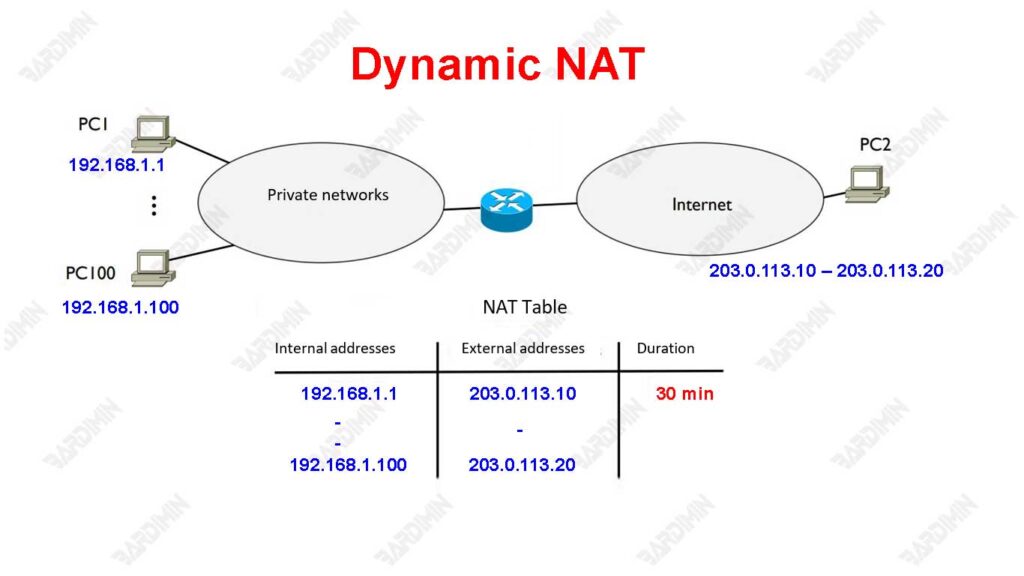
Dynamic NAT is a method of network address translation in which a private IP address is dynamically translated into one of the available public IP addresses from a predefined range. Unlike Static NAT, Dynamic NAT does not permanently associate between private and public IP addresses. In contrast, devices in a private network will temporarily obtain a public IP address only when needed, such as when the device is attempting to access the internet.
Example Scenario: Client Connection with a Private Address to the Internet
Suppose a small office has a network with multiple devices that each have a private IP address, such as 192.168.11.2, 192.168.11.3, and so on. The routers on that network have been configured with Dynamic NAT and have a range of available public IP addresses, for example, 203.0..113.10 – 203.0.113.20.
When one of the devices, e.g. 192.168.11.2, attempts to access the internet, the router will dynamically assign one of the public IP addresses of the available range, e.g. 203.0.1113.10, to be used during the connection session. The address will be released once the connection is complete so that it can be used by other devices.
Advantages of Dynamic NAT
Dynamic NAT allows multiple devices on a private network to share a small range of public IP addresses. This is very efficient, especially if only a small number of devices require internet access at the same time.
By provisioning public IP addresses temporarily, Dynamic NAT helps overcome the limitations of IPv4 addresses by utilizing public addresses interchangeably.
Dynamic NAT is ideal for networks with many client devices that rarely access the internet at the same time, such as in a small office or home network.
3. NAT Overloading (PAT)
NAT Overloading, also known as PAT (Port Address Translation), is a network address translation technique that allows several devices in a private network to use a single public IP address to access the internet.
Unlike Static or Dynamic NAT, NAT Overloading utilizes port numbers as identification. Each private device connected to the internet will be assigned a unique port, which is connected by a single public IP address.
With this method, the router can recognize the device that is communicating based on a combination of public IP address and port number. This makes NAT Overloading very efficient, especially on networks that have multiple devices but only have one or more public IP addresses.
How One Public IP Can Serve Multiple Private Devices Using Ports
For example, a private network has multiple devices with private IP addresses, such as:
- 192.168.1.2
- 192.168.1.3
- 192.168.1.4
The network has only one public IP address, for example, 203.0.113.1. Using NAT Overloading, the router will perform the following translations:
- The device 192.168.11.2 sends a request to the internet. The router will change its IP address to 203.0.113.1112345, where 12345 is a unique port number.
- The 192.168.11.3 device also sends a request, and the router changes it to 203.0.1113.1:12346, with a different port number.
- Likewise with the device 192.168.11.4, which translates to 203.0.113.1:12347.
When a reply from the internet is received, the router will use the port number to determine which devices in the private network are supposed to receive the data.
Benefits of NAT Overloading (PAT)
By utilizing a single public IP address for several devices, NAT Overloading contributes to saving limited IP address resources.
It is ideal for networks that have multiple devices that require internet access at the same time, such as on a home or small office network.
Devices in a private network remain invisible to the internet because only public IP addresses are exposed, thus increasing protection against possible attacks.
Through NAT Overloading, networks can effectively manage internet connectivity for various devices without the need to use multiple public IP addresses.
NAT Working Process
The NAT (Network Address Translation) process begins when a device in a local network that has a private IP address wants to connect to the Internet. When a request is sent, the router that manages the NAT translates the private IP address into a public IP address.
These routers are equipped with NAT tables that store information regarding the relationship between private and public IP addresses. When the request goes out, the router replaces the private IP address with the corresponding public IP address from the NAT table before sending the data packet to the internet.
How NAT Tables Work: Internal (Private) and External (Public) Columns
The NAT table on a router consists of several columns, including columns for internal (private) IP addresses and external (public) IP addresses. Whenever a translation is performed, the router records these relationships in a table. For example, if a device with the private IP address 192.168.1.10 sends a request to the internet, the router will log this relationship.
| Internal IP Address | External IP Address |
| 192.168.1.10 | 203.0.113.5 |
When a data packet arrives from the internet, the router utilizes the NAT table to convert the public IP address back to the appropriate private IP address and then sends that data to the appropriate device in the local network.
Case Study: Interaction between Devices on Private Networks and the Internet
Suppose there are two devices on the local network: PC1 with a private IP address of 192.168.1.2 and PC2 with a private IP address of 192.168.1.3. When PC1 attempts to access a website on the internet, here are the steps that occur:
- Request from PC1: PC1 sends a request to the website (e.g., www.example.com). This data packet has a source address of 192.168.1.2.
- Translation by Router: The router receives the packet and identifies that the source address is private. The router then replaces the source address with a predefined public address (for example, 203.0.113.5) and records the association in the NAT table.
- Delivery to the Internet: Translated data packets are now sent to the Internet with the source address 203.0.113.5.
- Replies from the Website: When a website provides a reply, it will be sent to the public address 203.0.113.5.
- Return to PC1: The router receives the reply and uses the NAT table to convert the public address 203.0.113.5 back to the private address 192.168.1.2 before sending the packet back to PC1.
In this way, devices in a private network can communicate with the internet even if they use a private IP address that cannot be recognized by external networks, thanks to a translation mechanism managed by the router through its NAT table.
Comparison of Static NAT and Dynamic NAT
| Aspects | Static NAT | Dynamic NAT |
| Superiority | – Public IP addresses are fixed. | – More efficient in the use of public IP addresses. |
| – Suitable for servers that require permanent access. | – Saves IP resources due to alternate use. | |
| – Easy to register to DNS. | – It is suitable for networks with many clients. | |
| Limitations | – Requires one public IP address for each private device. | – The device does not have a fixed public IP. |
| – Inefficient for large networks with multiple devices. | – Cannot be used for devices that need to be accessed from the internet. |
When to Use Static NAT and Dynamic NAT
1. Static NAT
It is implemented when a device in a private network requires a consistent public IP address.
Ideal for web servers, email servers, or other devices that require continuous access from the internet.
For example, a company has a server with a private IP address 192.168.1110 that it wants to access from the internet using a public IP address 203.0.113.10. Static NAT ensures that this connection is maintained.
2. Dynamic NAT
Used when many devices in a private network require access to the internet but do not require a fixed public IP address.
Suitable for clients who only communicate to the internet, such as the user’s computer in the office or IoT devices.
For example, a small office with a private network 192.168.11.0/24 takes advantage of the public IP range 203..0.113.10 – 203.0.113.20 to provide temporary access to their devices.
