A socket is the endpoint of two-way communication between two programs running on a network. Sockets allow applications to communicate with other applications on the same network or the internet. In the context of computer networking, sockets act as a link between the application layer and the transport layer, allowing data to be sent and received between the application and the network.
Sockets were first introduced in 1983 by Berkeley Software Distribution (BSD) as part of the Unix operating system. This development allowed Unix to become more flexible in network communication, and this BSD socket model was later widely adopted by various other operating systems, including Linux and Windows.
Over time, sockets have continued to evolve with the improvement of communication protocols and standards, supporting various modern networking technologies such as IPv6, and becoming an important foundation in the development of network applications.
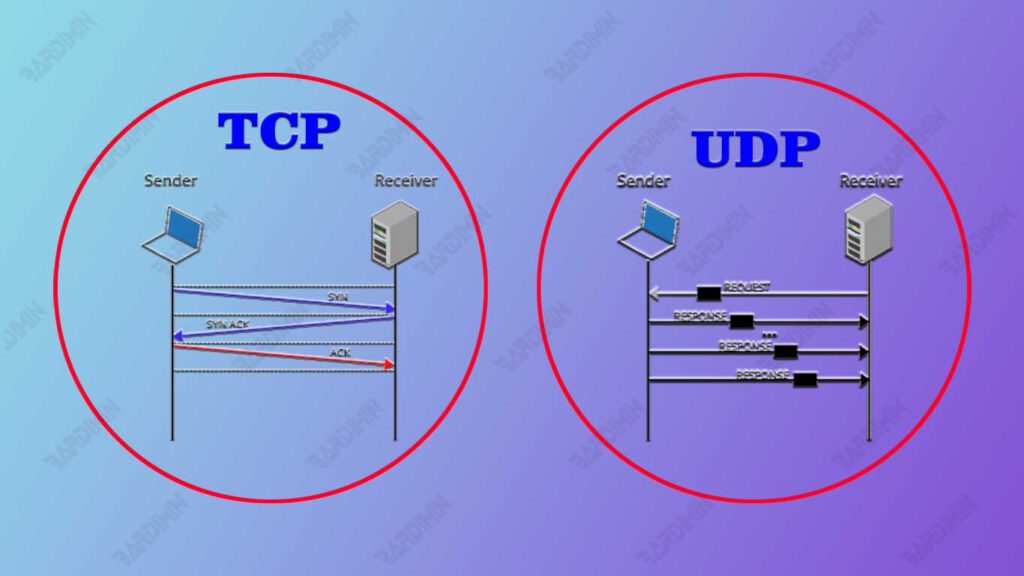
Understanding the differences between Socket Stream (TCP), Datagram Socket (UDP), Raw Socket, and Sequential Packet Sockets allows developers to choose the right type of socket for their applications, improving the efficiency, reliability, and security of network communications. In addition, this knowledge also helps in troubleshooting network problems and optimizing application performance.
Types of Sockets
Socket Stream (TCP)
Socket Stream (TCP) is a type of socket that uses the Transmission Control Protocol (TCP) protocol for data communication. TCP is a connection-oriented protocol that provides reliable and sequential communication between two endpoints.
Socket Stream allows applications to send and receive an orderly, error-free stream of bytes. The data sent through the Socket Stream is broken down into small segments, transmitted, and then reassembled at the destination in the correct order.
Socket Stream is used when an application requires reliable communication and the order is maintained. Because TCP guarantees error-free and correct ordering of data, Socket Stream is suitable for applications such as:
- Web Browsers: Downloading web pages from a server.
- Email Clients: Send and receive emails via protocols such as SMTP, IMAP, and POP3.
- File Transfer: Sending and receiving files using the FTP protocol.
- Audio/Video Streaming: Transfers streaming data that requires the right sequence of data.
The use of Socket Stream ensures that all data sent will arrive at its destination in the correct order and without data loss.
Socket Datagram (UDP)
Datagram Socket (UDP) is a type of socket that uses the User Datagram Protocol (UDP) protocol for data communication. UDP is a connectionless protocol that does not guarantee reliable transmission and data sequences. Unlike TCP, UDP sends data packets (known as datagrams) without ensuring that they are received by the destination or arrive in the order they are sent. This makes UDP faster but less reliable than TCP.
Datagram sockets are used when speed is more important than reliability and when losing some data packets is not a big deal. Because UDP does not require connection formation and does not perform fault control, it has lower latency and is more efficient for certain applications. Datagram Sockets are suitable for applications such as:
- Streaming Media: Delivers audio or video that can tolerate little data loss.
- VoIP (Voice over IP): Voice communication over the internet that requires low latency.
- Online Gaming: A game that requires quick response and can tolerate occasional data loss.
- Broadcast and Multicast: Transmit data to multiple receivers at the same time.
The use of Datagram Sockets is ideal for situations where speed and efficiency are more important than reliability and perfect data sequences.
Raw Socket
Raw Sockets are a type of socket that allows applications to access lower-layer protocols directly, such as Internet Protocol (IP), without going through layer transport protocols such as TCP or UDP.
With Raw Sockets, developers can create and read network packets with custom protocol headers, providing complete control over how data is sent and received. This is different from Socket Stream (TCP) and Socket Datagram (UDP), which hide network protocol details from users.
Raw Sockets are used in situations where full control over protocol headers is required, such as:
- New Protocol Development: Testing and developing new network protocols.
- Network Monitoring and Analysis: Collects and analyzes network traffic for security or performance purposes.
- Penetration Testing and Ethical Hacking: Identifying and exploiting weaknesses in network protocols.
- Network Diagnostic Tools: Create tools such as ping and traceroute that require direct access to the IP layer.
Because Raw Sockets allow for more in-depth manipulation of network packets, their use typically requires administrative privileges or root in many operating systems.
Socket Sequential Packet
A Sequential Packet socket is a type of socket that provides a stream of data in the form of sequential packets, ensuring that data is received in the same order in which it was sent. Socket Sequential Packet is commonly used with the Sequenced Packet Exchange (SPX) protocol in Novell NetWare networks, although the concept is also applied in several other protocols that require data sequencing.
Sequential Packet Sockets offer several advantages, especially in situations where sorting and data integrity are critical. The main advantages of using Socket Sequential Packet include:
- Reliability: Data is sent and received in the right order, ensuring consistency and integrity of information.
- Ease of Use: Developers don’t need to set the order of packets themselves, as the underlying protocol handles this automatically.
- Specific Use: Suitable for applications that require sequential data delivery such as network management protocols and some transactional applications that require a guaranteed sequence of data.
Network Protocols Used
TCP/IP Protocol
TCP/IP (Transmission Control Protocol/Internet Protocol) is a set of communication protocols used to connect devices on a network and the Internet. TCP/IP consists of two main protocols:
- Transmission Control Protocol (TCP): A connection-oriented protocol that ensures data is transmitted reliably and sequentially between the sender and receiver.
- Internet Protocol (IP): A connectionless protocol that is responsible for routing data packets from source to destination over complex networks.
Sockets serve as interfaces for using these protocols in applications. Socket Stream uses TCP for reliable communication, while Socket Datagram uses UDP for fast but less reliable communication.
Role in Network Communication
TCP/IP plays an important role in network communication for several reasons:
- Reliability: TCP provides an error control mechanism and ensures that data is received in the correct order without data loss.
- Flexibility: TCP/IP can be used in many different types of networks, including local area networks (LANs) and wide networks (WANs).
- Compatibility: TCP/IP is the de facto standard for network communication, which means that almost all devices and operating systems support it.
- Scalability: TCP/IP is designed to support networks of all sizes, from small networks to the global internet.
TCP/IP is often used with Socket Stream because this combination provides reliable and orderly communication, which is essential for many applications such as web browsing, email, and file transfer.
UDP protocol
UDP (User Datagram Protocol) is a communication protocol that is part of the TCP/IP protocol family. UDP is a connectionless protocol that allows the delivery of data packets (known as datagrams) without any guarantee of reliable delivery or correct sequence of data. Datagram sockets use UDP for fast and efficient data communication.
Differences with TCP/IP
Advantages of using UDP:
- Speed: Because there is no overhead for connection control or packet sequencing, UDP is faster than TCP.
- Low Latency: UDP has lower latency because it does not require connection settings before data can be sent.
- Efficiency: UDP is more efficient for applications that can tolerate the loss of multiple data packets, such as media streaming and online games.
Disadvantages of using UDP:
- Unreliable: UDP does not guarantee data transmission. Data packets can be lost or arrive in the wrong order.
- No Flow Control: UDP does not have a flow control mechanism to avoid overloading the network.
- No Error Recovery: UDP does not have a mechanism to detect and correct errors in data transmission.
UDP is suitable for applications that require high speeds and can tolerate some data loss, while TCP is more suitable for applications that require reliability and precise data sequences.
Socket Stream (TCP) vs. Socket Datagram (UDP)
Socket Stream (TCP) and Socket Datagram (UDP) have different characteristics that make them more suitable for different situations. Choosing between speed and reliability depends on the specific needs of the application or service being developed.
Socket Stream (TCP)
Reliability:
- Sequential Delivery: TCP guarantees that data will be received in the same order as it was sent.
- Error Control: TCP has a mechanism for detecting and correcting transmission errors.
- Flow Control: TCP manages the flow of data between the sender and receiver to prevent network overload.
- Handshaking: TCP requires a three-way process (three-way handshake) to establish a connection before data can be transmitted, ensuring that the connection is stable before communication takes place.
When to Choose TCP (Socket Stream):
- Web Applications: HTTP and HTTPS use TCP to ensure the delivery of complete and sequential web documents.
- Email: Protocols such as SMTP, IMAP, and POP3 use TCP to ensure that email messages are sent and received correctly.
- File Transfer: The FTP and SFTP protocols use TCP to ensure that files are transferred without errors.
- Transaction Applications: Banking systems and financial transactions use TCP to ensure that transaction data is not lost or corrupted.
Socket Datagram (UDP)
Speed:
- No Connection: UDP doesn’t require a connection process like TCP, making it faster.
- No Delivery Guarantee: UDP does not guarantee reliable or sequential delivery, so it has lower latency.
- Efficiency: UDP is more efficient in terms of resource usage because there is no overhead for error control and sequencing.
When to choose UDP (Socket Datagram):
- Streaming Media: Applications such as streaming video and online radio use UDP to send data continuously with low latency, although some data packets may be lost.
- Online Gaming: Online games often use UDP for fast communication between the server and the client, as losing some data packets doesn’t affect the gaming experience as much.
- VoIP (Voice over IP): Internet telephony applications use UDP to send voice data with low latency, as a little data loss doesn’t interrupt the conversation.
- Broadcast and Multicast: UDP is used to send data to multiple receivers simultaneously in a network.
Here is a simple comparison table between TCP and UDP:
| Feature | TCP (Socket Stream) | UDP (Socket Datagram) |
| Reliability | High (with fault control) | Low (no fault handling) |
| Sequential Delivery | Guaranteed | Not Guaranteed |
| Flow Control | Yes | Not |
| Speed | Slower due to fault control overhead | Faster without additional overhead |
| Latency | Higher | Lower |
| Use | Web browsing, email, file transfer, transaction | Streaming media, online gaming, VoIP, multicast |
Ease of Use: Which Type of Socket is Easier to Implement in a Given Project
TCP (Socket Stream) is easier to implement in projects that require reliability and orderly data delivery. Because TCP handles many aspects of error control and sequencing, developers don’t need to add a lot of additional code for these features.
UDP (Socket Datagram) is simpler in terms of protocol, but since there are no delivery or sequence guarantees, developers need to add additional mechanisms if the application requires reliability or sequencing. This can make UDP implementations more complex in scenarios that require reliability.
Conclusion:
- TCP: Easier to implement for applications that require reliability and data sequencing because many aspects are handled by the protocol.
- UDP: Easier to implement for applications that only require fast delivery without the need for reliability or data sequences.
Security Aspect: How Each Type of Socket Handles Security in Data Communication
TCP (Socket Stream):
- SSL/TLS: TCP can be easily integrated with security protocols such as SSL/TLS for end-to-end data encryption. This is important for applications such as online banking, email, and web browsing that require encryption to protect user data.
- Error Control: TCP error control also helps in detecting and mitigating attacks such as packets being changed in the middle of the way.
UDP (Socket Datagram):
- Lack of Built-in Encryption: UDP does not have a built-in mechanism for encryption or error control. To improve security, applications must implement additional protocols such as DTLS (Datagram Transport Layer Security) which is similar to SSL/TLS but designed for UDP.
- Vulnerability: Because UDP lacks flow control and fault control, it is more vulnerable to attacks such as spoofing, where attackers can send fake packets that appear to come from legitimate sources.
Conclusion:
- TCP: Easier to integrate with standard security protocols such as SSL/TLS, providing better reliability and security.
- UDP: Requires additional protocols such as DTLS to provide security, making its implementation more complex if security is a critical requirement.
Here is a simple comparison table between TCP and UDP from the perspective of ease of implementation and security:
| Aspects | TCP (Socket Stream) | UDP (Socket Datagram) |
| Ease of Implementation | Easier for applications that require reliability and data sequence | Simpler for applications that require speed without the need for reliability |
| Security | Easy to integrate with SSL/TLS | Requires additional protocols such as DTLS for security |
| Error Control | Provides built-in fault control | No built-in fault control |
| Use | Web apps, emails, file transfers, transactions | Streaming media, online gaming, VoIP, multicast |
Use of Sockets in Modern Web Applications
Sockets play a crucial role in modern web applications, especially in cases where real-time communication is required. Two types of sockets that are often used in the context of web applications are Socket Stream (TCP) and Socket Datagram (UDP). Here are some examples of implementations:
App Chat:
- Socket Stream (TCP) is often used for chat applications due to the need for reliable and sequential messaging. For example, chat apps like WhatsApp Web or Slack use TCP to ensure that each message sent arrives correctly and in the appropriate order.
- WebSocket is a TCP-based protocol that allows two-way communication between the client and server within a web application. WebSockets allow for real-time data updates without the need to refresh the page.
Video Streaming:
- UDP is often used for video streaming due to its ability to send data with low latency even though some packets may be lost. Protocols such as Real-time Transport Protocol (RTP) and Real-time Transport Control Protocol (RTCP) are often used on top of UDP for media streaming.
- Apps like YouTube and Netflix use adaptive streaming techniques that deliver video in chunks using UDP to reduce latency. Although UDP does not guarantee data delivery, it uses buffers to overcome packet loss.
Use of Sockets in Mobile Applications
Different types of sockets are also implemented in mobile applications, depending on the communication needs of the application:
Socket Stream (TCP):
- Used in mobile applications that require a stable and reliable connection, such as banking and email applications. A TCP connection ensures that data, such as financial transactions or email messages, is received in its entirety and the correct order.
Socket Datagram (UDP):
- Used in mobile applications that require fast communication with data loss tolerance, such as gaming and VoIP applications. UDP allows for low-latency data delivery, which is essential for a responsive user experience.
Examples of Deep Socket Uses in Industry
Telecommunications:
- Datagram Socket (UDP) is used in the telecommunications industry for applications such as VoIP and video conferencing. Protocols such as Session Initiation Protocol (SIP) and RTP are used on top of UDP to make voice and video calls in real time. The speed and low latency of UDP make it ideal for these applications, although there is some risk of packet loss.
- Applications such as Zoom and Skype use UDP for real-time transmission of voice and video data. They implement buffering techniques to handle the possibility of packet loss and ensure a smooth user experience.
Internet of Things (IoT):
- Socket Stream (TCP) and Socket Datagram (UDP) are used in IoT applications to connect various devices. TCP is used for communications that require reliability, such as sending sensor data to a central server. UDP is used for communications that require low latency, such as sending control data to devices within a local network.
- Home automation systems use TCP to control devices such as thermostats and door locks, ensuring commands are received correctly. UDP is used for applications that require real-time communication with sensors, such as security cameras and alarm systems.
Transportation Industry:
- In the transportation industry, Socket Datagram (UDP) is used for vehicle tracking systems and communication between vehicles and control centers. Low latency is important for real-time tracking systems, while lost data does not affect overall operations.
- GPS tracking systems in truck fleets use UDP to periodically transmit location data to the control center. This data is used to monitor the route and speed of the vehicle in real time.
Conclusion
In the world of network communication, understanding the different types of sockets and how they work is key to developing effective and efficient applications. By understanding the different types of sockets and their applications, developers and IT professionals can design and implement better solutions, improve system efficiency, and ensure an optimal user experience. Choosing the right type of socket according to the specific needs of the application is the key to success in network application development.