

“Why can’t many affordable PCs run the latest games? The answer lies in the integrated motherboard—a cost-effective solution that could be a problem!”
As the need for digital technology increases, many PC users, both at home and in the office, are attracted to a more economical solution: Integrated Motherboards. However, behind the benefits, some risks are often unrealized.
About 60% of PC users in the office don’t realize that their motherboards limit the ability to upgrade, including adding a GPU or improving overall system performance.
To better understand this, imagine buying a car with all the features already integrated, saving space and costs. However, when the main engine breaks down and cannot be replaced separately, the entire car must be repaired thoroughly or even replaced. This is a risk that Integrated Motherboard users often face.
This article from Bardimin will discuss in depth the advantages and disadvantages of using an Integrated Motherboard, as well as help you determine if this option is suitable for your computing needs, whether for work, study, or gaming. With the right understanding, you can make smarter decisions and avoid costly solutions that end up being expensive.
Revolution or Limitation? Integrated Motherboard
Integrated motherboards are the result of the need for computer systems that are efficient in terms of space use, cost, and ease of assembly. However, like the two sides of a coin, this integration also affects flexibility and long-term performance.
The Uniqueness of Integrated Motherboards
These motherboards are equipped with essential components that are permanently attached to the main printed circuit board (PCB):
- Onboard GPUs (such as Intel UHD Graphics or AMD Radeon Vega)
- Integrated audio and networking chips
- Fixed, irreversible I/O ports
These components are directly attached to the main PCB, reducing the need for additional expansion slots. These systems are perfect for light use but may limit performance and future upgrade options.
Examples of Integrated Motherboard Usage
Integrated motherboards are often used in devices that prioritize cost-efficiency and compact design. Here are some examples:
Office Laptops
- Example: Lenovo Ideapad 3 with AMD Radeon Vega Graphics.
- The laptop is designed for everyday productivity, such as document processing, browsing, and video streaming.
Mini PC
- Example: Intel NUC (Next Unit of Computing).
- These mini-PCs offer enough performance for light duty with an ultra-compact design, ideal for small workspaces or business use.
“Many manufacturers promote PCs with integrated motherboards as ‘economical’, but don’t explain that this is like buying a house without extra rooms, when your family grows, you have to move!”
“Based on the Steam Survey 2024, only 12% of gamers are satisfied with the performance of integrated GPUs for modern games.”
Pros of Integrated Motherboards — When Should You Choose One?
One of the main factors that makes Integrated Motherboards so desirable is cost efficiency. By not having to buy a separate GPU, the total cost of building a PC can be significantly reduced.
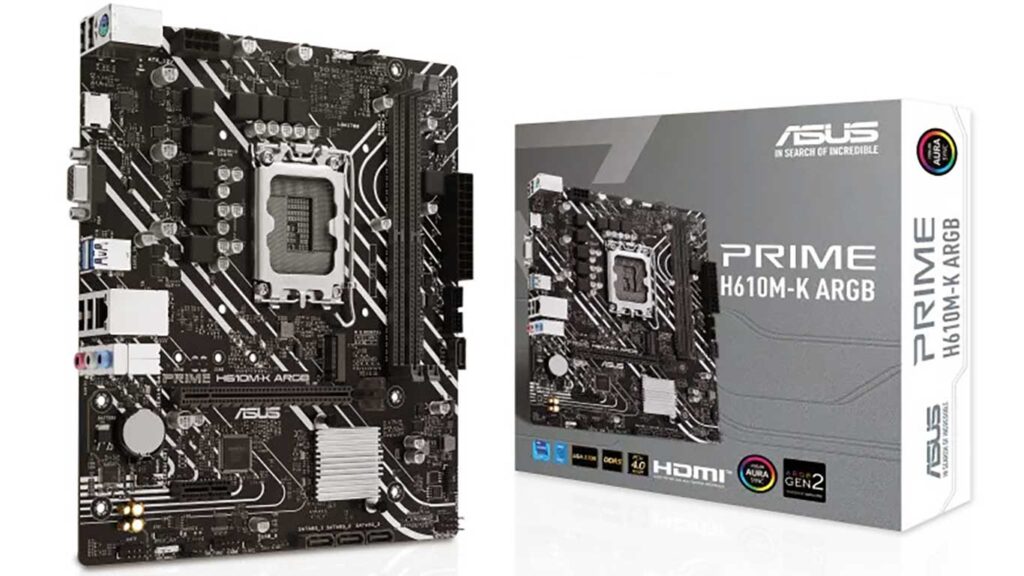
| Component | Integrated Build (ASUS Prime H610M-K) | Non-Integrated Build (MSI B660M + Entry-Level GPU) |
| Motherboard | ~ USD 80 | ~ USD 120 |
| GPU | – (integrated) | ~ USD 140 (example: GTX 1650) |
| Total | ~ USD 80 | ~USD 260 USD (difference ~USD 180) |
Savings reach 50–70% of the total main components, which is especially beneficial for users with limited budgets or basic needs.
Ideal User
Not everyone needs high performance. For those who only do light tasks or daily activities, an Integrated Motherboard is a great choice.
Who Is Suitable?
1. Remote Freelancer
Who uses Google Docs every day, attends meetings on Zoom, and does light browsing?
2. Parents at Home
To watch Netflix, access social media, or read the news.
3. Micro, Small, and Medium Enterprises and Internet Cafes
A system that is efficient in power usage, low cost, and sufficient for cashier, administration, or light gaming needs such as Point Blank or Dota 2 with low settings.
Electricity Saving = Your Monthly Bill Is Light.
One of the advantages of an Integrated Motherboard is its excellent energy efficiency.
Energy Usage Comparison:
- Integrated PC: On average, only requires ≤150W
- Gaming PC (with Split GPU): Can reach ≥500W
With 6–8 hours of daily use, this energy saving can significantly lower your monthly electricity bill, an ideal solution for households as well as small offices.
Easy, Ideal for Those Who Don’t Want to Be Hassled
The integrated system is very easy to maintain and use, as all the main components are designed to be compatible with each other from the start.
It is suitable for lay users, parents, or small business owners who don’t want to bother with technical matters or routine maintenance.
Disadvantages of Integrated Motherboards — Warning for you!
Integrated motherboards do offer affordable prices, but the advantages are often not worth the limitations that come with them. Let’s discuss its three main drawbacks in depth.
1. Gaming? Forget!
If you like AAA games or competitive games that require high graphics, then the Integrated Motherboard is not the right choice.
Benchmark Results:
- Intel UHD Graphics 730 can only run Genshin Impact at 720p, 30fps resolution at low settings.
- Meanwhile, the RTX 3050 can play the same games at 1080p, 60fps at high settings.
With an integrated GPU, the gaming experience is often limited, laggy, and less immersive. Heavy games like Cyberpunk 2077, Red Dead Redemption 2, or Call of Duty Warzone are almost impossible to play well.
2. When You Need an Upgrade, You’ll Regret It
One of the main drawbacks of integrated motherboards is the very limited upgrade support, especially for components like GPUs and additional coolers.
True stories like Rina, a design student who had to replace an entire system because she wanted to upgrade the GPU, are real proof of this problem.
Issues such as few PCIe slots, inadequate VRM, or incompatible electrical power often make the upgrade process not only tricky but also worth building a new system from scratch.
3. Overheating: The Silent Enemy
Because all the essential components are integrated into a single board, the heat circulation becomes denser and more difficult to control. This increases the risk of overheating, especially in small cases or hot rooms.
Mitigation Tips to Reduce Heat:
- Install additional fans, such as the Cooler Master Hyper 212 Black Edition, for a significant increase in CPU airflow.
- Use a well-ventilated or air-conditioned room, especially if the PC is used for extended periods, such as streaming, editing, or multitasking.
Overheating not only degrades performance but also shortens the life of components and risks causing permanent damage to the motherboard.
Choosing Guide — Customize to Need!
One computer system cannot meet everyone’s needs. When choosing a motherboard, do it as you would choose a car: adapt it to your personal needs, not just follow what’s trending.
Consider the specifications you need, such as the ability to play games, do heavy work, or perform daily use. This way, you’ll get the right motherboard to support your activities optimally.
Answer These 3 Questions Before Buying!
Before buying an Integrated Motherboard or system with a dedicated GPU, you should answer the following three important questions:
1. What are your main activities?
Determine your computer’s primary use:
| Activity | Recommendations |
| Office, Zoom, Streaming | Integrated Motherboard |
| Graphic Design, Video Editing | Dedicated Motherboard + GPU |
| Competitive gaming or AAA Titles | Dedicated GPU mandatory |
If you’re only running lightweight applications like Microsoft Office, Google Chrome, Netflix, or Zoom, then an integrated-based system will suffice.
2. What is your maximum budget?
The budget determines the specifications that can be obtained. For a limited budget, consider a processor with an APU (Accelerated Processing Unit) that is already integrated with a powerful GPU.
Save Recommendations:
< USD 350 → AMD APU (Budget Efficient, Optimal Performance)
Our recommendation is AMD Ryzen 5 5600G. This processor is equipped with Vega Integrated Graphics, which is quite reliable for various purposes. You can enjoy light gaming like Valorant, CS:GO, and Minecraft, as well as edit 1080p videos using apps like DaVinci Resolve or Adobe Premiere Pro at a basic level.
Without the need for an additional GPU, this system is perfect for students, beginner freelancers, and simple offices or internet cafes. It’s an ideal choice for those looking for an all-in-one system that is efficient in terms of power and cost consumption while still offering good visual performance.
USD 350 – USD 700 → Dedicated Entry-Level (For Flexibility & Upgrade)
Our recommendation is Intel Core i5 + NVIDIA GTX 1650. This option is perfect for those who are looking for Ease of future upgrades (such as replacing GPUs, RAMs, SSDs, and more), as well as better performance in competitive games at 1080p resolution (such as Fortnite, Apex Legends, and GTA V). The system is also capable of handling light to medium editing quickly.
This configuration provides the best combination of price and possible upgrades, perfect for users who have a long-term plan.
> USD 700 → High-End Build (For Gamers and Creative Professionals)
Our recommendations are the Ryzen 7 5800X and the NVIDIA RTX 3060. The system is perfect for gaming at 1440p or 4K resolution with ray tracing enabled, as well as for 3D rendering, animation, architectural design, and visual effects. In addition, the system is also ideal for live streaming and professional content production.
Choosing this configuration is the right step for those of you who want high performance, good multitasking capabilities, and efficiency in working time.
Conclusion: Choose wisely, invest wisely
Before you decide to build or buy a computer system, it’s important to understand the advantages and disadvantages of an Integrated Motherboard. On the one hand, these motherboards offer lower costs, efficient power consumption, and ease of installation, making them a good choice for beginners, office workers, or families who only need the device for light tasks. However, on the other hand, limitations in graphics performance, the risk of overheating, and minimal room for upgrades make it less ideal for gamers, professional content creators, or users who need high performance.
By answering three important questions- key activities, budget constraints, and upgrade plans- you can make smarter, more strategic decisions. In an age where technology is constantly evolving, choosing a computer system is not just about price but also about efficiency, functionality, and the ability to adapt in the future.
