

MP3Juices is a free online service that lets you download music from YouTube in MP3 format. This article covers its features, step-by-step usage, technical aspects of conversion, and the legal and security risks that professionals, technicians, and gamers should consider.
What Is MP3Juices?
MP3Juices is a popular YouTube to MP3 converter and downloader, widely used by those who want to listen to music offline without paying. The platform requires no registration or software installation, making it incredibly convenient. It serves a global user base through two primary methods: converting a specific YouTube video URL or searching by song or artist keywords.
As a web‑based tool, MP3Juices extracts audio streams from YouTube videos and transcodes them into MP3 format at various bitrates. While the service is free, users should be aware of copyright implications and potential security risks commonly associated with such platforms.
Key Features of MP3Juices
- URL‑based conversion: Paste any YouTube link, and the system quickly generates downloadable MP3 or MP4 files.
- Built‑in search: Enter a track title or artist name, and MP3Juices fetches results from multiple video sources.
- Fast conversion: Most files are processed in 2–5 seconds, depending on server load and video length.
- Direct downloads: No waiting for email links or captchas; the file is ready immediately after conversion.
- Multiple format support: Besides MP3, you can also download videos as MP4 with standard quality.
How to Use MP3Juices: A Technical Guide
Follow these steps to download music from YouTube using MP3Juices. Ensure you have a stable internet connection and an up‑to‑date browser.
- Copy the YouTube video URL of the song you want. Alternatively, if you don’t have a link, you can directly search for the track name in MP3Juices’ search box.
- Open the MP3Juices website in your browser. The current commonly used address is https://www.mp3juices.cc (note that domains may change; always verify you’re on the latest working site).
- Paste the URL or enter keywords into the search field, then click the “Search” button or magnifying glass icon.
- Select the desired audio quality. Typical bitrate options include 128 kbps, 192 kbps, and 320 kbps. Higher bitrates yield better sound quality but larger file sizes.
- Click the “Download” button to save the MP3 file to your device. The file will be stored in your browser’s default download folder.
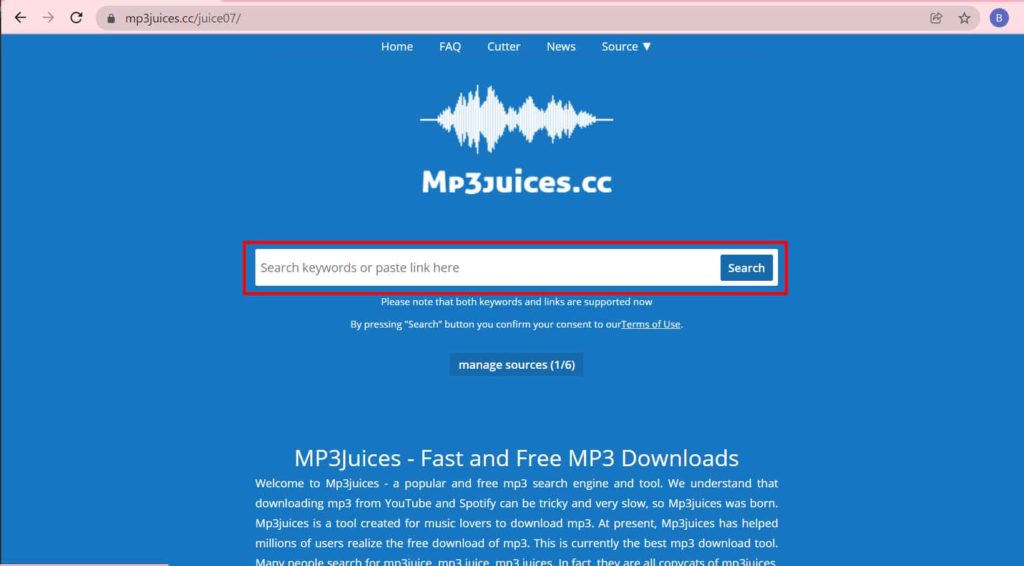
MP3Juices converts videos in seconds, but users must remain cautious of intrusive pop‑up ads that may lead to malicious sites.
Technical Aspects of YouTube to MP3 Conversion
The conversion process involves several backend steps. First, MP3Juices’ servers fetch the YouTube video using the provided URL. Next, an audio extractor isolates the sound stream from the video container. Finally, the audio is re‑encoded into MP3 format at the selected bitrate. Key factors affecting output quality include the original video’s audio bitrate, the encoding algorithm, and current server performance.
For optimal results, choose official music videos with high‑quality audio (often found on artists’ channels) and select 320 kbps. Be aware that higher bitrates produce larger files, which may be less practical for devices with limited storage.
Advantages and Disadvantages of MP3Juices
Pros
- Free and no registration required
- Clean, straightforward interface
- No software to install
- Integrated search feature
- Fast conversion, usually under five seconds
Cons
- Aggressive pop‑up ads that may host malware
- Inconsistent audio quality across different videos
- Some videos cannot be converted due to regional restrictions or copyright protections
- Domain changes frequently, making it hard to keep bookmarks current
Legality and Risks of Using MP3Juices
Downloading music from YouTube via services like MP3Juices generally violates YouTube’s Terms of Service and the copyrights of content owners. YouTube explicitly permits streaming only, not permanent downloads. In many jurisdictions, this practice may be considered copyright infringement, even for personal use. As a professional, technician, or gamer, you should weigh the legal aspects and support artists by using official services such as YouTube Music Premium, Spotify, or Apple Music, all of which offer legal offline listening.
Beyond copyright concerns, MP3Juices exposes users to security threats. The site often displays aggressive advertisements that can redirect to phishing pages or trigger unwanted downloads. It is advisable to use a reputable ad blocker and avoid clicking any suspicious links. Always keep your antivirus software up to date.
Safer Alternatives to MP3Juices
If you need legal and secure ways to enjoy music offline, consider these alternatives:
- YouTube Music Premium: Official paid service from YouTube allowing downloads and offline playback.
- SoundCloud Go+: Offers millions of tracks with offline listening for subscribers.
- Jamendo: A platform with thousands of royalty‑free songs available for legal download.
- Free Music Archive: Curated collection of music with open licenses, ideal for content creators.
For technicians and developers needing audio samples for testing, sites like Freesound.org provide a vast library of sound effects and music under Creative Commons licenses.
Conclusion
MP3Juices remains a popular choice for free YouTube to MP3 conversion because of its simplicity and speed. However, professionals, technicians, and gamers must carefully consider the legal and security risks involved. If you choose to use it, do so cautiously: employ an ad blocker, verify the website’s URL, and never redistribute copyrighted material. For any serious or regular use, always prioritize official services that compensate creators.
Note: This article is for educational purposes only. We do not condone copyright infringement. Always respect intellectual property rights and use content legally.
