

A VLAN (Virtual Local Area Network) is a networking technology that allows logical segmentation within a single physical infrastructure, enhancing security, performance, and network management. This article discusses the definition, types, operation, as well as the advantages and disadvantages of VLANs in depth, designed for IT professionals, network technicians, and advanced users like gamers optimizing their networks.
A VLAN (Virtual Local Area Network) is a method for creating several separate logical networks within a single physical switch device. This technology overcomes the limitations of traditional LANs by grouping devices based on function, department, or security needs without relying on physical location. VLANs have become a crucial foundation in modern networking, especially for enterprise scale, data centers, and environments requiring traffic isolation.
The use of VLANs is highly relevant with the development of Software-Defined Networking (SDN) and cloud networking. Therefore, a deep understanding of this concept is vital for network administrators, IT professionals, and even gaming enthusiasts who want to create low-latency networks.
What is a VLAN and Why is it Needed?
A VLAN is a logical subnetwork that groups devices within a Local Area Network (LAN). This concept introduces flexibility by separating broadcast domains, so traffic is only distributed within the designated group. VLAN implementation relies on the IEEE 802.1Q standard for tagging Ethernet frames.
Before VLANs existed, networks relied on physical segmentation which required many switches and cables. Now, a single switch can support multiple VLANs simultaneously. Additionally, VLANs allow for stricter access control, which is critical for network security.
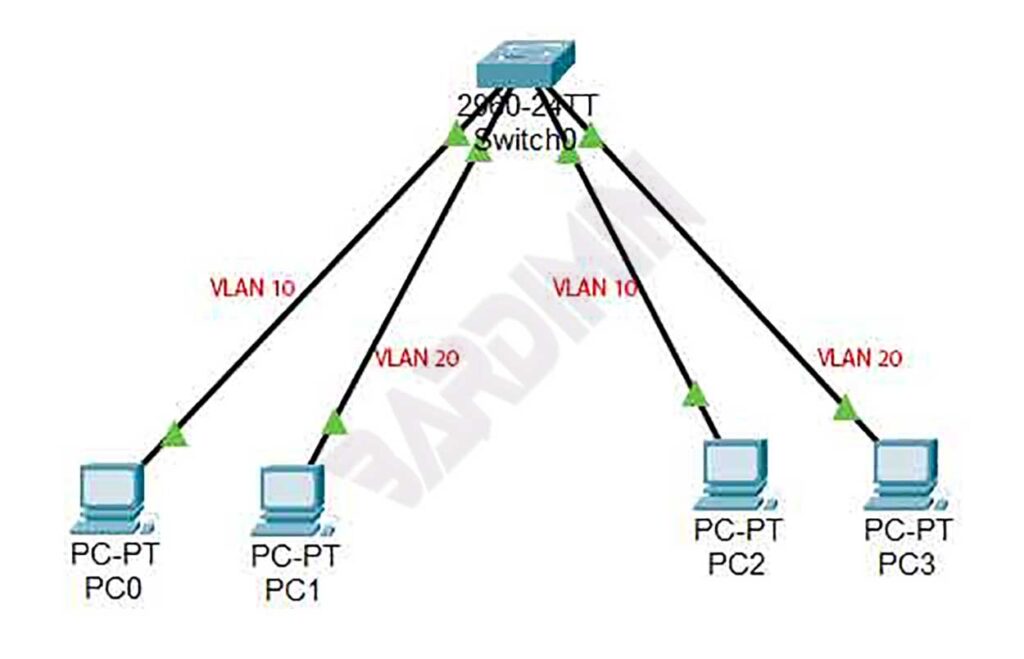
This technology is crucial for rapidly growing networks. Organizations can add devices without having to change the physical infrastructure. VLANs also facilitate compliance with data security regulations by isolating sensitive traffic.
Types of VLANs Based on Grouping Methods
1. Port-Based VLAN
This is the most common type. VLAN membership is determined by the physical port on the switch. The administrator configures each port to be part of a specific VLAN. This method is simple but less flexible if devices move frequently.
Ports configured as trunk can carry traffic from multiple VLANs simultaneously. Trunk configuration is essential for inter-switch connections. However, VLAN membership cannot be seen physically, requiring good documentation.
2. MAC Address-Based VLAN
This type of VLAN groups devices based on their MAC address. The switch will have a table mapping MAC addresses to specific VLANs. The advantage is that a device can connect to any port and remain in the same VLAN.
This method enhances user mobility within the network. However, its administration is more complex because it requires managing the MAC address table for each device. This method suits environments with static devices like printers or IP cameras.
3. Protocol-Based VLAN
Grouping is based on the network protocol used, such as IPv4, IPv6, or IPX. The switch examines the protocol header in the frame and forwards traffic to the appropriate VLAN. This approach is rarely used in modern IP-dominated networks.
Additionally, VLANs can also be implemented at Layer 3 using IP subnets as the basis for grouping. Another more advanced method is using 802.1X authentication to determine VLAN membership based on user identity.
VLAN ID Range and Its Functions
The IEEE 802.1Q standard defines the VLAN ID range from 0 to 4095. However, not all IDs can be used freely. Understanding this range is important for network planning.
| VLAN ID Range | Description and Usage |
| 0, 4095 | Reserved. Cannot be used for user VLANs. |
| 1 | Default VLAN on most switches. Can be used but not recommended for production traffic. |
| 2 – 1001 | Normal Range. The most commonly used VLAN IDs and can be configured. |
| 1002 – 1005 | Default VLANs for legacy technologies (such as FDDI and Token Ring). |
| 1006 – 4094 | Extended Range. Supported by newer switches for large-scale needs. |
For general networks, it is recommended to use IDs between 2 and 1001. Avoid using VLAN 1 for better security and management. Furthermore, some devices support VLAN pruning features to optimize trunk traffic.
How VLANs Work: Tagging and Trunking
VLANs work by adding a tag (identifier) to the Ethernet frame. This process is called tagging and uses the IEEE 802.1Q standard. The tag contains the VLAN ID which tells the switch the destination group for that frame.
Switch ports can operate in two main modes:
- Access Mode: This port only carries traffic for one specified VLAN. Typically used to connect end devices like computers or printers.
- Trunk Mode: This port can carry traffic from many VLANs simultaneously. Trunks connect switch-to-switch or switch to router. The 802.1Q tag remains along the trunk path.
Communication between VLANs requires a Layer 3 device like a router or layer 3 switch. Without such a device, hosts in different VLANs cannot communicate with each other. This is what makes VLANs effective for segmentation and security.
Advantages and Disadvantages of VLAN Implementation
VLAN Advantages
- Enhances Security: Isolates sensitive device groups (like finance departments) from the main network. Traffic cannot cross VLANs without configured routing.
- Reduces Broadcast Traffic: Limits the broadcast domain so traffic does not need to spread across the entire network. This significantly improves performance.
- Flexibility and Scalability: Adding or moving devices only requires software configuration. No need to change cables or physical topology.
- Cost Saving: Reduces the need for additional physical switches because multiple logical networks can run on one hardware unit.
VLAN Disadvantages
- Configuration Complexity: Requires managed switches and specialized knowledge for setup and maintenance. Incorrect configuration can cause downtime.
- Potential Single Point of Failure: If the main switch fails, all VLANs running on it will be disrupted. Redundancy is required for critical environments.
- Management Overhead: Network administration becomes more complex because it must track logical membership, trunk configuration, and inter-VLAN routing policies.
When Should You Use VLANs? Case Analysis
VLANs are not always necessary. For home or small office networks with fewer than 20 devices, the benefits may not outweigh the complexity. However, consider VLANs in the following scenarios:
- Medium to Large Enterprise Networks: Separating department networks (HR, Engineering, Guest) for security and traffic management.
- Data Centers and Cloud: Isolating production, development, and testing environments. VLANs are also used for multi-tenancy.
- Campus or Education Networks: Separating student, faculty, and administrative networks within a single campus infrastructure.
- Gaming or Streaming Network Optimization: Gamers can group gaming devices into a separate VLAN to reduce latency and interference from other household devices.
Before implementing, create a thorough plan including VLAN numbering schemes, documentation, and a routing plan. Always test the configuration in a lab environment first. Additionally, ensure the IT team has adequate expertise to manage this technology.
Overall, VLANs are a powerful tool for designing secure, efficient, and growth-ready networks. A solid understanding of how VLANs work and the types of VLANs is an essential skill for anyone serious in the field of computer networking.
