

Ventoy is a revolutionary solution for creating a multiboot bootable USB drive. This open-source tool allows you to store multiple operating system ISO files, such as Windows and Linux, on a single drive without repeated formatting. This article discusses its key features, how to use it, and its advantages over similar tools for professionals and technicians.
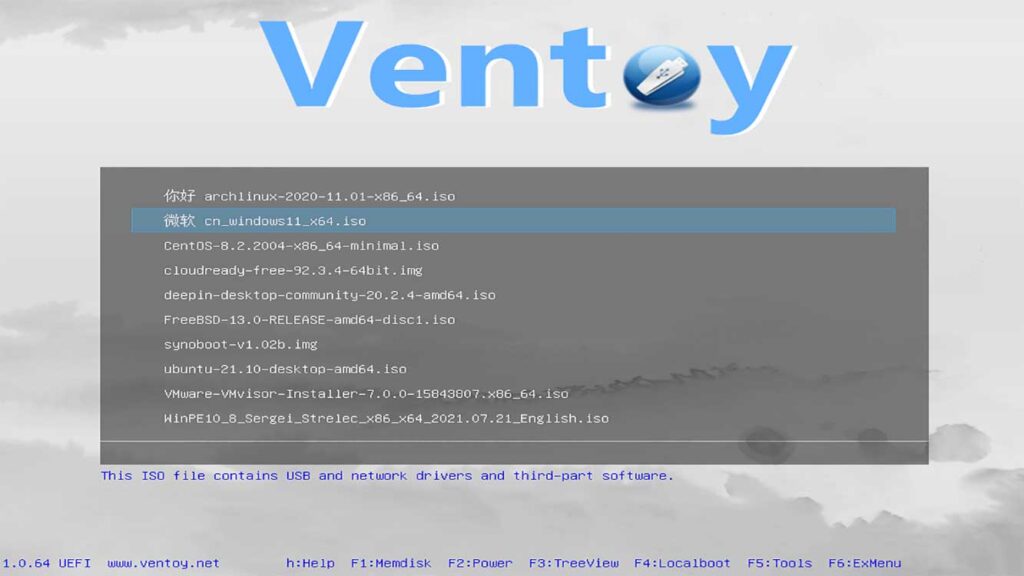
Creating a bootable USB for operating system installation is often cumbersome. You typically need one drive for each ISO file. However, that situation has changed with the arrival of Ventoy. This free software enables you to create a single USB flash drive that can hold dozens of different ISO files. You simply copy the ISO files onto the drive, then select them from an elegant boot menu.
Ventoy is different from tools like Rufus or Yumi. Those tools generally write one ISO file to the entire drive. In contrast, Ventoy installs a small bootloader onto the USB drive. Then, you can directly copy ISO, WIM, IMG, VHD(x), or EFI files to the available partition. This process is highly efficient and saves significant time.
Key Advantages of Ventoy
- Universal Compatibility: Supports both Legacy BIOS and UEFI (including ARM64 and Secure Boot). It also supports both MBR and GPT partition schemes.
- Broad Format Support: Can read file systems like FAT32, exFAT, NTFS, UDF, XFS, and Ext2/3/4 on the storage partition.
- No Extraction Needed: ISO files boot directly without needing to extract their contents first.
- Simple Updates: Updating Ventoy to the latest version does not delete the stored ISO files.
- Plugins and Customization: Supported by various plugins for added functionality and customizable menu themes.
The tool officially supports over 960+ tested ISO files (2024 data), covering the latest Linux distributions, Windows 11, and system recovery utilities. Therefore, Ventoy has become the top choice for IT technicians and advanced users.
Complete Guide: Creating a Multiboot USB with Ventoy
Creating a multiboot drive using Ventoy is straightforward. Follow these technical steps below.
- Download the Latest Ventoy: Visit the official Ventoy releases page on GitHub to get the latest stable version.
- Prepare the USB Drive: Use a flash drive with a minimum capacity of 8GB. All data on it will be erased, so ensure you have backed up any important files.
- Run Ventoy2Disk: Extract the downloaded ZIP file, then run
Ventoy2Disk.exe(for Windows) with Administrator privileges. - Installation Process: In the Ventoy interface, select your detected USB device. Next, click the Install button and wait for the process to complete.
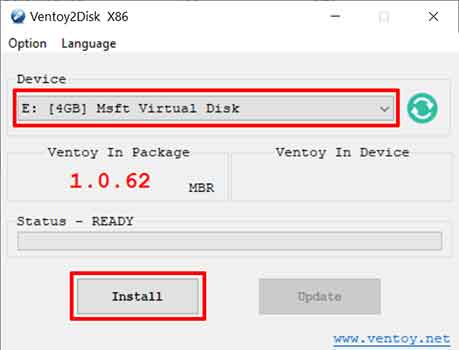
Important Warning: The Ventoy installation process will erase all data on the selected drive. Ensure you have backed up critical data before proceeding.
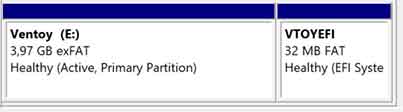
Once installation is finished, you will see two partitions on the USB drive. The first partition is the storage area where you copy ISO files. Next, you can copy your operating system ISO files to this partition. For example, copy both windows11.iso and ubuntu-22.04.iso files simultaneously.
The final step is to boot from that USB drive. Ventoy will then display a list of all available ISO files. You simply choose which ISO file you want to run. This way, a single USB drive can function as a complete toolkit for installing, maintaining, and recovering various systems.
Conclusion: Ventoy is the Best Multiboot Solution
Ventoy has changed the paradigm for creating bootable installation media. This tool offers exceptional ease of use, speed, and compatibility. For professionals and technicians who frequently handle various operating systems, Ventoy is an invaluable time-saving investment. Furthermore, its open-source nature and continuous development ensure long-term reliability and security. Therefore, it is no exaggeration to declare Ventoy the most efficient multiboot USB creation tool available today.
