

In today’s digital era, data security is one of the most important aspects that every individual and company must consider. With the development of technology, security risks are getting higher. Data theft, cyberattacks, and various other forms of digital threats are real threats that can seriously impact information privacy and integrity.
Virtual Keyboard or On-Screen Keyboard is a type of keyboard displayed on the screen of a digital device, such as a computer, tablet, or smartphone, and is operated by touch or mouse click. This technology is typically used as an alternative to physical keyboards, especially on devices that do not have a physical keyboard or for specific security needs.
While virtual keyboards can help protect against some types of threats, such as keyloggers that capture input from physical keyboards, they are not completely secure. Virtual keyboards are still vulnerable to various forms of cyberattacks, such as screen capture malware, spyware, and other techniques that can steal information entered through these keyboards.
Therefore, it is important to know how to implement more secure methods to protect sensitive data and user privacy.
What is a Virtual Keyboard?
A Virtual Keyboard is an input device that is displayed on the screen of a digital device such as a computer, tablet, or smartphone. Users can type by pressing virtual buttons using a mouse, stylus, or a touch of a finger on the touchscreen. Virtual keyboards are generally used as an alternative to physical keyboards, especially on devices that do not have a physical keyboard or for special purposes such as added security.
How it Works and Functionality
Virtual keyboards work by mapping the layout of a physical keyboard into an on-screen visual form. When the user presses a key on the screen, the virtual keyboard software sends the same signal as if the key was pressed on a physical keyboard. Some virtual keyboards also come with additional features such as text prediction, auto-correction, and a variety of input languages.
The virtual functionality of the keyboard includes:
- Data Input: Allows users to input text and characters into the device without the need to use a physical keyboard.
- Additional Security: Used to enter sensitive data such as passwords or financial information to avoid keyloggers capturing input from physical keyboards.
- Accessibility: Helping users with special needs or physical limitations to type and interact with digital devices.
Advantages and Disadvantages of Using a Virtual Keyboard
Advantage:
- Portability: It doesn’t require any additional hardware, making it especially useful for portable devices like tablets and smartphones.
- Security: Reduces the risk of keylogging on physical keyboards, as input cannot be captured by keyloggers working on hardware.
- Flexibility: Can be used on a variety of devices and platforms with customizable layouts and functions.
Deficiency:
- Vulnerability To Malware: Despite protecting against physical keyloggers, virtual keyboards are still vulnerable to malware attacks that can record the user’s screen or activity.
- Speed and Efficiency: Typing on a virtual keyboard is generally slower and less efficient compared to a physical keyboard, especially for long text.
- Convenience: Users may feel less comfortable and get tired more easily when typing with a virtual keyboard, especially on smaller devices such as smartphones.
Security Risks of Using Virtual Keyboard
Keylogger
A keylogger is a type of malware that records every keystroke a user makes on a physical or virtual keyboard. Although virtual keyboards are designed to avoid hardware keyloggers, there are software keyloggers that can capture data from virtual keystrokes. This keylogger can record sensitive information such as passwords, credit card numbers, and other personal data.
Spyware
Spyware is software that is installed without the user’s knowledge with the purpose of monitoring and collecting information from the user’s device. Spyware can record screen activity, including what is typed on the virtual keyboard. This allows hackers to obtain sensitive information that users enter.
Malware Attacks
Various types of malware can attack the user’s device and exploit weaknesses in the virtual keyboard. Some malware is capable of recording screen activity or taking screenshots while the user is typing important information. There is also malware that can change or redirect keyboard input so that the information entered by the user can fall into the wrong hands.
A Safer Method of Virtual Keyboard
Using Hardware Security Modules (HSMs)
Hardware Security Modules (HSMs) are hardware devices specifically designed to manage and protect cryptographic keys. HSMs provide a secure environment for executing cryptographic operations, such as encryption and decryption, that cannot be accessed by software or unauthorized users. By using HSMs, sensitive data entered through a virtual keyboard can be encrypted and protected from theft.
Utilizing Biometric Authentication
Biometric Authentication is an authentication method that uses a user’s unique physical characteristics, such as fingerprint, face, or retina, to verify identity. Biometrics are difficult to forge and provide an additional layer of security that is stronger compared to passwords or PINs entered through a virtual keyboard. The use of biometric authentication can reduce the risk of theft of data entered through the virtual keyboard.
Two-Factor Authentication (2FA) Implementation
Two-Factor Authentication (2FA) is a security method that requires two forms of verification before granting access to an account or data. Typically, this involves a combination of something the user knows (a password) and something the user has (a verification code from an authentication device or app). By implementing 2FA, even if the information entered through the virtual keyboard is successfully stolen, hackers still need a second factor to access the account or data.
Practical Steps Users Can Take
- Use Security Hardware (HSM)
- Choose a recognized and trusted HSM device.
- Integrate HSMs with systems that require encryption of sensitive data.
- Make sure the HSM is always updated with the latest firmware to address security vulnerabilities.
- Enable Biometric Authentication
- Use a device that supports biometric authentication.
- Register unique biometrics such as fingerprints or facial recognition.
- Make sure the biometric software is set up correctly and securely.
- Implement Two-Factor Authentication (2FA)
- Enable 2FA on all accounts that support this feature.
- Use a trusted authentication app like Google Authenticator or Authy.
- Avoid using SMS as a second method, as it is more vulnerable to attacks.
- Update and Protect Software
- Keep the software and operating system updated to fix security gaps.
- Use trusted antivirus and antimalware to protect your device from cyberattacks.
- Avoid downloading or installing apps from unknown or untrusted sources.
- Security Education and Awareness
- Educate yourself and employees about the security risks associated with virtual keyboards.
- Follow best security practices in device and internet usage.
- Don’t carelessly share sensitive information and always verify sources before entering important data.
Alternative Technologies for Data Security
Physical Keyboards are traditional input devices that consist of physical keys that are pressed to enter data. While virtual keyboards offer some advantages, physical keyboards remain a safer and more efficient option in most cases.
Advantages of Physical Keyboards:
- Speed and Efficiency: Users can type faster and more efficiently compared to virtual keyboards.
- Malware Resistant: Physical keyboards are not susceptible to attacks such as screen capture malware that can affect virtual keyboards.
- Durability: It is usually more durable and can be used for a long period without experiencing a decrease in performance.
- Convenience: It is more convenient to use for typing for a long time, reducing user fatigue.
Use of Encrypted Keyboards for a Higher Level of Security
Encrypted Keyboards are a type of physical keyboard that have encryption capabilities for each keystroke. This technology encrypts the input data at the time of keystrokes and decrypts it only on the intended device, thus preventing data theft through keyloggers or other malicious software.
Advantages of Encrypted Keyboards:
- High Security: Every keystroke is encrypted, so data remains safe from theft.
- Keylogger Protection: Prevents keyloggers from capturing sensitive information entered.
- Easy Integration: Can be used like a regular keyboard without the need for complicated configuration.
Integrating Password Managers with Additional Security Features
Password Managers is an app or software that helps users store and manage passwords securely. They encrypt all stored passwords and require one master password to access all other passwords.
Advantages of Password Managers:
- Secure Storage: All passwords are encrypted and stored securely.
- Strong Passwords: Password managers can generate strong and unique passwords for each account.
- Ease of Access: It makes it easy for users to manage multiple accounts with various passwords without having to remember them all.
- Additional Security Features: Some password managers provide additional features such as two-factor authentication (2FA), data breach monitoring, and biometric authentication.
Recommended Tools and Software That Can Be Used
- Password Managers:
- LastPass: Provides encryption, 2FA, and data breach monitoring features.
- Dashlane: Offers secure password storage and additional security features.
- 1Password: Provides end-to-end encryption and biometric integration.
- Encrypted Keyboards:
- Vasco Digipass: Keyboard with encryption feature to improve data security.
- SafeType Secure Keyboard: Offers input encryption to protect sensitive data.
- Antivirus and Antimalware:
- Norton: Provides comprehensive protection against viruses and malware.
- Kaspersky: Offers robust security features to protect devices from cyber threats.
- Malwarebytes: Specialist in detecting and removing malware.
- Biometric Authentication Devices:
- Apple Touch ID/Face ID: Biometric authentication for Apple devices.
- Windows Hello: Supports facial recognition and fingerprint for Windows devices.
- Samsung Biometric Security: Provides facial recognition and fingerprint for Samsung devices.
Recommendations for Encrypted Keyboards
Here are some keyboard brands that provide encryption to improve data security:
1. Vasco Digipass
Vasco Digipass is a brand known for its advanced security solutions, including encrypted keyboards. The keyboard offers encryption on every keystroke to ensure data stays safe from keyloggers and malware. Vasco Digipass is often used in the financial sector and organizations with high-security requirements.
2. SafeType Secure Keyboard
SafeType Secure Keyboard is another option for encrypted keyboards that offer input encryption. This product is designed to provide maximum protection against cyber threats by securing data at the hardware level. SafeType Secure Keyboard is suitable for users who need extra protection on sensitive data.
3. Cherry Secure Board
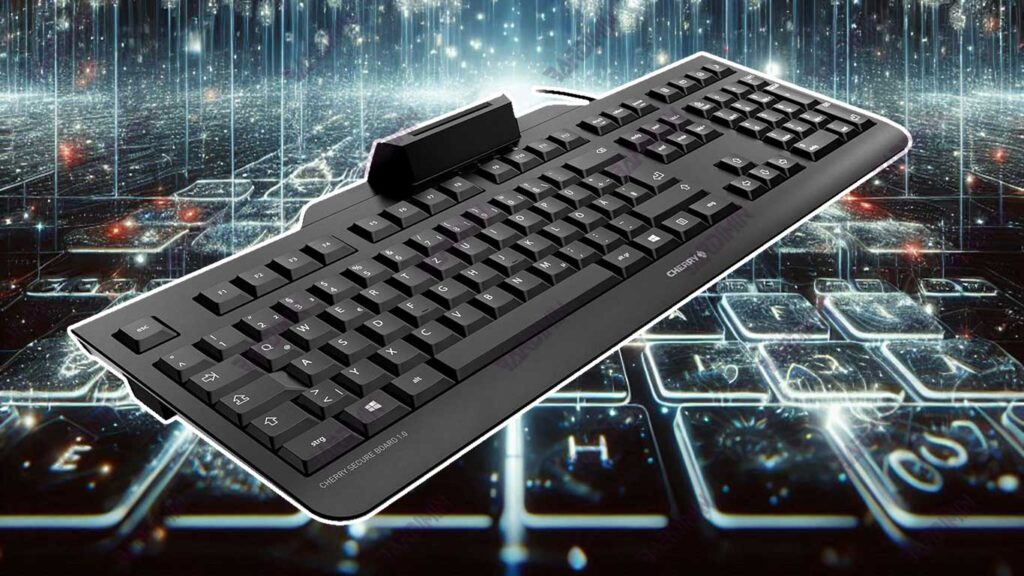
Cherry Secure Board is a product of Cherry, a well-known company in the field of computer peripherals. This keyboard provides a hardware encryption feature to protect input data from theft. Cherry Secure Board is often used in business and government environments that require a high level of security.
4. iStorage datAshur Keyboard
iStorage datAshur Keyboard offers an encryption feature to ensure every keystroke is protected. This keyboard is designed with the latest security technology to protect sensitive information from various threats. iStorage is known for its reliable data security products and is often used in industries that place a high priority on security.
5. Keytroller Smart Keyboard
The Keytroller Smart Keyboard is an encrypted keyboard option that provides advanced encryption for every keystroke. With features such as malware detection and hardware encryption, the Smart Keyboard Keytroller provides an additional layer of protection for sensitive data.
Conclusion
Virtual keyboards, while beneficial, remain vulnerable to a variety of cyber threats. Using alternative technologies and methods such as physical keyboards, encrypted keyboards, biometric authentication, and password managers can significantly improve data security. The implementation of this solution not only protects sensitive data but also increases efficiency and user trust.
Data security is a shared responsibility that requires attention and proactive action. By adopting the technologies and best practices that have been described, we can create a safer and more reliable digital environment. Start now by implementing the security solutions discussed to protect your data from increasingly sophisticated cyber threats.
