

AskAdmin is a lightweight and effective Windows security solution for controlling user access. This portable tool empowers system administrators, parents, or advanced users to easily block specific applications, files, or folders, making it an ideal choice for enhancing productivity and security in various environments.
In today’s digital ecosystem, maintaining computer security and focus is crucial. AskAdmin emerges as a practical answer from Sordum.org. This free utility allows for granular access restriction without the need to tinker with complex Group Policy settings. With its simple interface, you can immediately apply block policies to almost any type of resource on your Windows system.
This tool is highly relevant for various scenarios. For parents, AskAdmin serves as an effective parental control tool to limit gaming time or access to social media. For IT administrators, it can be used to disable potentially harmful or unproductive applications on company computers. Even home users can utilize it to lock personal folders from other users sharing the same computer.
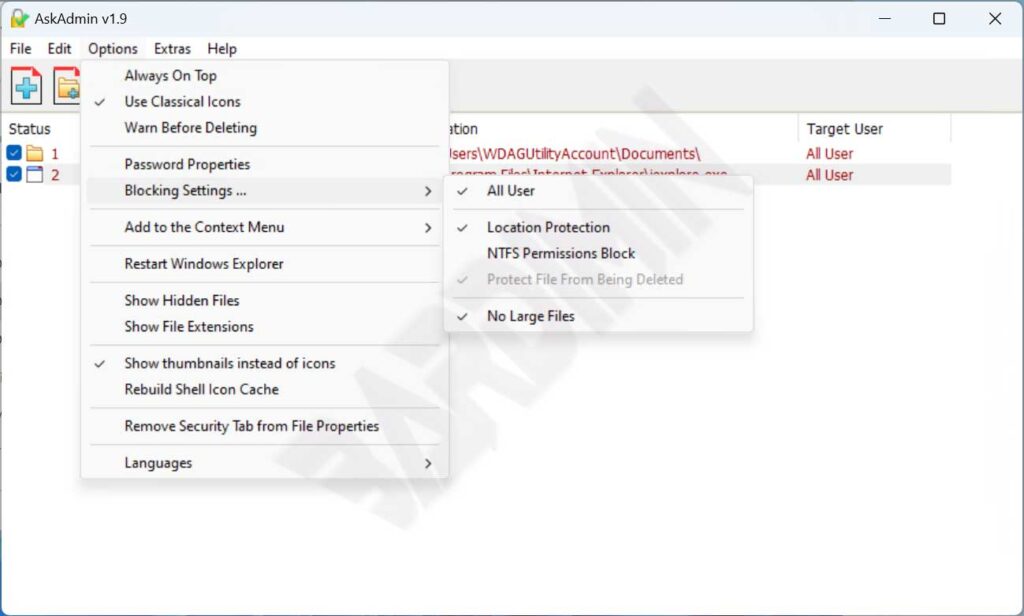
Main Advantages of AskAdmin Compared to Similar Tools
Why should you consider AskAdmin? First, this tool is fully portable. It requires no installation, leaving no traces in the Windows registry. Simply extract and run the executable file, even from a USB flash drive. Second, its blocking scope is extensive. Unlike built-in Windows tools which are limited, AskAdmin can lock traditional desktop applications (.exe), built-in Universal Windows Platform (UWP) apps like Microsoft Edge and Calculator, script files (.bat, .cmd), and even prevent access to specific registry keys.
An additional security feature is the password option. After setting up a block list, you can protect AskAdmin settings with a password. This ensures only you can change or disable the applied restrictions. The ability to export and import configuration lists also saves time, especially if you need to apply the same rules across multiple computers.
How to Use AskAdmin: A Quick Guide
- Step 1: Download and run AskAdmin as an Administrator (this privilege is mandatory).
- Step 2: Add items you wish to block. You can drag and drop shortcuts, executable files (.exe), or folders directly into the main AskAdmin window.
- Step 3: Select items from the list, then click the “Block Selected Items” button. Confirm your action in the dialog that appears.
- Step 4 (Optional): Open the Password menu to set a password to protect AskAdmin settings from being changed by others.
Once blocked, any attempt to run the application or access the file/folder will be denied by the system with an error message. This method is much cleaner and more systematic than simply deleting or hiding shortcuts.
Latest System Support and Compatibility
AskAdmin is known for its excellent compatibility. The tool is natively supported on Windows operating systems from older versions to the latest. The following is a list of officially supported systems according to developer information:
- Windows 11 (all editions, including the latest 22H2 and 23H2 versions).
- Windows 10 (all builds from version 1507 to the latest).
- Windows 8.1 / Windows 8.
- Windows 7 & Windows Vista (support for legacy systems).
- Windows XP (for very specific environments).
The tool works on both x86 (32-bit) and x64 (64-bit) architectures. However, for optimal performance and security, always ensure you run it on a system environment that still receives security updates from Microsoft.
Security and Ethical Usage Considerations
Despite its power, using AskAdmin must be done responsibly. Always inform other users on the same computer about any restrictions, especially in business environments, for transparency. Furthermore, it’s important to remember that this tool is not designed as a replacement for complete endpoint security solutions like antivirus or firewalls.
For system integrity, always download software from official sources. Only obtain the AskAdmin file from the developer’s website, Sordum.org, to avoid the risk of harmful modifications. As a best practice, scan downloaded files with a trusted antivirus before running them.
Conclusion: Is AskAdmin Right for You?
AskAdmin is a brilliant specialist utility that excels at one thing: restricting access simply and effectively. If you need a quick, portable, and installation-free solution to control what can run on a Windows PC, this tool is highly recommended. However, for centralized, large-scale security policy management in enterprises, Group Policy features or MDM (Mobile Device Management) solutions may be more appropriate.
With its lightweight nature and ease of use, AskAdmin remains an invaluable tool in the toolbox of system administrators, technicians, and home users concerned with security and access control.
This article is written based on hands-on experience and official documentation. Compatibility information has been updated as of July 2024 to ensure relevance to the latest Windows 11 versions. Always use system tools cautiously and in legitimate environments.
