

When your reliable Epson SX235 printer suddenly halts with a stubborn "Service Required" error or a relentlessly blinking ink light, the culprit is almost always the waste ink pad counter. The definitive solution is the Epson SX235 Adjustment Program, a specialized maintenance utility designed to reset your printer's internal counters and restore it to full functionality without a costly service call.
This professional tool, often called a resetter, is the key to regaining control. By using the provided Resetter_Epson_SX235.rar file, you can perform this critical reset yourself in minutes. It’s an essential resource for technicians, savvy users, and anyone committed to maximizing their printer's lifespan and performance.
Key Takeaway: The Epson SX235 Adjustment Program is a safe, user-friendly software tool that resets the waste ink counter, clearing error codes and allowing continued use of your printer. It is the most effective DIY fix for this common issue.
What Does the Epson SX235 Resetter Do?
This adjustment program performs several critical maintenance functions that go beyond a simple reset. Its primary role is to communicate directly with your printer's firmware to clear error flags.
- Reset Waste Ink Counter: This is the core function. It clears the "Service Required" warning triggered when the predefined limit for absorbed waste ink is reached.
- Access Service & Maintenance Modes: Unlock hidden menus for advanced operations like print head cleaning, nozzle checks, and ink charging.
- EEPROM Initialization: In some cases, restoring the printer's memory (EEPROM) to default values can resolve deeper software glitches.
- Extend Hardware Lifespan: Regular maintenance via this tool can prevent permanent damage and postpone the need for physical pad replacement.
Core Features and Compatibility
The SX235 resetter is built for efficiency and reliability. Here are its standout features:
- Offline Operation: Once downloaded, the program requires no internet connection, ensuring privacy and speed.
- Simple Interface: Designed with clarity in mind, its straightforward layout makes it accessible even for non-experts.
- Broad System Support: Fully compatible with Windows 7, 8, 10, and 11 (both 32-bit and 64-bit architectures).
- Model Flexibility: Also supports related models like the Epson SX230 and SX235W.
- Non-Intrusive: The software does not modify core system files; it only interacts with the printer's service data.
Step-by-Step: How to Use the Adjustment Program
Follow this guide carefully to reset your Epson SX235 printer successfully. Ensure your printer is connected to your computer via USB and turned on before starting.
- Disable Antivirus Temporarily: Security software may flag the tool as a potential threat. Temporarily disable it to prevent interference during the reset process.
- Extract the Archive: Download and extract the
Resetter_Epson_SX235.rarfile to a folder on your desktop. - Run as Administrator: Right-click the extracted
.exefile and select "Run as administrator" to grant necessary permissions. - Select Model and Port: In the program, choose "Epson SX235 from the list and select the correct USB port your printer is using.
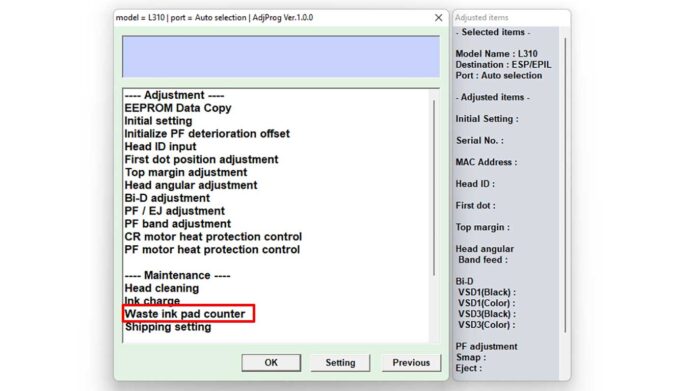
- Navigate to Waste Ink Reset: Click "Particular Adjustment Mode" → select "Waste Ink Pad Counter" → click "Check".
- Initialize the Counter: Finally, click the "Initialization" button. The program will reset the counter to zero.
- Restart Your Printer: Power the printer off completely, wait 30 seconds, and then turn it back on. The error message should now be cleared.
Important Security Note: Always download such tools from reputable sources to avoid malware. The reset process is generally safe for your printer, but incorrect use of other functions in the tool may cause issues. Proceed with caution.
Download Details and File Information
Below are the essential specifics for the adjustment program file. Keep this information handy during the setup process.
| File Name | Resetter_Epson_SX235.rar |
| File Type | Printer Adjustment Utility (Resetter) |
| File Size | Approximately 3.2 MB |
| Archive Password | bria |
The Epson SX235 Adjustment Program empowers you to take control of your printer's maintenance. Consequently, it saves significant time and money compared to professional servicing. For optimal results, ensure you follow the steps precisely and consider performing a physical cleaning or waste ink pad replacement if the error recurs frequently, as the pad itself may be saturated (Epson Support). This tool, therefore, is not just a fix but a vital component of responsible printer ownership for professionals and enthusiasts alike.
By downloading files from bardimin.com, you agree that:
- Files are obtained from the internet, and copyrights remain with their respective owners.
- Files are for educational, reference, and personal use only.
- bardimin.com does not guarantee that files are free from viruses or malware.
- Any risks, damages, or legal claims arising from the use of files are the sole responsibility of the user.
- bardimin.com is released from any and all claims or liabilities.
If you do not agree, please do not download the file.
