

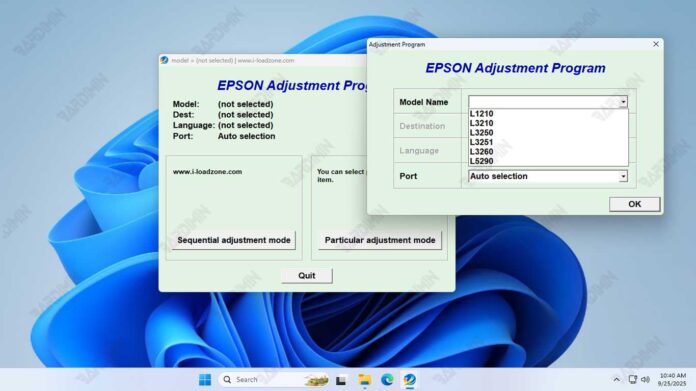
The Epson Adjustment Program for L1210, L3210, L3250, L3251, L3260, and L5290 models is a dedicated service utility. Technicians use it to reset the waste ink counter and perform critical maintenance. This guide provides the latest download link, official usage instructions, and vital safety information for effective printer repair.
What Is the Epson Adjustment Program?
This specialized software accesses the printer's service mode. Consequently, it allows resets and diagnostics beyond standard user menus. The tool primarily addresses the "Waste Ink Pad Counter Full" error. It digitally resets the counter after physical maintenance.
Key Features and Benefits
- Waste Ink Counter Reset: Clears the digital counter for errors like "A printer's ink pad is at the end of its service life."
- Advanced Diagnostics: Perform nozzle checks, head cleaning, and alignment to maintain print quality.
- Printer Information: Access detailed data such as page counts and ink usage levels.
- Model Compatibility: Specifically designed for Epson models L1210, L3210, L3250, L3251, L3260, and L5290.
Download and Installation Details
You can download the Epson Adjustment Program package for the specified models below. Ensure your system meets the requirements first.
- File Name: Reset_Epson_L1210_L3210_L3250_L3251_L3260_L5290.rar
- Archive Format: RAR
- File Size: Approximately 4 MB
- OS Compatibility: Windows 7, 8, 10, 11 (32-bit & 64-bit)
Critical Usage Guidelines
- Run as Administrator: Always right-click the executable and select 'Run as Administrator' for proper system access.
- Disable Antivirus Temporarily: Security software may flag service tools. Therefore, disable it during use to prevent false positives.
- Physical Maintenance is Key: This program only resets the software counter. You must still check and service the physical waste ink pad regularly.
- Ensure Stable Connection: Connect your printer via USB cable and keep it powered on throughout the process.
For official hardware specifications and support, visit the Epson official website.
Final Note: Use this adjustment program responsibly. It is intended for trained technicians performing actual printer maintenance. Always back up printer settings before making adjustments.
By downloading files from bardimin.com, you agree that:
- Files are obtained from the internet, and copyrights remain with their respective owners.
- Files are for educational, reference, and personal use only.
- bardimin.com does not guarantee that files are free from viruses or malware.
- Any risks, damages, or legal claims arising from the use of files are the sole responsibility of the user.
- bardimin.com is released from any and all claims or liabilities.
If you do not agree, please do not download the file.
