

Encountering a "Service Required" error or blinking lights on your Epson EcoTank printer? This guide provides the definitive resource for the Epson Adjustment Program, a professional utility designed to reset waste ink counters and restore functionality for monochrome models like the M1140, M1170, M1180, M2140, M2170, M3140, M3170, and M3180. We cover its core functions, secure download details, and essential usage prerequisites for technicians and professionals.
What is the Epson Adjustment Program?
The Epson Adjustment Program is specialized maintenance software for authorized service operations. Consequently, it allows users to reset the waste ink pad counter, a common cause of printer shutdown. Furthermore, it enables precise calibration of printer components and performs critical maintenance tasks.
Core Functions of the Adjustment Tool
This technical program executes several key maintenance operations:
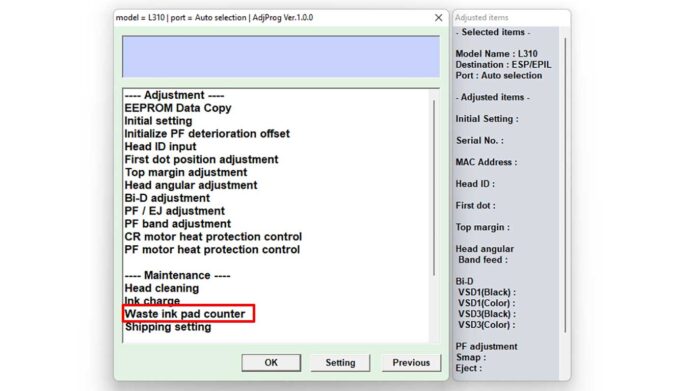
- Waste Ink Counter Reset: This is the primary function. It clears the internal counter that tracks ink absorbed by the maintenance pad, directly addressing the "Service Required" error.
- Printhead Cleaning and Ink Charging: The software can initiate deep cleaning cycles and prime the ink system to resolve clogs or flow issues.
- EEPROM Initialization: It can restore certain printer settings to their factory-default state, effectively clearing hardware error logs.
- Paper Feed Adjustment: This function calibrates the paper feeding mechanism to ensure accurate alignment and prevent skewing.
- Nozzle Check and Test Print: Users can generate diagnostic patterns to verify printhead health and overall print quality after maintenance.
Printer Model Compatibility & System Requirements
The utility supports the following Epson Monochrome EcoTank models: M1140, M1170, M1180, M2140, M2170, M3140, M3170, and M3180. For optimal performance, ensure your operating system is Windows 7, 8, 10, or 11 (32-bit or 64-bit).
Important Note: Always install the latest official Epson printer driver for your specific model before attempting to run the adjustment program. A stable connection requires the original Epson USB cable.
Secure Download Instructions
The official adjustment file for these models is packaged in a secure archive. The filename for download is: Reset Epson M1140 M1170 M1180 M2140 M2170 M3140 M3170 M3180.rar.
To ensure file integrity and prevent unauthorized modifications, the archive is protected with a password. You must enter this password to extract and use the program files.
bami
Pre-Execution Checklist
- Disable Antivirus Temporarily: Security software may flag service tools as a false positive. Temporarily disable it during extraction and use, but re-enable it afterward.
- Run as Administrator: Right-click the program executable and select "Run as Administrator" to grant necessary system permissions.
- Ensure Stable Power: Connect the printer and computer to a reliable power source to prevent interruptions during the reset process.
Step-by-Step Waste Ink Counter Reset Procedure
- Download the Reset Epson M1140 M1170 M1180 M2140 M2170 M3140 M3170 M3180.rar file.
- Extract the archive using the password provided above.
- Power on your Epson printer and connect it via USB.
- Run the adjustment program as Administrator.
- Select the correct printer model and communication port.
- Navigate to the "Waste Ink Pad Counter" or similar menu.
- Click "Read" to check the current counter value, then "Reset" to clear it.
- Close the program and restart your printer to apply the changes.
Final Recommendations and Disclaimer
Using the Epson Adjustment Program is an advanced procedure. It is intended for experienced users, technicians, or IT professionals. Resetting the waste ink counter does not physically clean or replace the saturated pad inside your printer. For long-term reliability, plan for physical pad replacement or seek service from an Epson authorized center.
Always reference your printer's official Epson manual for model-specific guidelines. This information is for educational purposes to help you perform informed maintenance on your Epson M1140, M1170, M1180, M2140, M2170, M3140, M3170, and M3180 printers.
By downloading files from bardimin.com, you agree that:
- Files are obtained from the internet, and copyrights remain with their respective owners.
- Files are for educational, reference, and personal use only.
- bardimin.com does not guarantee that files are free from viruses or malware.
- Any risks, damages, or legal claims arising from the use of files are the sole responsibility of the user.
- bardimin.com is released from any and all claims or liabilities.
If you do not agree, please do not download the file.
